TL;DR: Microsoft has introduced a team knowledge base in SharePoint: a library of interlinked pages that Copilot builds from the emails, meetings, chats and files a team chooses, so people and agents work from the same context. It is rolling out now in Frontier preview, only for users enabled for usage-based billing, and it spends Copilot Credits. Two governance details matter most. Anyone who can read a knowledge base can see what was added to it, even if they cannot open the original source, and pages only change when someone asks Copilot to update them. Separately, the preview PowerShell controls that decide where Copilot in SharePoint runs stop being honored on November 1, 2026. Settle your site controls and spending policies first, then pilot with one team.
Every team has the same quiet problem. The decision was made in a meeting, the reasoning lives in an email thread, and the latest version of the plan sits in someone's OneDrive. People who have been around for a while can connect those pieces. New hires cannot, and neither can agents.
Microsoft's answer, announced on October 14, 2026, is a team knowledge base that Copilot curates inside SharePoint. It is a useful step, and it arrives with a date attached: November 1, 2026, about two weeks away. That is when Microsoft stops honoring the preview PowerShell settings that many tenants used to keep Copilot in SharePoint on or off for specific sites. Copilot in SharePoint is the main place people create knowledge bases, so the site controls you set before then decide where your teams can start building one.
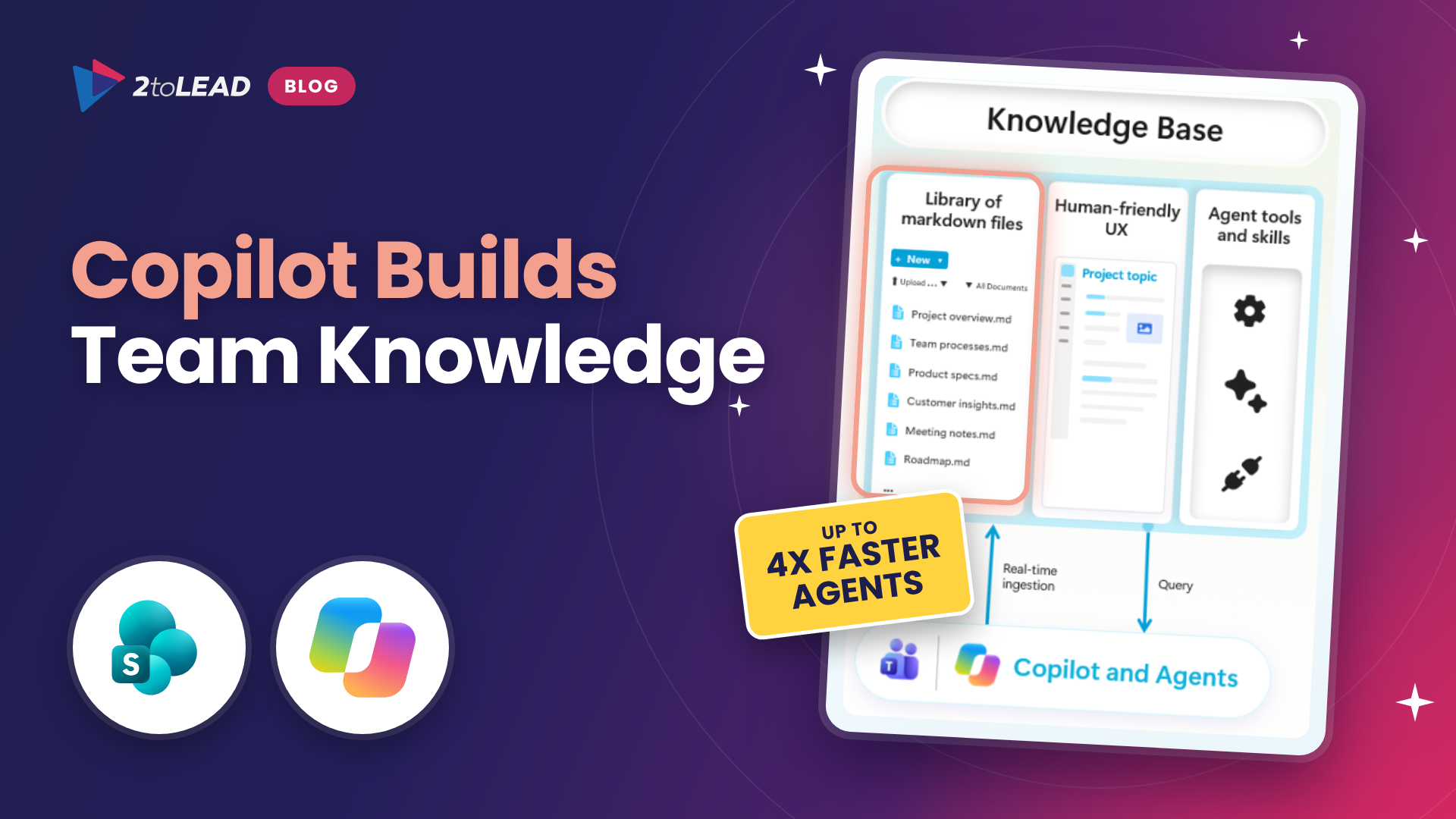
A team knowledge base is a special library you add to an existing SharePoint site, including sites behind Teams channels and Microsoft 365 Groups. It holds interlinked, agent-friendly markdown pages that Copilot creates with Work IQ's knowledge compilation engine. Team members choose what goes in (email, messages, meetings and files on their SharePoint sites), and Copilot organizes it by topic. People read the pages, and agents working with the team use them as a starting point instead of digging through raw files.
Microsoft's examples are practical: a legal team gathering knowledge from emails, files and notes to support contract work, an engineering team giving coding agents project history, and a sales team keeping account history in one place. For the bigger picture on why shared context matters, read The New Role of the Knowledge Base in SharePoint.
The details below come from Microsoft's announcement, Introducing a team knowledge base, curated by Copilot and agents, on the Microsoft SharePoint Blog, along with Microsoft's current product guidance.
Swipe horizontally to view each change and what it means.
| Area | What is changing | What it means for you |
|---|---|---|
| What it is | A special library of interlinked, agent-friendly markdown pages, added to any SharePoint site, including sites behind Teams channels and Microsoft 365 Groups. | Your existing team sites become the place where shared context lives. No new app to deploy. |
| How it is built | Team members add email, messages, meetings and SharePoint files. Copilot organizes them by topic using Work IQ's knowledge compilation engine. | Quality depends on what people add. Pick sources deliberately and keep formal records in their own systems. |
| Where people use it | Copilot in SharePoint, plus Autopilot in the Copilot app, Teams and email. Autopilot access rolls out on a separate cadence. | Most teams will start in Copilot in SharePoint, so site-level AI settings matter. |
| Who can access it | Frontier preview, rolling out now. Only users enabled for usage-based billing. Billing terms may change before general availability. | Usage consumes Copilot Credits. Nothing runs in enterprise tenants until an admin creates a spending policy. |
| Permissions | Anyone who can read the knowledge base can see content added to it, even without access to the source. | Treat every knowledge base like a published page. Check who can read the site before adding sensitive content. |
| Updates | Pages update only when someone asks Copilot. Source changes do not flow through automatically. | Assign an owner and a review rhythm, or the knowledge base will drift out of date. |
| Admin controls | Spending policies under Copilot, Cost management. Preview PowerShell controls for Copilot in SharePoint are honored until November 1, 2026. | Move to Site AI settings and Restricted Content Discovery before November 1. |
| Coming next | Knowledge bases in Cowork, Copilot in Teams and Copilot Studio agents, automated curation with agent flows, and Work IQ access for coding agents. | More agents will read and write team knowledge. Decide now which agents may contribute. |
The knowledge base also builds on Work IQ, the layer that gives Copilot and agents context from across Microsoft 365. If that term is new to your leadership team, Work IQ Is Redefining How We Work in 2026 is a good primer.
/cost shows what a task used. In enterprise tenants, nothing runs until an admin creates a spending policy, and spending policies can pick up new services automatically unless you turn that setting off.Some sectors have extra decisions to make:
KnowledgeAgentScope and a selected sites list. Map every site you excluded to Restricted Content Discovery or to Site AI settings before November 1, so sensitive sites stay out of Copilot in SharePoint on your terms.A knowledge base also works well alongside repeatable AI tasks in SharePoint. SharePoint Skills Explained shows how teams turn recurring work into reusable workflows that can draw on the same curated context.
The knowledge base is one of the first SharePoint capabilities where cost depends on use. That is a good thing if you can see the value side clearly. Microsoft's own billing terms may change before general availability, so build the habit of measuring now, while the pilot is small.
A simple monthly view is enough to start:
/cost in CopilotFor example, if a 12-person team saves 45 minutes each per week because decisions, context and current guidance are in one reviewed place, that is about 39 hours a month. Set that against the credits the team spent and the decision to expand, adjust or stop becomes straightforward. Beyond 'Active Users': The Copilot Adoption Metrics That Actually Prove Value covers how to capture the value side, and Microsoft 365 Copilot Licensing Changes: December 2026 Guide explains how usage-based billing fits into your wider Copilot budget.
It is rolling out to Frontier preview tenants. Users need a Microsoft 365 Copilot license and must be enabled for usage-based billing through a spending policy in the Microsoft 365 admin center. Microsoft notes that billing terms may change before general availability.
Copilot only uses sources the contributor can access, but the pages it creates are visible to everyone who can read the knowledge base. Content added from a restricted source can be seen by people who cannot open that source, so check who can read the site before adding anything sensitive.
Not today. Pages update only when someone asks Copilot to update them. Microsoft lists automated, ongoing curation with Copilot Studio agent flows as a roadmap item.
Microsoft stops honoring the preview PowerShell settings used to switch Copilot in SharePoint on or off for tenants and sites. From then on, use Site AI settings and Restricted Content Discovery to manage where Copilot in SharePoint, and so the knowledge base experience, appears.
2toLead works with small and mid-market organizations across healthcare, nonprofit, education, financial services, professional services, government and manufacturing on Copilot readiness, SharePoint governance and adoption. For the SharePoint knowledge base, we can help you:
For more on Copilot, SharePoint and governance, browse the 2toLead Insights hub. When you are ready, book a knowledge base readiness review with our team and start your pilot on solid ground.
No hype. Just practical, governed AI that actually gets adopted.


Join Our Newsletter