


TL;DR: On December 1, 2026, Microsoft 365 Copilot "(add-on)" offers reach end of sale in CSP, new Copilot offers arrive without a base-subscription purchase prerequisite, and usage-based billing becomes the default for new Microsoft 365 Copilot Business licenses bought through CSP. Existing subscriptions keep working as they are. Before December 1, inventory your seats, set cost management policies, name an owner for AI spend, and decide your renewal path.
On December 1, 2026, the way most organizations buy Microsoft 365 Copilot changes. The current add-on offers reach end of sale through Cloud Solution Providers, new offers launch at the same price without a base-subscription prerequisite, and new Copilot Business licenses arrive with usage-based billing switched on.
For CIOs, CHROs and IT leaders at small and mid-market organizations, this is more than a licensing footnote. It changes how Copilot shows up in your budget, how renewals get quoted and who is accountable for AI spend. You have about six weeks to get ahead of it, and the work is very manageable if you start now.
Microsoft confirmed the details to partners on October 1 and October 14, 2026, in its Partner Center announcements for October 2026. The changes follow the launch of the new Copilot experience, which we break down in The New Microsoft Copilot Explained: Home, Code and Autopilot.
Swipe horizontally to view each date, change and what it means.
| Date | What changes | What it means for you |
|---|---|---|
| October 16, 2026 | Current offers that require a Microsoft 365 base subscription are renamed with "(add-on)", for example "Microsoft 365 Copilot (add-on)" | Quotes and invoices show new names. Your seats, pricing and terms do not change. |
| November 1, 2026 | New offers appear in the CSP price list preview with their own product and SKU IDs | Ask your partner for a side-by-side quote of the add-on and the new offer for the same users. |
| December 1, 2026 | "(Add-on)" offers reach end of sale in CSP. End of sale is not end of life. | Existing customers can still renew and adjust seat counts. New purchases move to the new offers. |
| December 1, 2026 | New Microsoft 365 Copilot and Copilot Business offers can be bought without a qualifying Microsoft 365 base subscription, at the same price | Copilot features still depend on the Microsoft 365 apps and services each user is licensed for, so license mapping still matters. |
| December 1, 2026 | Usage-based billing is on by default for new Microsoft 365 Copilot Business licenses bought through CSP (moved from November 2), with a default limit of 4,000 Copilot Credits per user per month | New Copilot Business seats can create variable charges for Cowork and other usage-based features unless you set limits first. |
Two details are easy to miss. First, the new offers apply across commercial, education, government and nonprofit customers. Second, usage-based billing covers Microsoft's newer long-running work, including Cowork and Work IQ APIs, while everyday Copilot in Chat, Word, Excel, PowerPoint, Outlook and Teams stays on the per-user license. Our guide to Copilot Chat vs Cowork vs Code vs Autopilot explains which experiences fall where.
Copilot pricing now has two parts. A per-user subscription license covers everyday AI in Chat, Word, Excel, PowerPoint, Outlook and Teams. Copilot Credits are the usage-based currency for advanced work, such as Cowork tasks, Work IQ APIs and frontier models, billed on top of the license through pay-as-you-go.
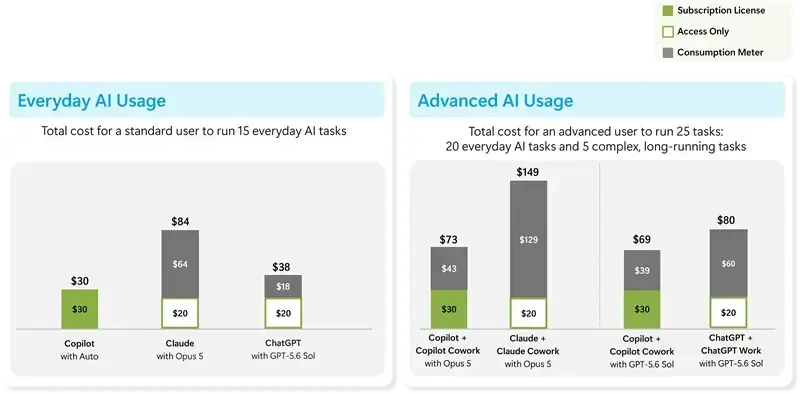
In Microsoft's own example, a standard user running everyday tasks costs the $30 license. An advanced user who adds Copilot Cowork for long-running work costs $69 to $73 a month, with $39 to $43 of that coming from consumption. That gap is exactly what IT and finance need to plan for.
Per-seat pricing gave finance a fixed number. Usage-based billing ties part of the cost to how people actually use Copilot. That is fairer, and it is only predictable if someone is watching it.
Some sectors have extra decisions to make:
Licensing for AI now reaches beyond Copilot seats. If you are also deploying agents, read Agent Identity Governance Licensing: Why Your E3 and E5 Tenants Cannot Govern Agents.
Usage-based billing makes one question unavoidable: what are we getting for this? If you cannot show which teams use Copilot, for which tasks, and what time or quality that saves, every variable charge looks like cost without return.
The organizations that handle this well measure adoption and outcomes first, then fund the use cases that pay back. A simple monthly view is enough to start:
Good starting workflows are the ones you can count, such as hours saved on monthly reporting, faster contract review or fewer service desk tickets. Copilot for HR, Finance and Sales has examples worth borrowing.
Microsoft positions usage-based billing as a way to match cost to value. That only works when you can see the value side, which is why the metrics in Beyond 'Active Users': The Copilot Adoption Metrics That Actually Prove Value matter more after December 1, not less.
No action is required. Microsoft says existing subscriptions keep their product and SKU IDs, pricing, renewal terms and auto-renew settings, with no migration or license reassignment. End of sale is not end of life, so you can keep renewing and adjusting seat counts.
The default applies to new Microsoft 365 Copilot Business licenses purchased through CSP from December 1, 2026. Ask your partner how any renewal or expansion will be quoted, and set spending policies either way.
The new offers drop the base-subscription purchase prerequisite, but Copilot experiences still depend on the Microsoft 365 apps and services each user is licensed for.
In the Microsoft 365 admin center under Copilot, then Cost management. Create spending policies, assign them to groups, set limits and turn on alerts.
2toLead works with small and mid-market organizations across healthcare, nonprofit, education, financial services, professional services, government and manufacturing on Copilot readiness, licensing and adoption. Before December 1, we can help you:
For more on Copilot, agents and governance, browse the 2toLead Insights hub. When you are ready, book a Copilot licensing review with our team before the December 1 changes.
No hype. Just practical, governed AI that actually gets adopted.


Join Our Newsletter


