TL;DR: SharePoint News audio overviews are here. Employees with a Microsoft 365 Copilot license can now listen to an AI-generated audio overview of SharePoint News posts in the SharePoint app for Teams, on desktop and mobile. Microsoft finished rolling it out worldwide in early September 2026, and no admin action was required, so it is very likely already live in your tenant. That makes the next eight weeks of year-end news, from benefits enrollment to holiday schedules, the first real test. Before then, check who can hear your news, write posts that summarize well, tell people the feature exists, and set up a simple way to measure whether it reaches more employees.
Most intranet teams measure news by page views and hope the important messages land. The people they most need to reach, such as managers between meetings, clinicians between shifts and staff on the plant floor, are often the ones least likely to stop and read a long post. An audio option inside Teams changes that, at least for employees who hold a Copilot license.
The feature arrived quietly. Microsoft's Message Center notice said no preparation was needed, so many organizations never told their communicators or their employees. Year-end communications start now: open enrollment, policy updates, holiday hours and annual planning messages. If audio overviews are going to help those messages land, the groundwork needs to happen in the next few weeks, not in January.
SharePoint News audio overviews are short, AI-generated spoken summaries of a SharePoint News post. Copilot reads the post, writes a summary and plays it back, so an employee can hear the key points in a minute or two instead of reading the full article. They are part of Copilot in SharePoint and appear in the SharePoint app for Teams (formerly Viva Connections), where most employees already see company news.
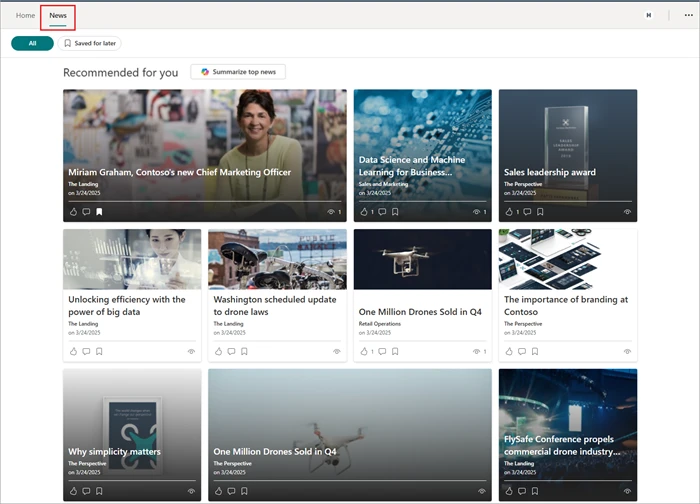
When a Copilot-licensed employee opens a supported News post in the SharePoint app for Teams, they can select Listen to an audio overview instead of reading the full post. According to Microsoft's guidance on generating audio overviews with AI, an audio player opens and starts the summary after a short music intro. Listeners can pause, change playback speed, rewind or fast-forward and open the transcript. The original post stays available, so the audio is a starting point rather than a replacement.
Swipe horizontally to view each consideration, what changes and what it means.
| Consideration | What changes | What it means for you |
|---|---|---|
| Availability | General availability rolled out worldwide from mid-August to early September 2026, on Teams desktop, iOS and Android. | The option is most likely live today. Your year-end news is the first big test. |
| Who can listen | Employees with an eligible Microsoft 365 Copilot license. Access follows licensing, with no separate on or off switch in the notice. | Unlicensed employees, often frontline and field staff, will not see the option. Plan for that gap. |
| Admin action | None required. Microsoft suggests telling users the feature exists. | If nobody announces it, adoption will be accidental and impossible to measure. |
| Language and content | English-language News posts are supported, and the audio is generated from the post itself. | Poorly structured or very short posts produce weaker summaries. Writing quality now shapes what employees hear. |
| Listening controls | Play and pause, playback speed, rewind and fast-forward, plus a transcript. | The transcript helps with accessibility and gives communicators a way to check what the AI said. |
| Source of truth | The original News post remains available alongside the audio. | Authoritative detail, such as dates, eligibility rules and links, should stay in the post and be easy to find. |
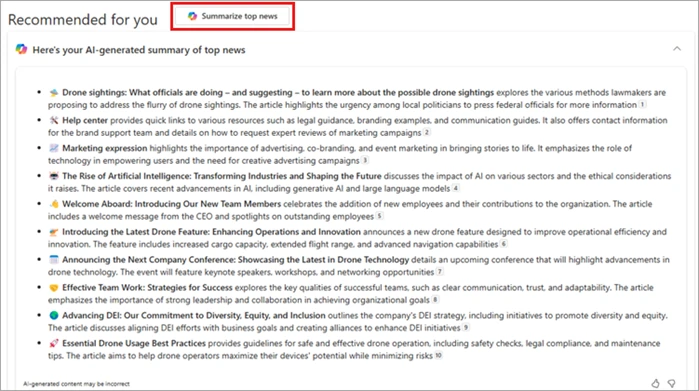
Audio overviews build on a Copilot feature many teams already have. In the same News tab, Copilot-licensed users on Teams desktop can select Summarize top news to get a written summary of up to 10 posts in their feed. Audio overviews bring that same idea to a single post, in a format people can take on the go.
This sits alongside other recent changes to how SharePoint News travels. Posts can now be cross-posted into Viva Engage with a single shared conversation, which we covered in SharePoint News to Viva Engage Cross-Posting: What to Do. Microsoft is also developing a Community Agent that answers questions inside Viva Engage communities, building on the patterns in Agents Arrive in Viva Engage Communities. Taken together, one News post can now be read, heard, discussed and asked about.
A play button looks like a small convenience. In practice, it raises four questions that most organizations have not answered yet.
Some sectors have specific decisions to make:
Audio overviews are included with the Copilot license, so the question is not whether the feature costs extra. It is whether your existing Copilot spend is turning into better-informed employees. A short scorecard is enough to answer that.
Here is an illustrative example. A 600-person organization sends a benefits enrollment post to 250 Copilot-licensed managers and staff. Last year, HR fielded about 120 questions that the post already answered, each taking around 10 minutes. If clearer writing and an audio option cut those questions by a third, HR gets back roughly 7 hours during its busiest weeks, and enrollment closes with fewer late submissions. Small numbers, but they are real, they are easy to explain to a CHRO, and they come from a license you already pay for.
Open a News post in the SharePoint app for Teams, open Copilot in SharePoint and select Listen to an audio overview. The audio player opens and plays the summary, with controls for speed, rewind, fast-forward and the transcript.
No separate add-on is needed, but the listener needs an eligible Microsoft 365 Copilot license. Employees without one continue to read the post as usual.
Microsoft's notice describes access as managed through Copilot licensing, with no separate admin setting called out. Check the Microsoft 365 admin center and your Copilot policies for current options before you promise a specific control.
No. The original post remains available, and it should stay the authoritative source for dates, eligibility rules and links. Treat the audio as a quicker way in, not the official record.
Microsoft's guidance currently lists English-language News posts. If your organization publishes in several languages, keep a written summary in each language at the top of the post.
2toLead works with small and mid-market organizations across healthcare, nonprofit, education, financial services, professional services, government and manufacturing to build intranets and digital workplaces that people and Copilot can both rely on. Before your year-end communications go out, we can help you:
To see these ideas in action, join Microsoft MVPs Kanwal Khipple and Richard Plantt for Designing the Intelligent Intranet with SharePoint and Copilot on October 29, 2026. For more on SharePoint, Copilot and the digital workplace, browse the 2toLead Insights hub. When you are ready, book an intranet news readiness review with our team before your year-end messages go out.
No hype. Just practical, governed AI that actually gets adopted.


Join Our Newsletter