Now, as agents become part of the team, finding content is no longer enough. People and agents also need to understand how that content connects to the work. They need context.
Microsoft’s recently announced team knowledge base for SharePoint points to this next stage of the digital workplace.
The most interesting part of the announcement is not another place to publish information. It is the opportunity to create a shared understanding that people, Copilot and agents can use together.
The SharePoint Knowledge Base is currently in Microsoft’s Frontier preview, but the direction is already worth paying attention to.
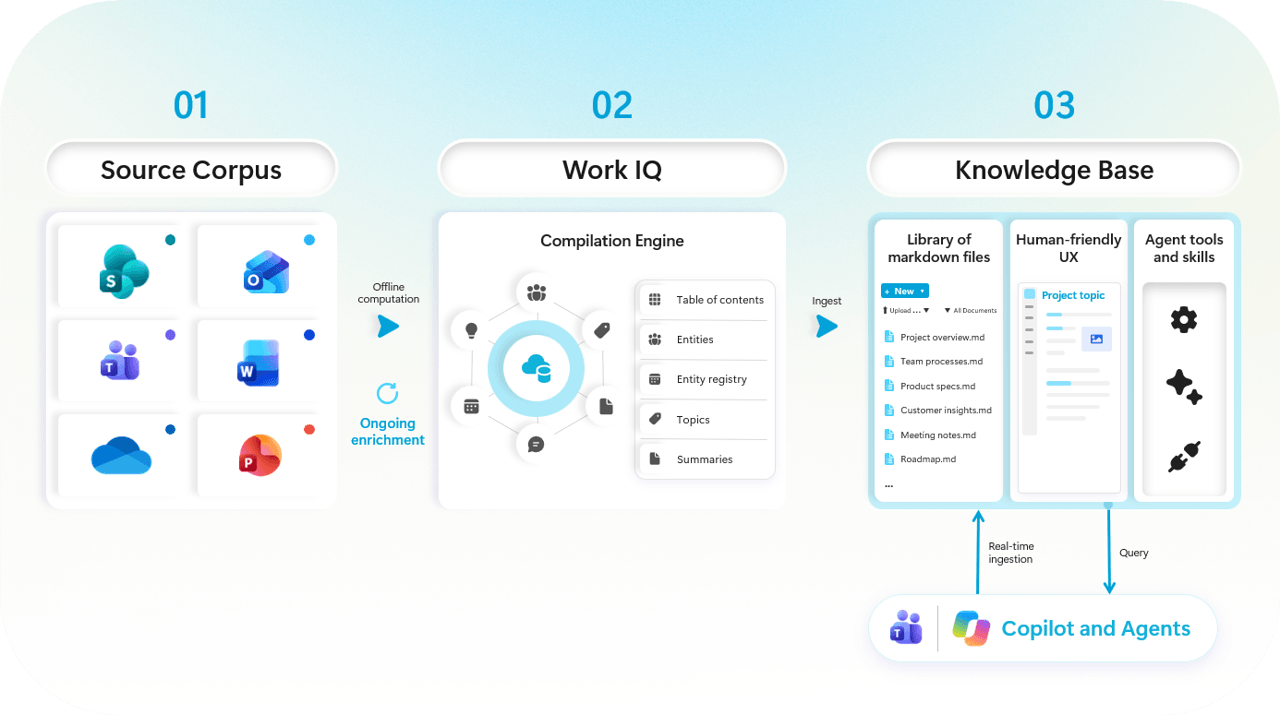
The information already exists in documents, Teams conversations, meeting notes, emails and the experience of employees. The problem is that these pieces rarely tell the full story on their own.
A project plan may explain what the team is doing, but not why a decision was made. Experienced team members know how to connect the pieces. New employees do not have that history. Neither do agents.
A knowledge base can make the team’s understanding visible and reusable. But it should not become an unfiltered copy of everything the team has created. It should be a reviewed layer that explains what matters, what is current and what the team has agreed to follow.
A team knowledge base can help us answer:
The knowledge base should not replace source material. It should connect and explain it. SharePoint can then become more than a source of content. It can become a context layer that people and agents use together.
This moves SharePoint beyond being only a source of content. It can become a context layer that people and agents use together.
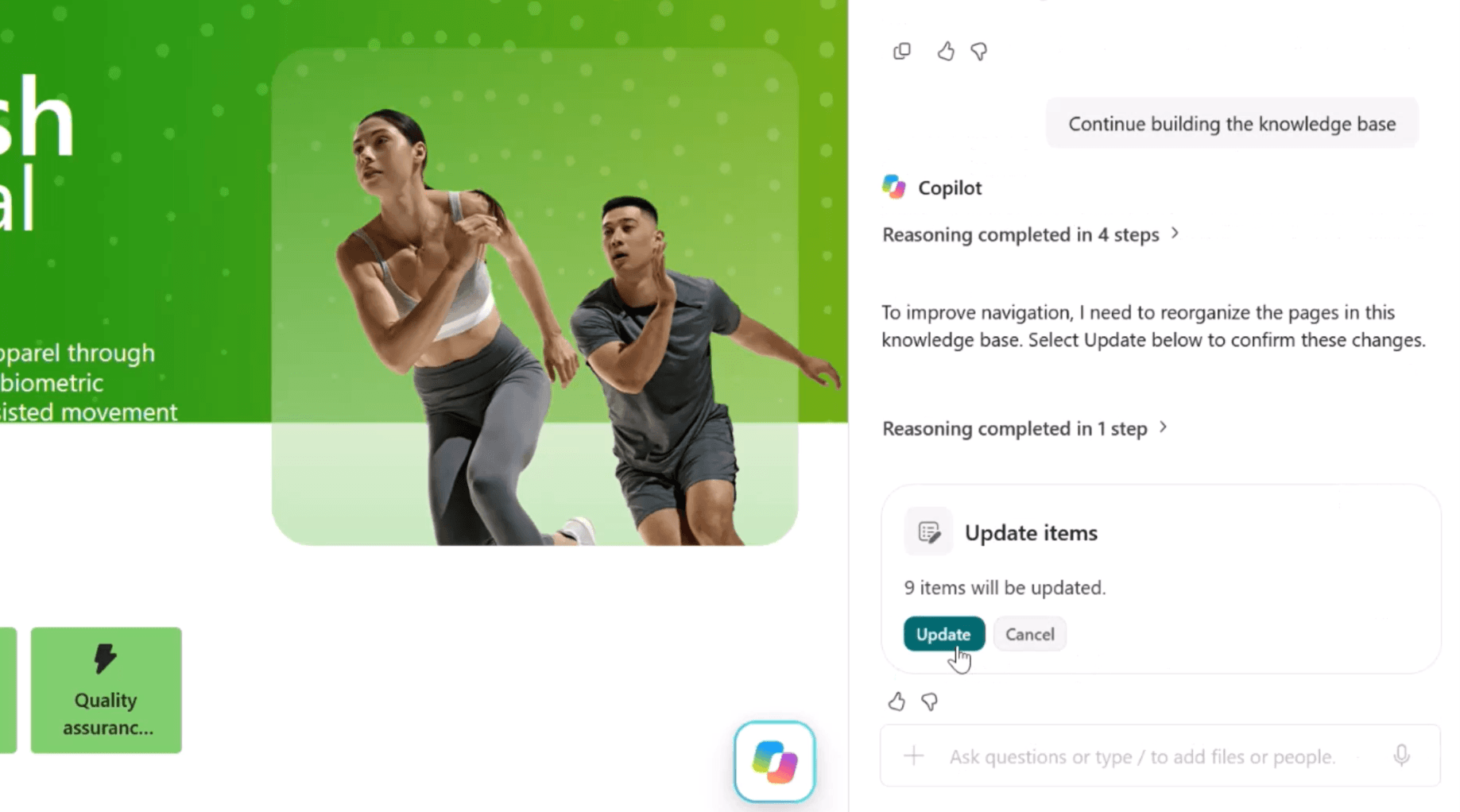
Human-agent collaboration becomes much more useful when people and agents are working from the same understanding.
Consider a project team preparing to launch a new service. A knowledge base can give the team a more consistent and curated starting point. It can help people and agents understand:
Microsoft’s Work IQ approach is designed to assemble organisational context so agents do not have to repeatedly connect raw signals from different places. The knowledge base makes that idea more tangible at the team level.
A knowledge base will not become trusted simply because Copilot helped create it. Agents can organize information and propose updates. People still need to resolve conflicts and decide what is approved.
Organizations do not need to move everything into a knowledge base. That would likely recreate the same information problems in a new format. Begin with one focused team need.
Look for areas where people regularly ask:
These questions reveal where shared context is weak. Choose a valuable scenario that is focused enough to maintain.
Do not begin with a folder of files. Begin with the questions people and agents need answered.
A customer account knowledge base might help a team understand:
A service desk knowledge base might focus on:
Starting with questions gives the knowledge base a clear purpose. It also helps the team decide which sources are relevant and which content does not belong.
Keep working files and formal records in their appropriate systems. Use the knowledge base to connect and explain them. Do not copy everything into one place. Identify the knowledge that supports better decisions.
A smaller, trusted knowledge base will often be more useful than a large one filled with conflicting guidance.
Someone needs to be responsible for reviewing proposed content, resolving conflicts, approving what the team should rely on and correcting outdated guidance.
This could be a project lead, site owner, subject matter expert or a small group representing the team. The role does not necessarily require a full-time knowledge manager, but someone should be accountable for:
Microsoft’s current guidance notes that changes in source material do not automatically update the knowledge base. Teams must ask Copilot to check for updates, review the proposed changes and confirm the result.
Human review is not an extra administrative task. It is part of making the knowledge base trustworthy.
Every useful knowledge base needs a regular review rhythm. Ask whether the guidance is still accurate and agents are producing better results.
Do not measure success by pages created. Look at whether the knowledge base reduces repeated questions, shortens onboarding, improves agent responses and helps a person or agent contribute sooner.
Before adding information, consider who can access the knowledge base, whether the content is appropriate for them, who can approve changes and what should remain in the original system.
For IT managers, this is a good reason to start with a focused, lower-risk pilot. Design it with the right audience, ownership and boundaries, then use what you learn to shape governance before expanding.
Microsoft notes that knowledge base pages do not inherit permissions from their original sources. Once information is added to a knowledge base page, anyone with access to that knowledge base may be able to see it, even if they cannot open the original source. File-level sensitivity labels from source files also do not currently carry over to knowledge base pages.
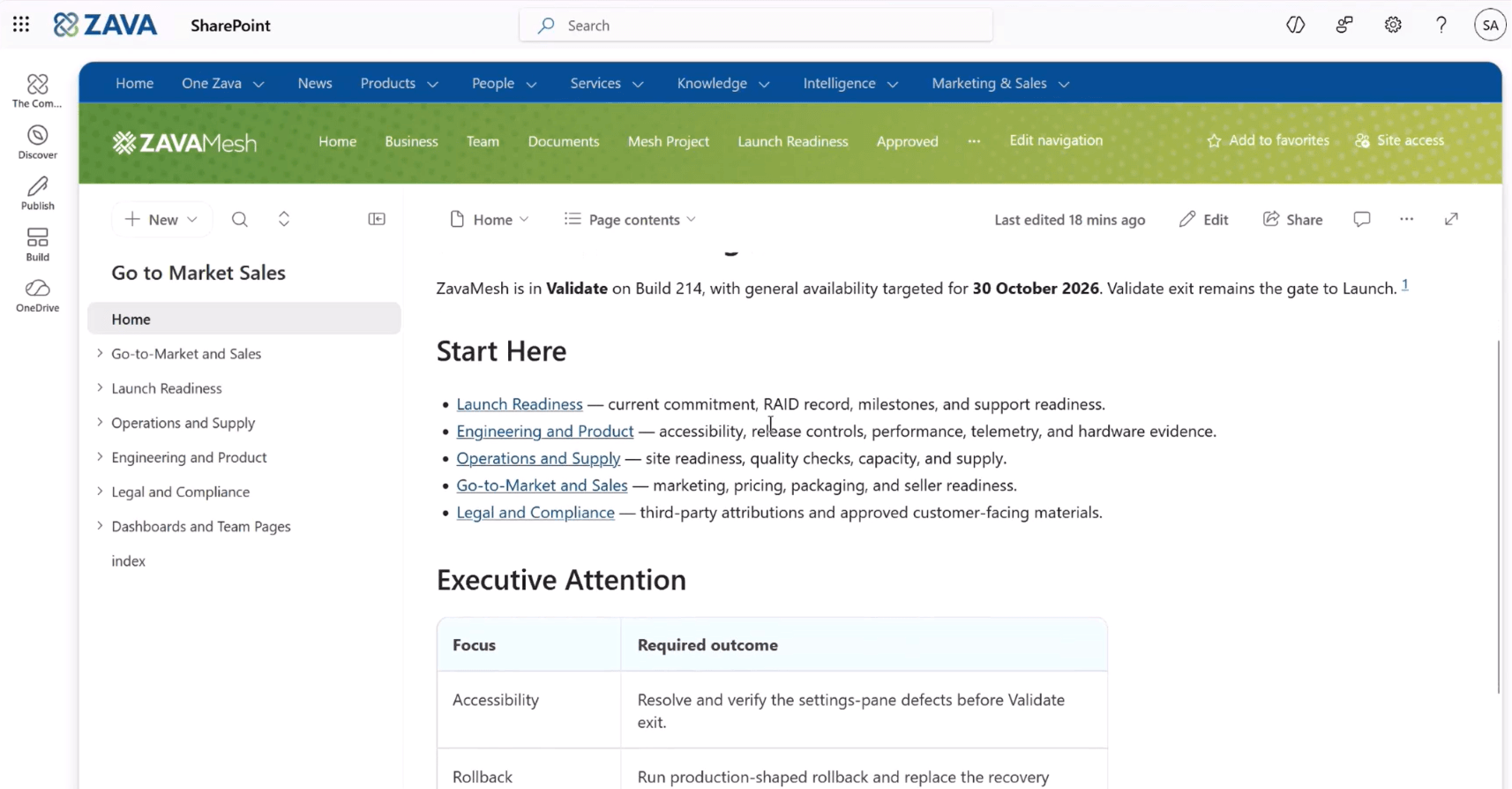
The most promising part of the SharePoint Knowledge Base is not that Copilot can create or update pages. It is that people and agents can begin working from the same reviewed understanding of the team’s goals, decisions and guidance.
This changes the role of knowledge management. It becomes less about publishing more information and more about creating the context that helps a team act.
But the work cannot stop with that question. Start with one team and one recurring context gap. Build a focused knowledge base from trusted sources.
Give people clear ownership. Let Copilot and agents support its organization and upkeep. Then measure whether the team can align faster, onboard people more effectively and make decisions with greater confidence.
The organizations that gain the most value from agents will not necessarily be the ones with the most agents. They will be the ones that give those agents clear goals, trusted knowledge, appropriate boundaries and meaningful human oversight.
The knowledge base is not simply another destination for content. It is a foundation for shared understanding and more responsible human-agent collaboration.
That is how we move from content to context.


Join Our Newsletter