Most organizations treat well-being and development as two different budgets owned by two different teams. Well-being sits with HR as a benefits line item. Development sits with L&D as a course catalogue. Neither owns the place where both actually fail: the daily flow of work.
An employee buried in back-to-back meetings, after-hours chats, and fragmented focus time does not have the capacity to learn. An employee with no visible path to grow does not stay engaged, no matter how good the wellness app is. Burnout and stagnation share a root cause. Work design is broken, and the tools people use every day are part of that design.
Here is the uncomfortable truth: buying more Microsoft Viva licenses will not fix this. Changing how work is measured, protected, and supported inside Microsoft 365 will.
They live outside the flow of work. A wellness portal or learning platform that requires a separate login competes with the inbox and loses. If learning means leaving Teams, opening another app, and hunting for the right course, most employees will postpone it indefinitely.
They rely on lagging signals. An annual engagement survey tells you how people felt months ago. By the time results are analyzed, the people most at risk may already be gone.
They put the burden on the individual. Telling employees to "take care of themselves" while leaving meeting culture, response expectations, and workload untouched shifts responsibility without changing conditions.
They are disconnected from career growth. Development content that is not linked to roles, skills, or real opportunities feels like busywork rather than progress.
The opportunity is not new features. It is that signals, nudges, learning, and feedback now live in the same tools employees already use every day. As we explored in 3 Shifts Redefining Your SharePoint Intranet and the Digital Workplace, SharePoint, Viva, and Copilot are converging into one connected employee experience, and well-being and development should be designed the same way.
Microsoft Viva Insights gives individuals, managers, and leaders a view of digital work patterns such as meeting load, after-hours activity, and focus time. Personal insights are private to the employee, while managers and leaders see aggregated, de-identified team and organizational trends.
Used well, this moves the conversation from "are you okay?" to "our team has averaged too many hours in meetings for six weeks, so what are we stopping?" That is a work design conversation, not a wellness lecture.
Practical moves:
Microsoft Viva Glint supports organization-wide engagement surveys with recommended actions, and Microsoft Viva Pulse lets managers run quick, targeted check-ins with their own teams.
Together they create a listening rhythm: Glint for the organizational baseline, Pulse for fast team-level feedback between cycles. Pairing survey feedback with collaboration data gives a far more complete picture, an approach we break down in Introduction to Workforce Analysis with Viva Insights and Glint. The point is not more surveys. The point is closing the loop. Every survey should produce one visible action, communicated back to employees.
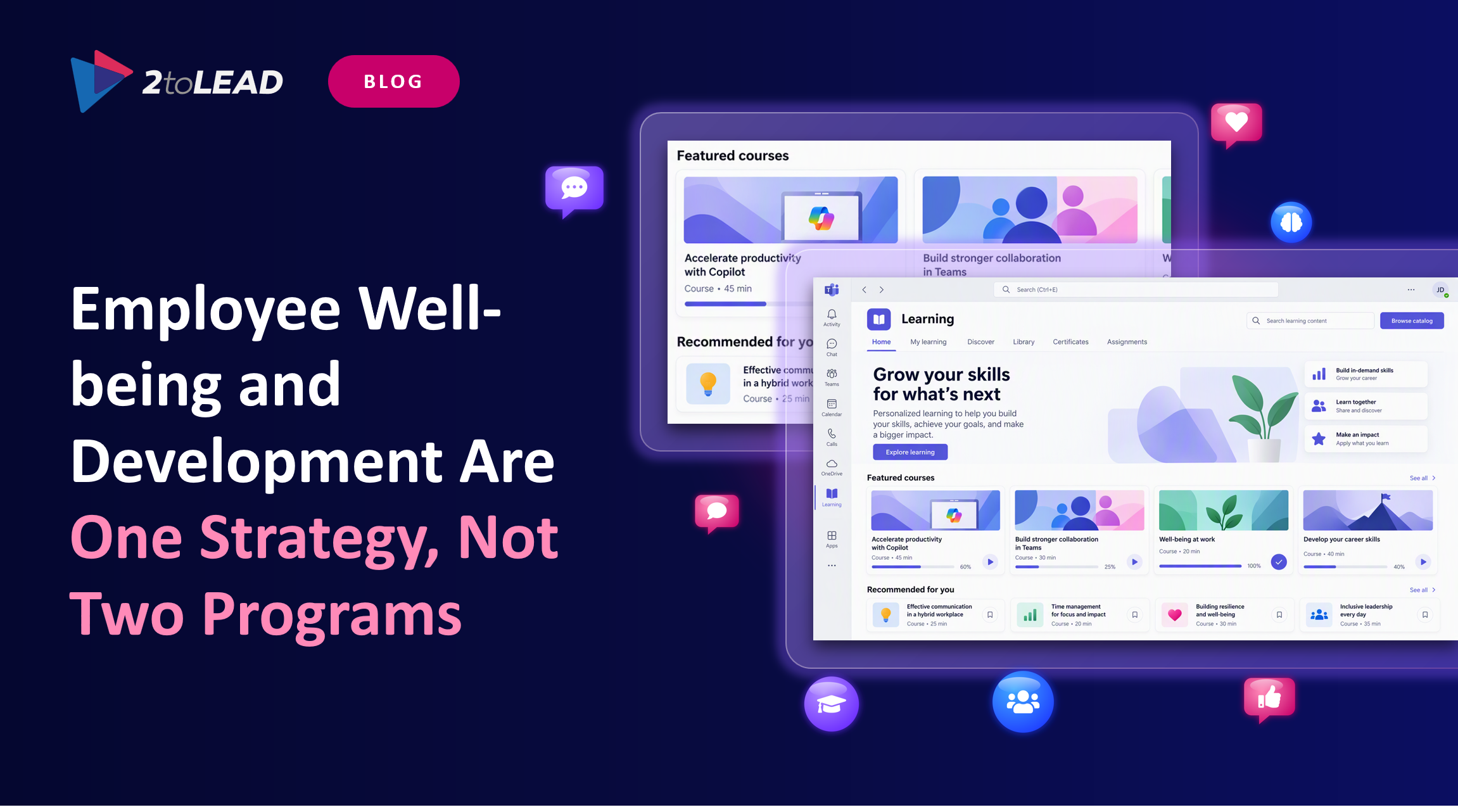
Microsoft Viva Learning brings learning content into Microsoft Teams and Microsoft 365, so employees can discover, share, and track learning without leaving the tools they work in. Organizations can surface their own content alongside Microsoft Learn, LinkedIn Learning, and integrated third-party learning providers.
What makes this effective is curation, not volume:
AI literacy is now a core development need, not an elective. Microsoft's own HR organization used the Viva suite to communicate, skill, and measure Microsoft 365 Copilot adoption, combining centralized learning with peer-led opportunities.
That model is transferable. Copilot adoption is a development program. Treat it as one, with learning paths by role, champions, and measurable progress, rather than a license rollout with a launch email. Culture matters more than tooling here, which is why we recommend starting with Building an AI-Ready Culture for Copilot and sequencing the rollout using The 4-Step Microsoft 365 Copilot Adoption Roadmap.
Development is not only consumption. Microsoft Power Platform lets employees automate repetitive work and build simple solutions, which reduces workload and grows capability at the same time. Pair low-code enablement with clear governance so innovation scales safely.
Microsoft Viva Insights, Viva Pulse, and Glint blend AI technology and people science to power predictive insights. The results benefit human resources, leaders, and managers. Quickly make sense of employee digital behaviour and engagement data. With better insights and tools that have built-in ways to action change, you can understand outcomes and take meaningful action.
As an example, are employees routinely getting 1-on-1 time with their managers? You can get these insights from Viva Insights. Refine them by comparing them amongst departments, business units, or work modes (mostly remote, hybrid, and onsite).
Moreover, it might be worth exploring the other side of manager time, such as how managers engage in employee meetings. Cultivating autonomy and development is essential for employee engagement. Empowering employees to make decisions and tackle new challenges enables managers to be more effective and reclaim time.

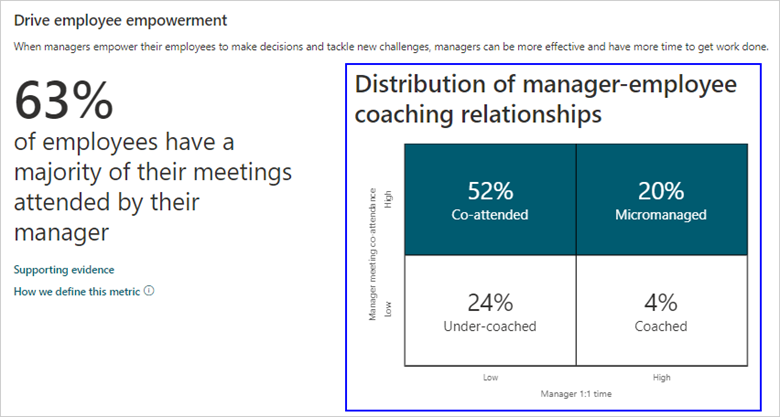
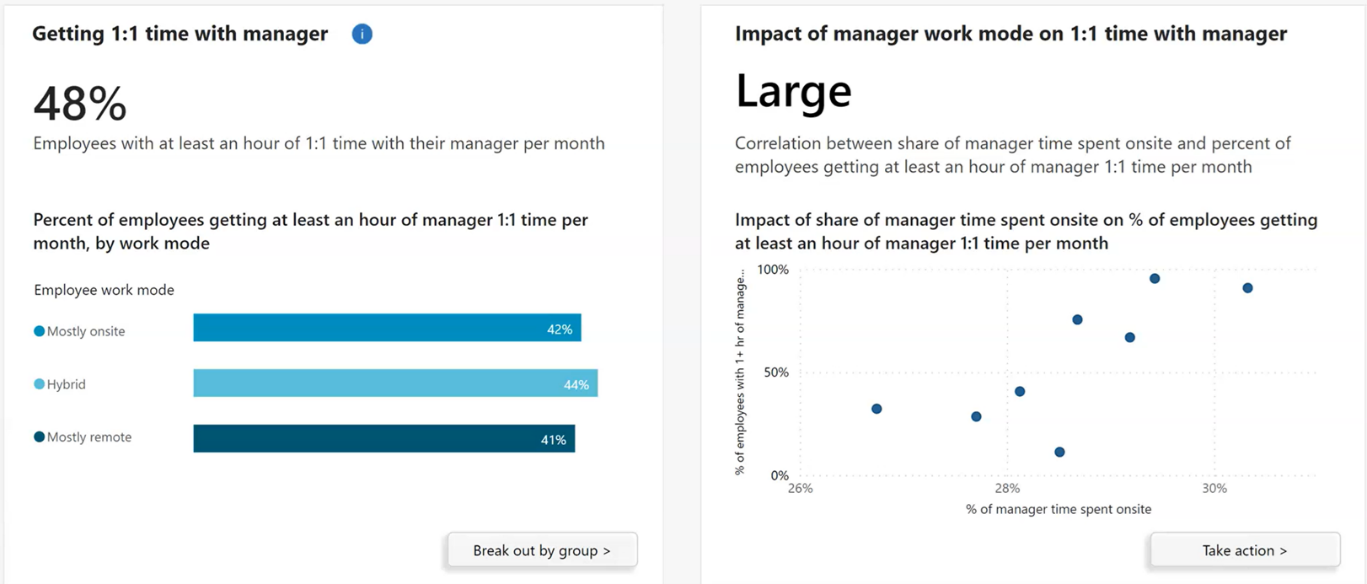
Employee Signals takes advantage of Glint's modern and agile listening approach. Rolling out Glint across your organization allows you to provide more actionable insights to your managers to help your employees thrive. Glint and Microsoft 365 bring feedback directly into the flow of work. They ensure leaders and managers have an easy way to access employee engagement insights and respond to their team's needs.
Days 1 to 30: Establish the baseline
Days 31 to 60: Change work design and enable learning
Days 61 to 90: Measure, communicate, and scale
AreaMetricWhy it mattersWell-beingAfter-hours collaboration trendEarly indicator of unsustainable workloadWell-beingWeekly focus timeCapacity to do deep work and to learnDevelopmentLearning completion tied to role pathsShows relevance, not just activityDevelopmentInternal mobility and project participationProves growth leads to opportunityEngagementSurvey action rateShows whether listening produces changeAI readinessCopilot usage depth by roleConnects skills investment to real adoption
Avoid stopping at activity counts. Our guide Beyond 'Active Users': The Copilot Adoption Metrics That Actually Prove Value shows how to move from activation to engagement, productivity, and business impact, and the same thinking applies to learning and well-being metrics.
Well-being analytics only work if employees trust them. Be explicit about what data is collected, who can see what, and how it will never be used, including individual performance evaluation. Configure privacy thresholds, involve HR, legal, and works councils where relevant, and communicate before you launch, not after. The same principle applies to AI: see how governance enabled faster adoption in Secure Copilot Adoption in 8 Weeks: A Purview Governance Case Study. Trust is the foundation of the program, not an add-on.
Well-being and development succeed or fail in the same place: the everyday experience of work. Microsoft 365, Viva, and Copilot give organizations the signals, the learning channels, and the feedback loops to improve that experience where it happens. The technology is ready. The real work is leadership commitment, manager enablement, and the discipline to act on what employees tell you.
At 2toLead, we help organizations design and deliver employee experience programs on Microsoft 365, Viva, and Copilot, from readiness and governance through adoption and measurable outcomes. Together, we can turn well-being and development from separate programs into one strategy your people actually feel.
Download The Definitive Guide to Employee Experience with Microsoft 365, Viva, and Copilot to see how all eight stages of the employee journey can be improved.


Join Our Newsletter