TL;DR: Microsoft is retiring Restricted SharePoint Search (RSS), the temporary allow-list that kept all but 100 SharePoint sites out of organization-wide search and Microsoft 365 Copilot. New enablement has been blocked since July 31, 2026, and RSS is fully retired by January 31, 2027. Microsoft will not carry your settings over to the replacement, Restricted Content Discovery (RCD), and the two controls work in opposite directions. If you do nothing, sites outside your allow-list can become discoverable in Copilot when RSS goes away. Start now, because large sites can take more than a week to process an RCD change.
If your organization turned on RSS during its first Copilot rollout, that was a sensible call. It bought time to review permissions before Copilot could surface overshared content. That time now has an end date: January 31, 2027, about 15 weeks away.
The detail that catches teams out is the direction of the change. RSS hid everything except the sites on your list. RCD shows everything except the sites you flag. Moving from one to the other is not a settings migration. It is a governance decision about which content Copilot should reach, and it deserves a plan rather than a last-minute switch.
Restricted SharePoint Search is a tenant-wide allow-list of up to 100 SharePoint sites. When it is on, only those sites (plus content a user owns, recently opened or had shared with them) appear in organization-wide search and Microsoft 365 Copilot. Restricted Content Discovery replaces it. RCD is a site-level setting that keeps a flagged site out of organization-wide search and Copilot, while every other site stays discoverable.
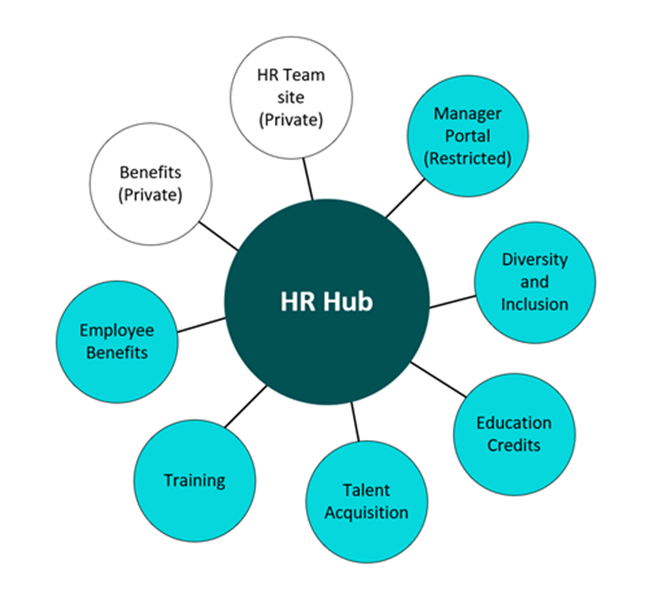
Microsoft's Restricted SharePoint Search documentation on Microsoft Learn now opens with the retirement notice and points organizations to Restricted Content Discovery, SharePoint Advanced Management and Microsoft Purview for long-term control.
Swipe horizontally to view each date, change and what it means.
| Date | What changes | What it means for you |
|---|---|---|
| July 31, 2026 | New Restricted SharePoint Search enablement is blocked. | If RSS is not on today, you cannot turn it on. Plan with Restricted Content Discovery instead. |
| Now to January 2027 | Retirement period. Tenants that already use RSS keep it for now. | This is your window to replace the allow-list with site-level controls on your own schedule. |
| January 31, 2027 | RSS is fully retired. Microsoft does not migrate RSS settings to Restricted Content Discovery. | Sites outside your allow-list can become discoverable in Microsoft Search and Copilot, within each user's existing permissions. |
| Going forward | Restricted Content Discovery, SharePoint Advanced Management and Microsoft Purview are the recommended controls. | Discoverability moves from one tenant switch to site-level decisions with named owners. |
Both controls change what appears in organization-wide search and Copilot. Neither changes who can open a file. The difference is the default.
Swipe horizontally to compare the two controls.
| Consideration | Restricted SharePoint Search (retiring) | Restricted Content Discovery |
|---|---|---|
| Model | Allow-list. Only listed sites appear in organization-wide search and Copilot. | Block-list. Every site appears unless you flag it. |
| Scale | Up to 100 sites. Sites associated with a listed hub are included. | Set per site, with no fixed site limit. |
| Scope | Tenant-wide. Affects search for every user, Copilot or not. | Site-level. Applies to SharePoint sites, not OneDrive. |
| Permissions | Unchanged. Not a security boundary. | Unchanged. People with access can still open the content directly. |
| AI on the site | No change to the site experience. | Hides the Copilot button, AI actions and Create pages with AI on flagged sites. |
| Who manages it | SharePoint administrators through PowerShell. | SharePoint admin center or PowerShell. Can be delegated to site admins, who must give a justification. Changes are audited in Purview. |
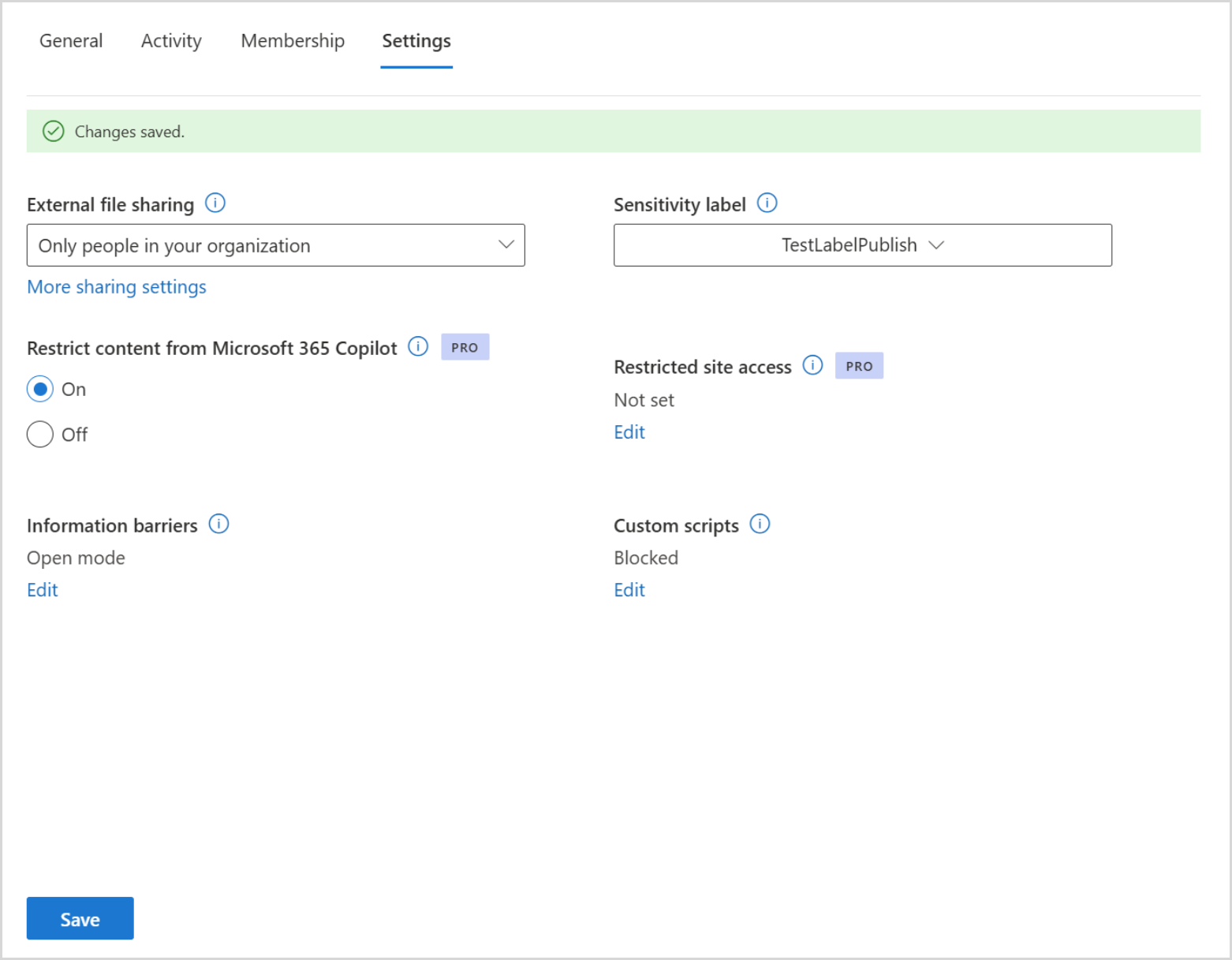
In the SharePoint admin center, go to Sites, then Active sites, select the site, open the Settings tab, set Restrict content from Microsoft 365 Copilot to On and select Save. For bulk changes, use PowerShell: Set-SPOSite -Identity <site-url> -RestrictContentOrgWideSearch $true.
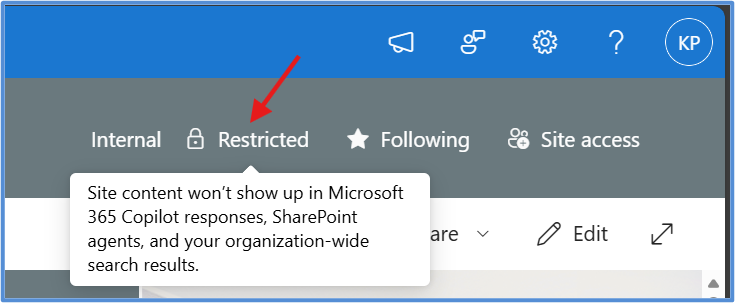
Once the change propagates, people who visit the site see a Restricted tag, and the Copilot button, AI actions and Create pages with AI disappear from that site. Anyone with permission can still open the content directly.
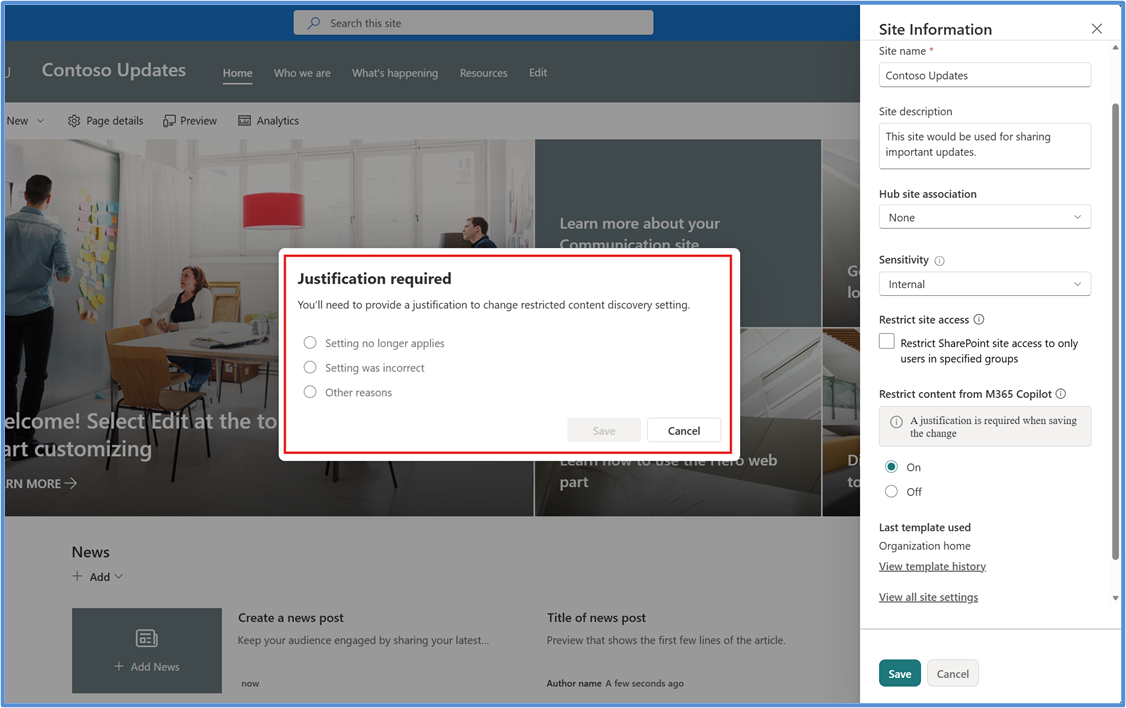
You can also let site admins manage the setting for their own sites with Set-SPOTenant -DelegateRestrictedContentDiscoverabilityManagement $true. Each change then asks for a justification, and Microsoft Purview records it in the audit log.
RCD requires a Microsoft 365 Copilot license in your tenant and SharePoint Advanced Management, which Microsoft includes for Copilot-licensed tenants. If you have not explored it yet, Take Advantage of SharePoint Advanced Management in Your Microsoft 365 Copilot Tenant walks through the features worth turning on first.
The pattern is familiar. In Your Agent Estate Doubled. Your Controls Didn't., we looked at how AI adoption keeps outpacing the controls behind it. A temporary control quietly becoming permanent is one of the most common ways that gap forms.
Some sectors have extra decisions to make:
Doing this once is not enough. As we argue in Copilot Governance Gap in 2026: Why Deployments Stall and How to Close It, governance holds when it becomes a routine with owners, not a project with an end date.
RSS carried a hidden cost. Every Copilot seat you paid for was grounding on a fraction of your SharePoint content. Retiring RSS well is one of the few governance changes that can lower risk and raise Copilot value at the same time, as long as you measure both sides.
A simple monthly view is enough to start:
For example, if 150 Copilot users each save 30 minutes a week once Copilot can reach reviewed policy, project and client content, that is about 300 hours a month. Set that against your license cost and the case for finishing the cleanup is easy to make. The metrics in Beyond 'Active Users': The Copilot Adoption Metrics That Actually Prove Value show how to capture the value side, and Secure Copilot Adoption in 8 Weeks: A Purview Governance Case Study shows what a structured remediation looks like.
New enablement was blocked on July 31, 2026, and Restricted SharePoint Search is fully retired by January 31, 2027. Microsoft does not migrate RSS settings to Restricted Content Discovery, so plan the move yourself.
Restricted Content Discovery, a site-level setting in SharePoint Advanced Management, replaces it. Microsoft also points to SharePoint Advanced Management access controls and Microsoft Purview for long-term governance.
No. RSS only affected what appeared in organization-wide search and Copilot. When it retires, permissions stay exactly as they are, which is why sites with broad access need attention before then.
No. RCD keeps a site's content out of organization-wide search and Copilot discovery, but anyone with permission can still open the content directly. Use permission changes, Restricted Access Control or sensitivity labels to limit access itself.
2toLead works with small and mid-market organizations across healthcare, nonprofit, education, financial services, professional services, government and manufacturing on Copilot readiness, SharePoint governance and adoption. Before January 31, we can help you:
For more on Copilot, SharePoint and governance, browse the 2toLead Insights hub. When you are ready, book a Copilot oversharing review with our team before Restricted SharePoint Search retires.
No hype. Just practical, governed AI that actually gets adopted.


Join Our Newsletter