By clicking “Accept”, you agree to the storing of cookies on your device to enhance site navigation, analyze site usage, and assist in our marketing efforts. View our Cookie Policy for more information.
Icon Rounded Closed - BRIX Templates
Insights

Copilot Studio Teams App Retirement: Your Plan Before January 2027

9 min read
share on
Copilot Studio Teams App Retirement: Your Plan Before January 2027

TL;DR: The Copilot Studio Teams app retirement (Microsoft 365 Message Center post MC1511056) moves all agent management to the Copilot Studio web app. Creating new agents in the Teams app already ended after June 2026. Starting January 2027, makers can no longer edit existing agents there, and starting February 2027 the app is removed from Teams completely. Your published agents are not being switched off, but anyone who maintains a classic agent from inside Teams needs to move to the Copilot Studio web app. Use the weeks before January to inventory your classic agents, confirm who owns them, retire the ones nobody uses and move the rest into a governed home.

On October 16, 2026, Microsoft notified Microsoft 365 administrators in Message Center post MC1511056 that the Copilot Studio app in Microsoft Teams is being retired. The first hard date is the editing cutoff in January 2027, and the app disappears from Teams in February 2027.

For many small and mid-market organizations, the Teams app is where the first agents were built. An HR policy bot. An IT help desk assistant. A volunteer onboarding FAQ. Many of those agents were created by a champion during the Power Virtual Agents era and have not been reviewed since. That makes this retirement more than a change of address. It is a natural moment to find out which agents you have, who owns them and whether each one is still worth running.

When is the Copilot Studio app in Teams being retired?

The Copilot Studio app in Teams is retired in stages. Editing ends in January 2027 and the app is removed from Teams in February 2027. Here are the key dates from MC1511056 and what each one means for you.

Swipe horizontally to view each date, change and what it means.

Copilot Studio app in Microsoft Teams retirement milestones from June 2026 to February 2027 and what each means for IT leaders
DateWhat changesWhat it means for you
After June 2026Creating new classic agents in the Copilot Studio app in Teams is no longer supported. The app redirects makers to the web app.Anything built since then was built in the web app. Find out where it lives and who owns it.
October 16, 2026Microsoft publishes MC1511056, tagged as a major change with user and admin impact.This is your formal notice. Plan maker communication, training and help desk updates now.
January 2027Editing existing agents in the Copilot Studio app within Teams is no longer supported.Makers who update agents from inside Teams will be blocked. Move them before this date.
February 2027The Copilot Studio app is removed from Microsoft Teams and is no longer available.All creating, editing, publishing and managing happens in the Copilot Studio web app.

What is not changing: the notice retires the authoring app inside Teams, not your agents. Makers can keep managing supported classic agents in the Copilot Studio web app, and agents published to the Microsoft Teams channel are not part of this retirement. Makers who work under the Copilot Studio Teams plan included in select Microsoft 365 subscriptions remain limited to classic orchestration and to publishing in Teams.
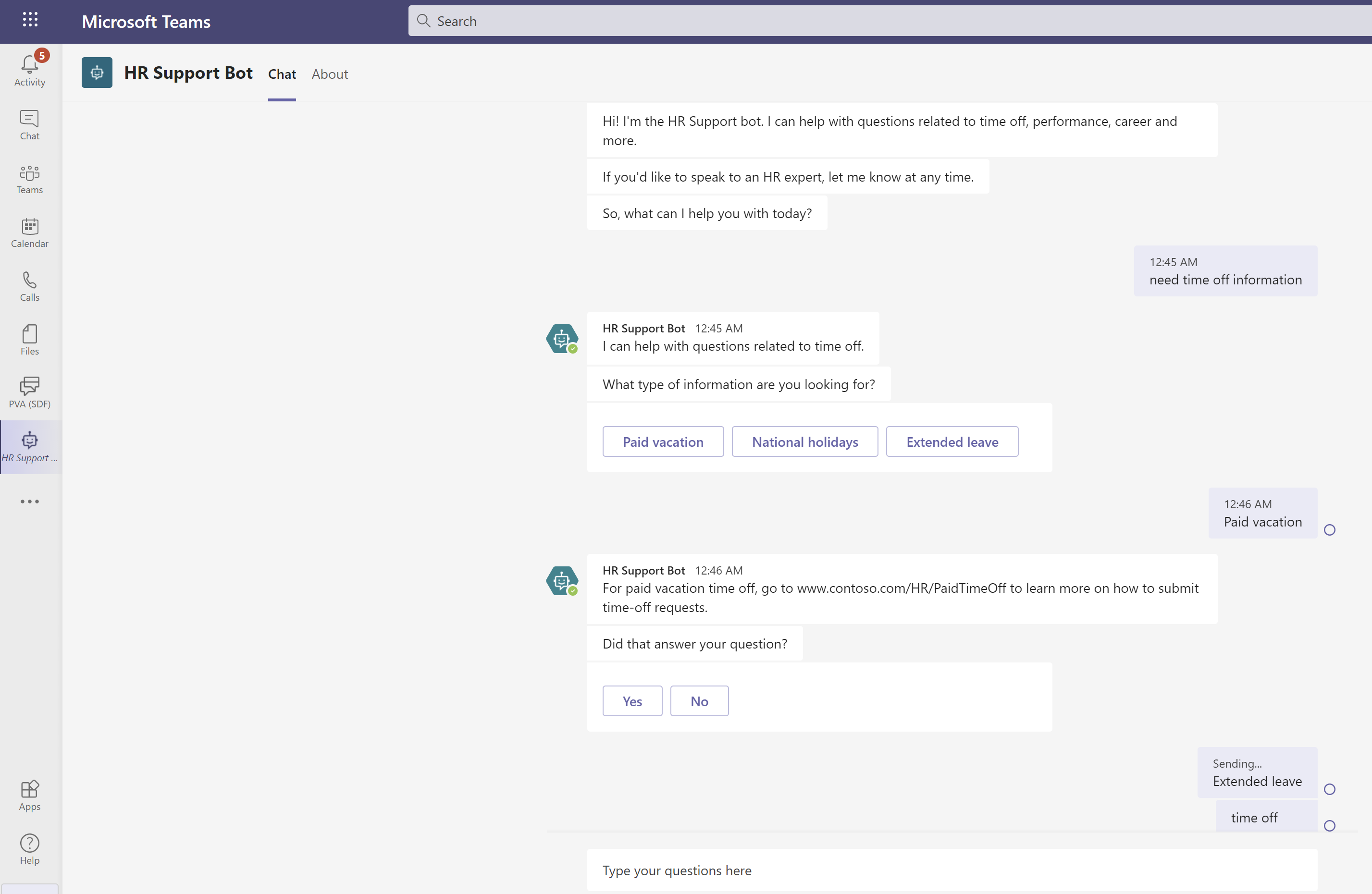
Classic Copilot Studio HR agent answering an employee question in Microsoft Teams
Classic agents published to Teams keep answering employees after the authoring app is retired. Image: Microsoft Learn.

If your team is still unsure where a simple agent should be built, Agent Builder vs. Copilot Studio: Which One Should You Actually Use in 2026? explains the difference.

How do you manage classic agents in the Copilot Studio web app?

Makers sign in to the Copilot Studio web app at copilotstudio.microsoft.com with the same Microsoft 365 account they use in Teams. The first time, Copilot Studio may ask them to pick the team that manages the agent, which points them to its existing Dataverse for Teams environment. From the agent overview, they can open topics, edit trigger phrases and question nodes, test in the built-in test panel and publish to the Microsoft Teams channel, all without leaving the browser.
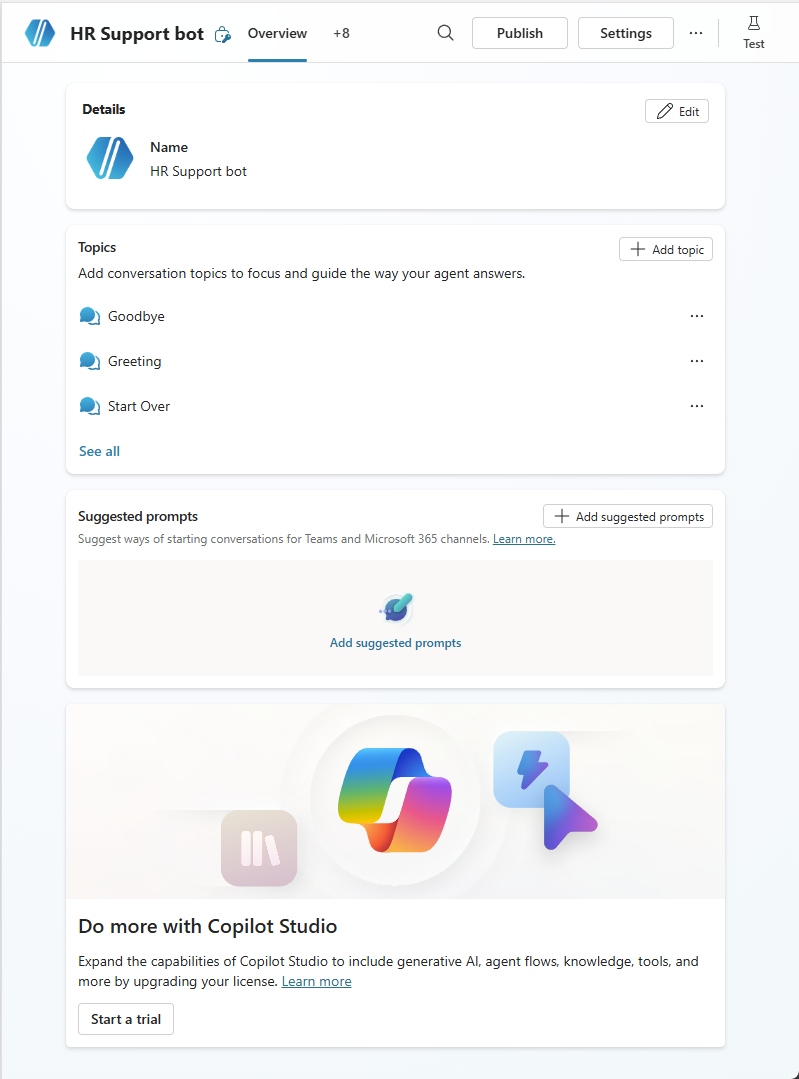
Copilot Studio web app agent overview page where makers manage classic agents after the Teams app retirement
The agent overview in the Copilot Studio web app, where classic agents are managed from January 2027. Image: Microsoft Learn.
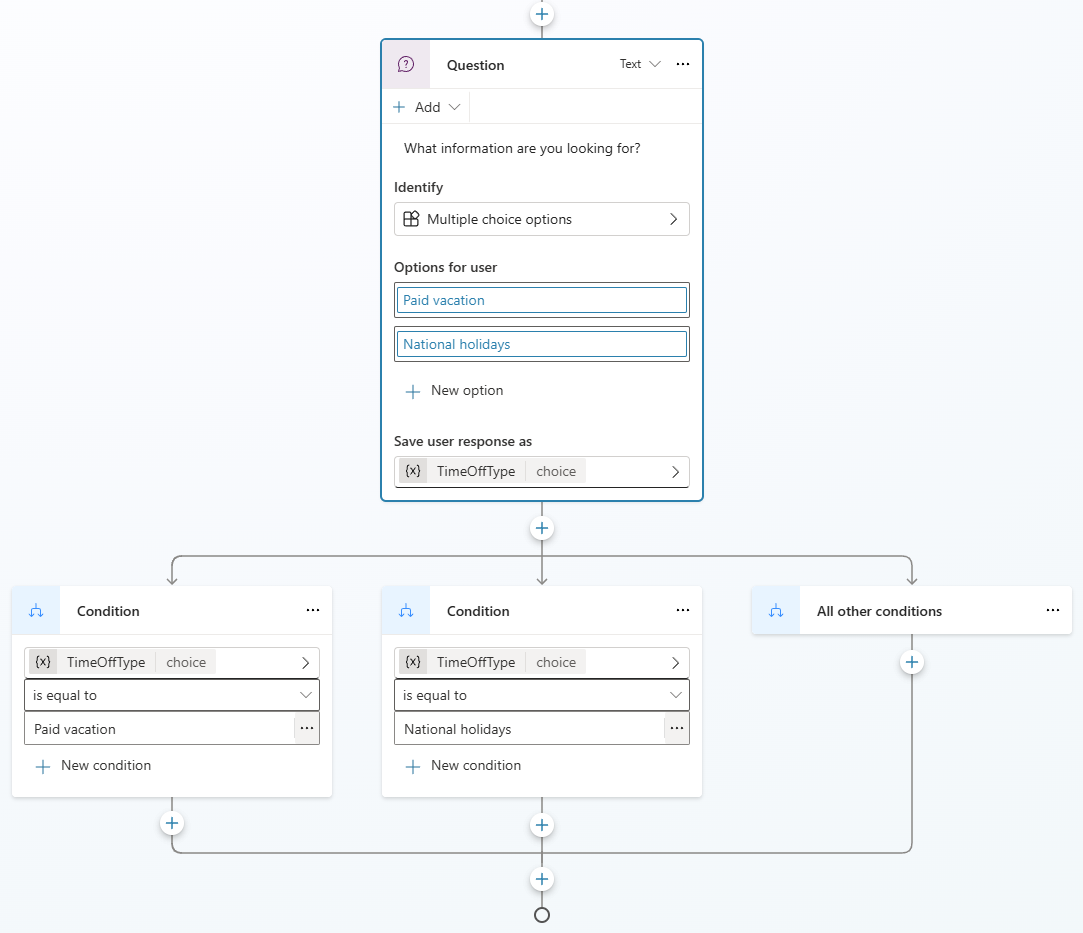
Classic Copilot Studio topic with a question node and time-off options, edited in the web app
Topics, trigger phrases and question nodes for classic agents are edited on the same canvas in the web app. Image: Microsoft Learn.

Why does the Copilot Studio Teams app retirement matter for IT leaders?

On paper, this is a URL change. In practice, it exposes questions most organizations have not answered about their earliest agents.

  • Ownership gaps. Agents built in Teams were often created by one enthusiastic person. If that person changed roles or left, the agent may still be answering questions with nobody accountable for the answers.
  • Help desk volume in January. Someone will open Teams to update holiday hours or a benefits answer and find the edit option gone. If your service desk has no script for that moment, it becomes a ticket, an escalation and a frustrated maker.
  • Governance blind spots. Agents created through the Teams experience often sit in Dataverse for Teams environments that your regular Power Platform reviews may not cover. The move to the web app is a good time to bring them into view.
  • Licensing decisions. Some classic agents have outgrown classic topics and trigger phrases. Modernizing them with generative orchestration or publishing beyond Teams needs licensing beyond the Teams plan, so that choice belongs in your budget conversation, not in a maker's afternoon.

Some sectors have specific considerations:
  • Nonprofits often rely on program staff or volunteers to maintain HR, volunteer and donor FAQ agents. Confirm each owner is still active, and make sure the people who keep these agents current know where to go once the Teams app is gone.
  • Education institutions should plan around the academic calendar. The January editing cutoff lands as winter term begins, so complete the move for admissions, IT and faculty support agents before the December break, while staff still have time.
  • Government organizations should confirm the dates for their own tenant in the Message Center, since rollout timing can differ by cloud. Check that Conditional Access and web filtering allow makers to reach the Copilot Studio web app, and update records of who administers each agent.

What should IT leaders do before the January 2027 editing cutoff?

  1. Confirm the notice in your tenant. Open MC1511056 in the Microsoft 365 admin center Message Center and note any tenant-specific timing. Share it with the people who own Teams and Power Platform administration.
  2. Inventory your classic agents and their owners. List every agent, its environment, its owner, its last published date and how often people use it. The Agent Inventory in the Copilot Agent Kit can speed this up, as covered in Agent Inventory V2 Lands: What the Copilot Agent Kit September 2026 Release Means for Governance.
  3. Decide to keep, modernize or retire each agent. Keep agents that are accurate and used. Modernize agents where demand has outgrown classic topics, and choose the right runtime with Harness Choice Is a Design Decision, Not a Toggle. Retire the rest, and tell their users what replaces them.
  4. Move makers to the web app. Confirm makers can reach copilotstudio.microsoft.com through your Conditional Access and web filtering policies. Run a short walkthrough so the first visit happens with support, not during a January deadline.
  5. Tighten sharing and ownership as you go. Give every agent a named owner and a backup. Decide who can share agents with the whole organization using the controls in New Copilot Studio Sharing Controls Every Organization Should Enable.
  6. Update documentation, training and help desk scripts. Replace screenshots and bookmarks that point to the Teams app. Add a help desk response for “I can’t edit my agent in Teams” that sends makers to the web app.
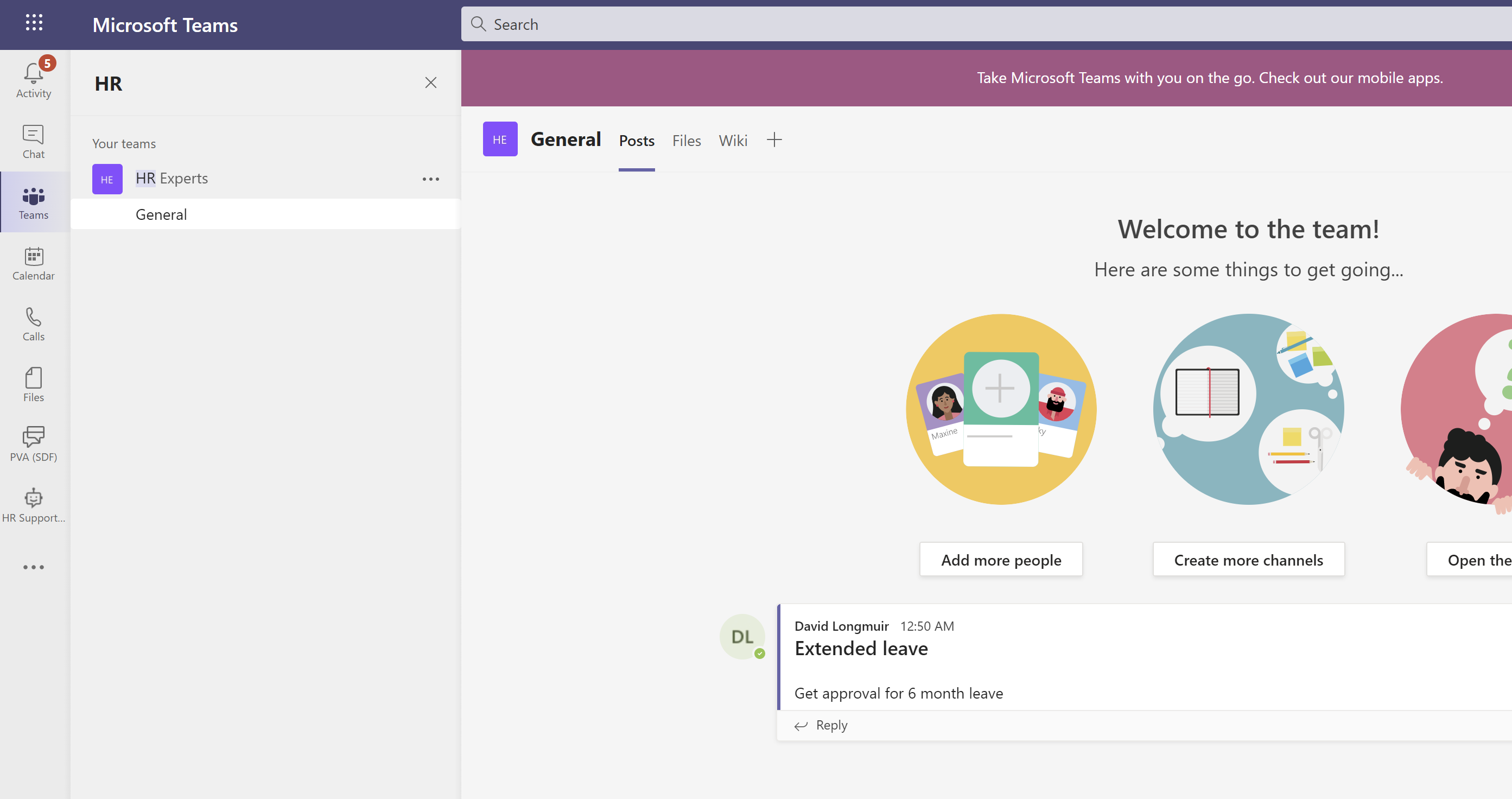
Copilot Studio agent escalating an employee request to an HR experts channel in Microsoft Teams
Check flows and escalations, like this hand-off to an HR experts channel, still work after each agent moves to web app management. Image: Microsoft Learn.

These steps work best when they are owned, not improvised. An Agent PMO gives you the intake, review and lifecycle routine to make them stick. See The Agent PMO Explained for Copilot Governance.

How do you tie Copilot Studio agent spend to measurable value?

Classic agents built under the Teams plan often look free because they carry little or no extra license cost. They are not free. They cost maker time to maintain, and an outdated answer on a policy question carries real risk. The retirement gives you a clean point to measure each agent before you invest more in it.

A simple scorecard is enough to start:

  • Usage: monthly conversations and unique users
  • Outcome: the share of conversations resolved without escalation, plus the satisfaction rating users give at the end of a conversation
  • Value: requests handled by the agent multiplied by the time each request would take a person
  • Cost: maker hours to maintain the agent, plus any licensing or capacity needed if you modernize it

For example, an HR FAQ agent that answers 300 questions a month, each of which would take an HR coordinator about 5 minutes, saves roughly 25 hours a month. That is a number a CHRO can weigh against upkeep. An agent with a handful of conversations a month and no named owner is a retirement candidate, whatever it cost to build.

Use that view to decide where to spend: expand agents where value clearly exceeds upkeep, modernize agents where demand outgrows classic topics and retire the rest. Beyond 'Active Users': The Copilot Adoption Metrics That Actually Prove Value shows how to turn these signals into an ROI story leadership will fund.

Copilot Studio Teams app retirement FAQ

Will our agents stop working in Teams?

No. MC1511056 retires the Copilot Studio authoring app inside Teams. Agents published to the Microsoft Teams channel are not part of this retirement. You manage them from the Copilot Studio web app instead.

Do we need to rebuild our classic agents?

No rebuild is required to keep them running. Microsoft's notice says users can continue to manage supported classic-style agents in the web app. Rebuild only when you decide to modernize an agent.

Do makers need a new license to use the Copilot Studio web app?

Makers can use the Copilot Studio web app to manage classic agents under the Teams plan. The Teams plan remains limited to classic orchestration and publishing to Teams, so moving beyond those limits requires additional Copilot Studio licensing. Confirm the right option with your licensing partner.

When does MC1511056 take effect in our tenant?

Editing in the Teams app stops starting in January 2027, and the app is removed starting in February 2027. Check MC1511056 in your own Message Center for any tenant-specific updates.

How can 2toLead help?

2toLead works with small and mid-market organizations across healthcare, nonprofit, education, financial services, professional services, government and manufacturing to build, govern and measure agents in Copilot Studio. Before the January cutoff, we can help you:

  • Inventory your classic agents, confirm owners and flag what to keep, modernize or retire
  • Bring Teams-built agents into your Power Platform governance, following the approach in Establishing a Power Platform Center of Excellence
  • Map licensing for agents you want to modernize, and set up a simple scorecard to track their value
  • Get your makers comfortable in the web app with hands-on Copilot Studio in a Day training

For more on Copilot, agents and governance, browse the 2toLead Insights hub. When you are ready, book a Copilot Studio agent review with our team before the January editing cutoff.

No hype. Just practical, governed AI that actually gets adopted.

Book a Copilot Studio agent review
Case Study Details

Similar posts

Get our perspectives on the latest developments in technology and business.
Love the way you work. Together.™
Next steps
Have a question, or just say hi. 🖐 Let's talk about your next big project.
Contact us
Mailing list
Occasionally we like to send clients and friends curated articles that have helped us improve.
Close Modal