TL;DR: A Copilot-ready intranet is not created by assigning licenses. It is created when the content behind every answer is accurate, owned, correctly permissioned, and governed over time. Copilot works only with what each employee is already allowed to see, so oversharing, outdated pages, and missing owners show up directly in the answers people receive. This guide covers five readiness dimensions, the Microsoft controls that support each one, and a ten-point checklist you can use to decide what to fix first.
Most intranets were never designed to be read by AI. Pages were published for a launch and never revisited. Policies were updated in one place but not another. Sites were shared broadly because it was easier than managing groups. For years, the cost of that drift was a frustrating search experience, and employees learned which pages to trust and which colleagues to ask instead.
Copilot changes the stakes. When an employee asks a question, Copilot draws on the SharePoint content that person can access and replies in clear, confident language. If the source is outdated, duplicated, or shared more widely than intended, the answer inherits that problem. Microsoft's guidance on building a secure and governed foundation for Copilot makes the connection explicit: responses are accurate, relevant, and secure when an organization's data is well governed, current, and appropriately shared.
That is why intelligent intranet governance has moved from an administrative chore to the foundation of a useful employee experience. This article explains what a Copilot-ready intranet really requires, which Microsoft capabilities help, and how to get there without slowing adoption.
Copilot does not create content problems. It surfaces the ones that were already there, faster and at greater scale. Issues that once sat quietly in a forgotten library can now appear inside an answer an employee acts on.
None of these issues are new. What is new is that each one now has a direct line to the quality of an AI answer. As we explored in 'What Is an Intelligent Intranet?', the intranet's role has shifted from a place people visit to a source that both people and AI depend on.
Licensing decides who can use Copilot. It does not decide whether the answers are any good. A more useful way to assess readiness is across five dimensions, each of which depends on the others.
Organizations tend to invest heavily in the first two dimensions and underinvest in the last three. Yet ownership and employee capability are often what decide whether trust holds after launch.
The good news is that many of the tools are already within reach. Microsoft includes SharePoint Advanced Management with Microsoft 365 Copilot licenses, and foundational Microsoft Purview capabilities come with Microsoft 365 E3. Together they cover most of the controls described in this article.
The biggest single driver of answer quality is the content Copilot draws from. Microsoft's own data hygiene guidance links cleanup directly to results: removing inactive content and applying retention and deletion policies reduces risk and improves the quality of Copilot responses. Content governance for Copilot starts with six practical tests.
Microsoft provides tools to make this manageable at scale. SharePoint Advanced Management includes site lifecycle policies for inactive sites, site ownership, and site attestation, which periodically ask owners to confirm that a site is still needed and correctly configured. For content that must be kept but should no longer inform answers, Microsoft 365 Archive moves inactive sites to a lower-cost storage tier, preserves their content and permissions, and keeps them out of Copilot's reach until they are reactivated.
Site owners can help too. AI-powered site recommendations in SharePoint can flag inactive pages and content gaps, as we covered in Improving Your SharePoint Site with AI.
Copilot does not bypass security. It works with content each user is already authorized to access, and agents in SharePoint follow the same rule. That principle is reassuring, but it also means every overshared site can become an overshared answer. Three principles should guide your approach to oversharing prevention.
Microsoft's foundational deployment blueprint describes a practical sequence: identify high-risk sites, apply interim protections, and then fix the underlying access. Data access governance reports and the Content Management Assessment in SharePoint Advanced Management highlight sites with oversized audiences, use of the Everyone Except External Users group, broken inheritance, and inactive or ownerless status. Site access reviews then ask site owners to remove excess access and rescope sharing links. Microsoft also notes that SharePoint sharing settings default to the most permissive option, so tightening tenant defaults for new sites and links stops the same problems from returning.
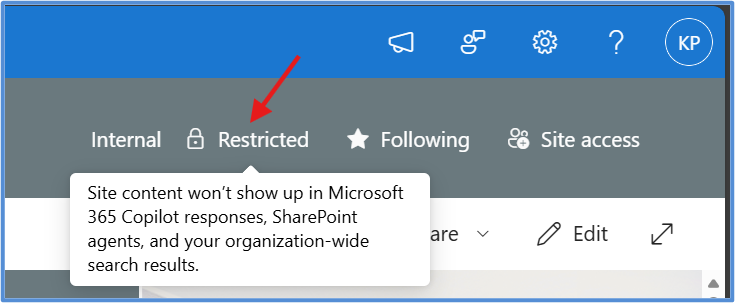
Restricted Content Discovery deserves particular attention. It is a site-level setting that keeps content from specific sites out of organization-wide search and Copilot responses while reviews take place, and it removes AI entry points such as the Copilot button from those sites. It does not change site permissions, and Microsoft notes that changes can take time to propagate depending on site size. Site owners can also manage it for their own sites when the tenant delegates that ability, with a justification recorded for each change.
Restricted Content Discovery is also becoming the standard interim control. Microsoft is retiring Restricted SharePoint Search, blocked new enablement from July 31, 2026, and will not carry existing allow-lists over to Restricted Content Discovery. Our guide to the Restricted SharePoint Search retirement explains how to plan that move before January 31, 2027.
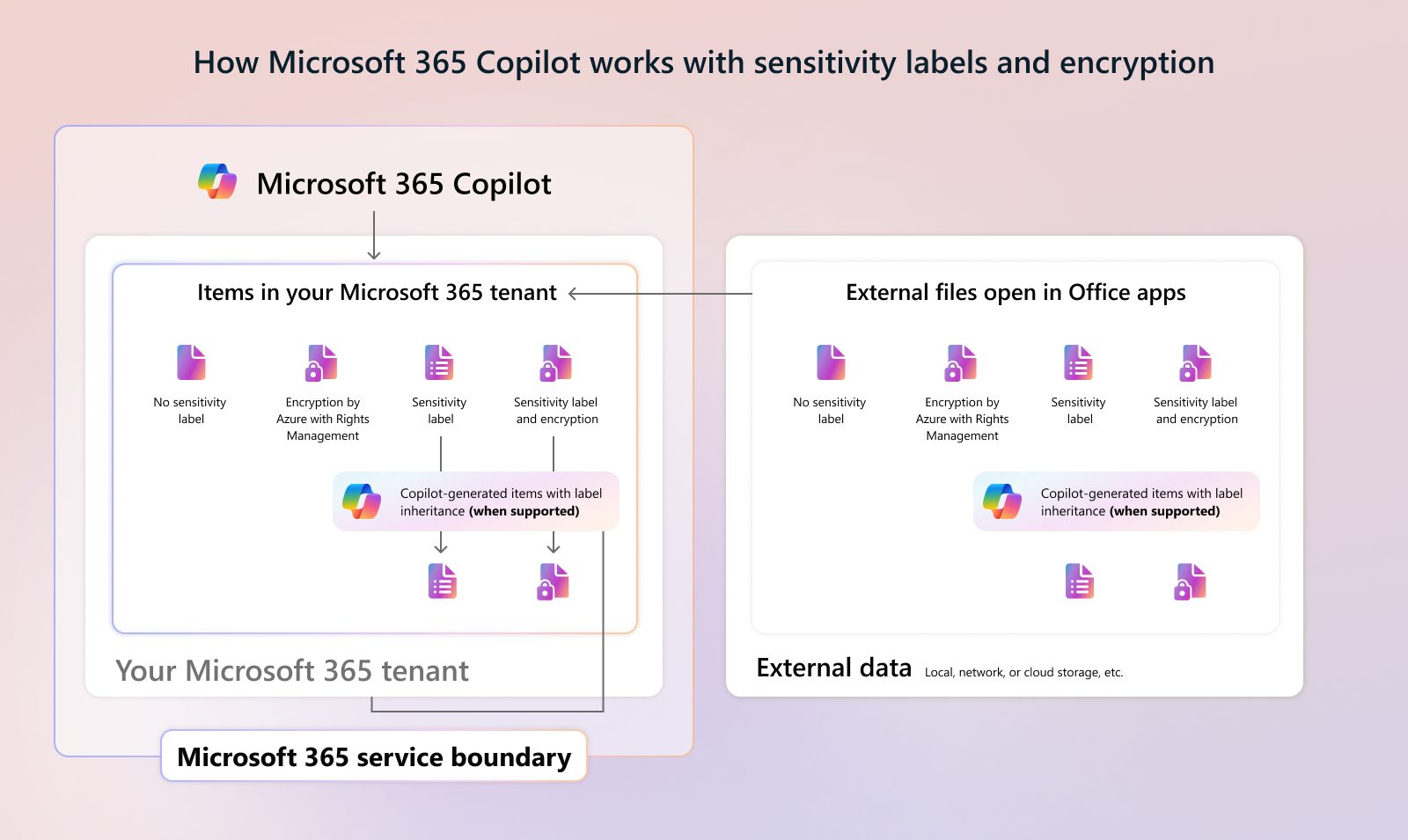
Sensitivity labels add protection that travels with the file. According to Microsoft's Copilot data protection architecture, when a label applies encryption, Copilot can work with the content only if the user holds both the VIEW and EXTRACT usage rights. New content that Copilot creates from labeled sources can inherit the highest-priority label where supported. Data loss prevention policies for Copilot add another layer by excluding files and emails with specific labels from Copilot processing.
Intelligent intranet experiences are no longer limited to pages and documents. Site owners and authors can now create SharePoint skills, which turn repeatable workflows into reusable instructions, and agents, which combine knowledge sources and behavior into a conversational experience. With Copilot in SharePoint rolling out to general availability from September 30, 2026, these assets will multiply quickly. Each one needs to be governed like any other business asset.
Microsoft's documentation on skills in Copilot in SharePoint sets out several built-in safeguards.
Permissions alone do not keep a skill or agent useful. Instructions go stale, knowledge sources move, and owners change roles. For every skill or agent, keep a simple lifecycle record.
Microsoft gives admins visibility to support this record. The Microsoft 365 admin center lists shared agents in an Agent Registry, with details such as the creator and creation date, and admins can block agents that are unsafe or noncompliant.
In SharePoint Advanced Management, agent access insights show which agents are reaching SharePoint sites and OneDrive, so admins can apply Restricted Access Control or Restricted Content Discovery where oversharing appears. For help choosing the first skills worth building and governing, see SharePoint Skills Explained.
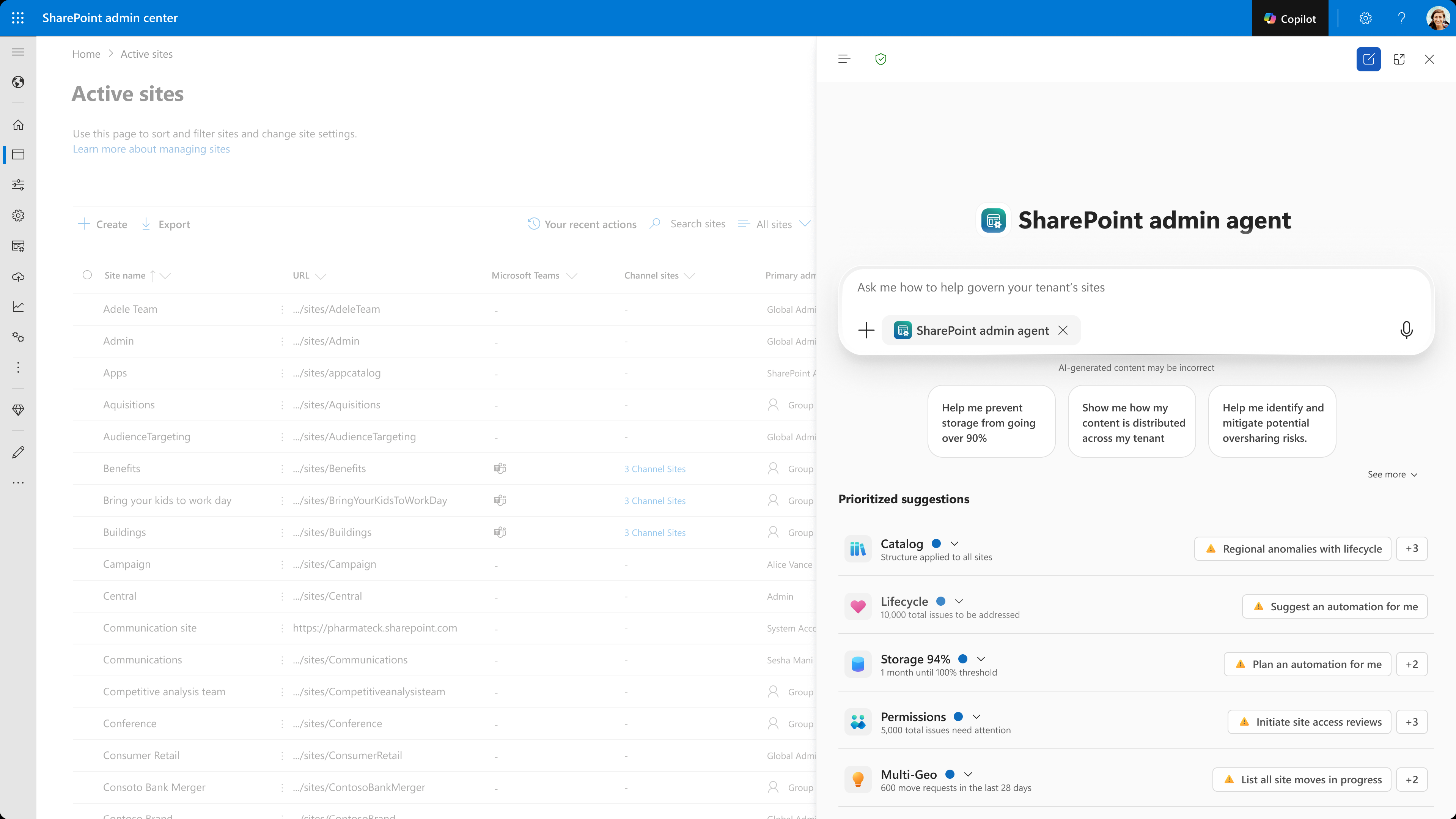
For many organizations, the hardest part of governance is knowing where to start. The SharePoint Admin Agent is built for that problem. It is an AI-powered governance experience that lets administrators investigate tenant conditions in natural language, rather than running reports one by one, and then take guided remediation steps. It draws on SharePoint and SharePoint Advanced Management data to focus on content sprawl, the content lifecycle, oversharing in search and AI responses, and access to sites and content.
Admins can open it in the Microsoft Copilot app, in Microsoft Teams, or through the content governance skills included in Copilot in the SharePoint admin center. Starter prompts suggested by Microsoft include asking which sites are overshared and how risky they are, identifying low-activity sites by department, and listing the agents that access SharePoint and OneDrive content most often. Using the agent requires SharePoint Advanced Management and the SharePoint Advanced Management Administrator role in Microsoft Entra ID.
Two guardrails matter for SharePoint AI governance. Copilot skills in the SharePoint admin center respect role-based access control, so admins see only the information and controls their role allows. Microsoft also states that Copilot in the admin center does not make configuration changes on an admin's behalf. Decisions stay with people.
Governance is often designed for administrators and invisible to everyone else. That is a missed opportunity. Employees decide whether to trust an AI answer, and they need enough context to do it well. A trusted intranet makes six things clear.
Behind the scenes, Microsoft Purview supports the oversight side of this experience. Audit records can capture Copilot prompts, responses, and the content referenced, and Purview retention policies govern how long those interactions are kept. Together, they let governance teams investigate the issues employees raise and show that controls are working.
Use this checklist to see where you stand today. Each item is practical enough to assign to an owner and track to completion.
If you can confidently tick fewer than half of these items, start with ownership and permissions. They reduce the most risk the fastest and make every other improvement easier to sustain.
A Copilot-ready intranet is not a project with an end date. New sites will be created, policies will change, and new skills and agents will appear every month. Governance works best as a continuous operating practice: assess regularly, fix what matters most, measure whether answers are improving, and adjust.
Organizations that treat governance this way do not slow AI down. They give employees a reason to trust it. Clear ownership, sensible permissions, and current content are what turn an intelligent intranet from an impressive demo into a dependable part of everyday work.
Your intranet does not become Copilot-ready when AI is switched on. It becomes ready when employees can trust the content, access, and experiences behind every answer.
Join Microsoft MVPs Kanwal Khipple and Richard Plantt for the live webinar Designing the Intelligent Intranet with SharePoint and Copilot on Thursday, October 29, 2026, at 11:00 AM EDT. In 45 minutes of live demos, you will see how design, authoring, reusable skills, and governance fit together, and how to assess whether your content is ready to produce trustworthy Copilot answers. Every registrant receives the recording and a copy of the SharePoint Skills Playbook for the AI-Powered Intranet.
Prefer to start with your own environment? Book a Copilot and intranet readiness call with our team. We help organizations review their governance posture, analyze permissions and oversharing, define ownership models and standards, and build a prioritized remediation roadmap, so adoption can move quickly without adding risk.
A Copilot-ready intranet is a SharePoint environment where content is accurate, owned, and current, permissions match business need, sensitive information is protected, and employees know how to use and check AI answers. Readiness is measured by how trustworthy the answers are, not by how many licenses are assigned.
No. Copilot works only with content the user is already authorized to access. The real risk is oversharing, where permissions are broader than intended, which is why reviewing access matters before and after rollout.
Restricted Content Discovery keeps a site's content out of organization-wide search and Copilot responses and removes Copilot entry points from that site. It does not change permissions, so people with access can still open the content directly.
No. A skill can act only on content the person running it can already access. Site skill files can also be governed with permissions, retention, sensitivity labels, and auditing like any other SharePoint file.
Many readiness capabilities, including Restricted Content Discovery, site lifecycle policies, data access governance reports, and the SharePoint Admin Agent, are part of SharePoint Advanced Management, which Microsoft includes with Microsoft 365 Copilot licenses. Microsoft Purview capabilities such as sensitivity labels and data loss prevention depend on your Microsoft 365 licensing.
Start by identifying your highest-risk sites with the Content Management Assessment or the SharePoint Admin Agent. Assign owners, apply Restricted Content Discovery to sensitive sites as an interim measure, and then fix the underlying permissions.


Join Our Newsletter