Somewhere in your organization, right now, someone is pasting a contract clause into ChatGPT to get a plain-English summary. Someone else is uploading a pricing model to a personal Google Drive because it was faster than requesting access.
Neither of them thinks they are doing anything wrong. Both of them are right that it is faster. And until very recently, neither action would have shown up in a single report you own.
That is the gap Microsoft Purview network data security is built to close, and it is now generally available.
Here is the part most coverage skips. This is not simply "Purview now covers AI apps." This is the first time Microsoft DLP enforces on traffic it does not own. Not a Microsoft 365 workload.
Not a managed endpoint app. Raw outbound web traffic heading to a service you have no tenant relationship with. That is a meaningful architectural shift, and the prerequisites are heavier than the announcement suggests.
So, let's start with what it actually does, then get honest about what it takes to switch on.
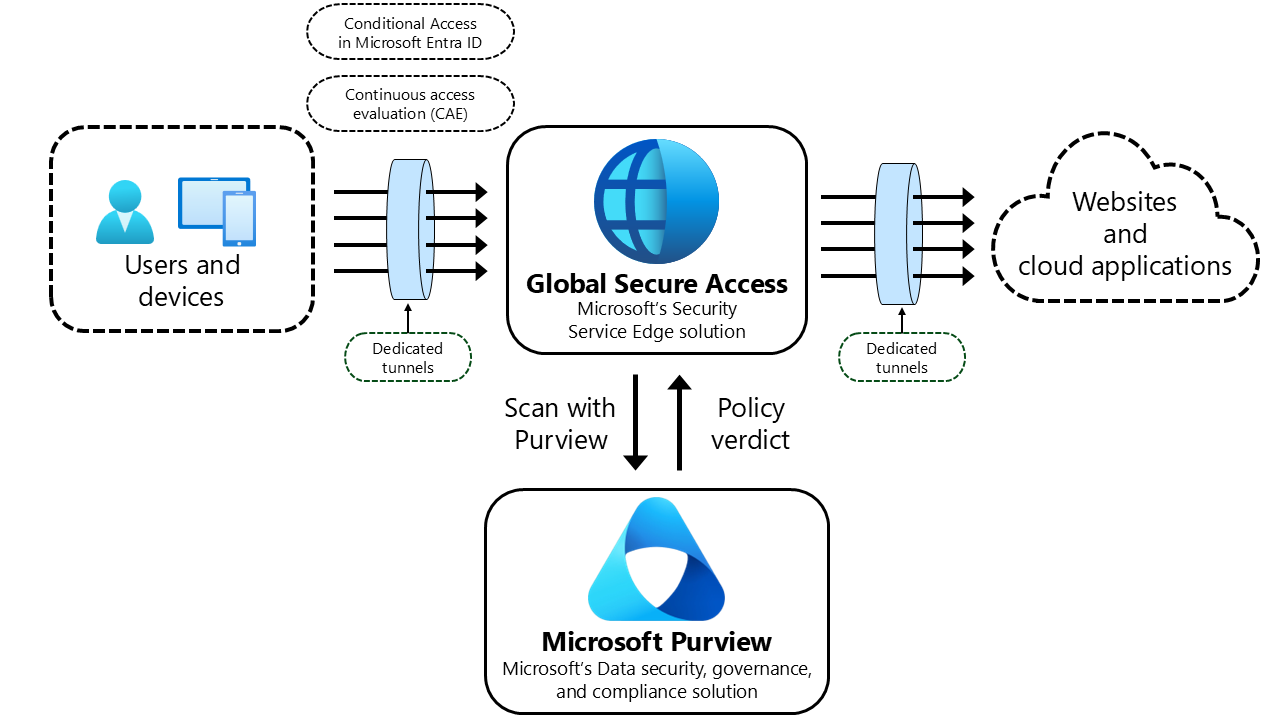
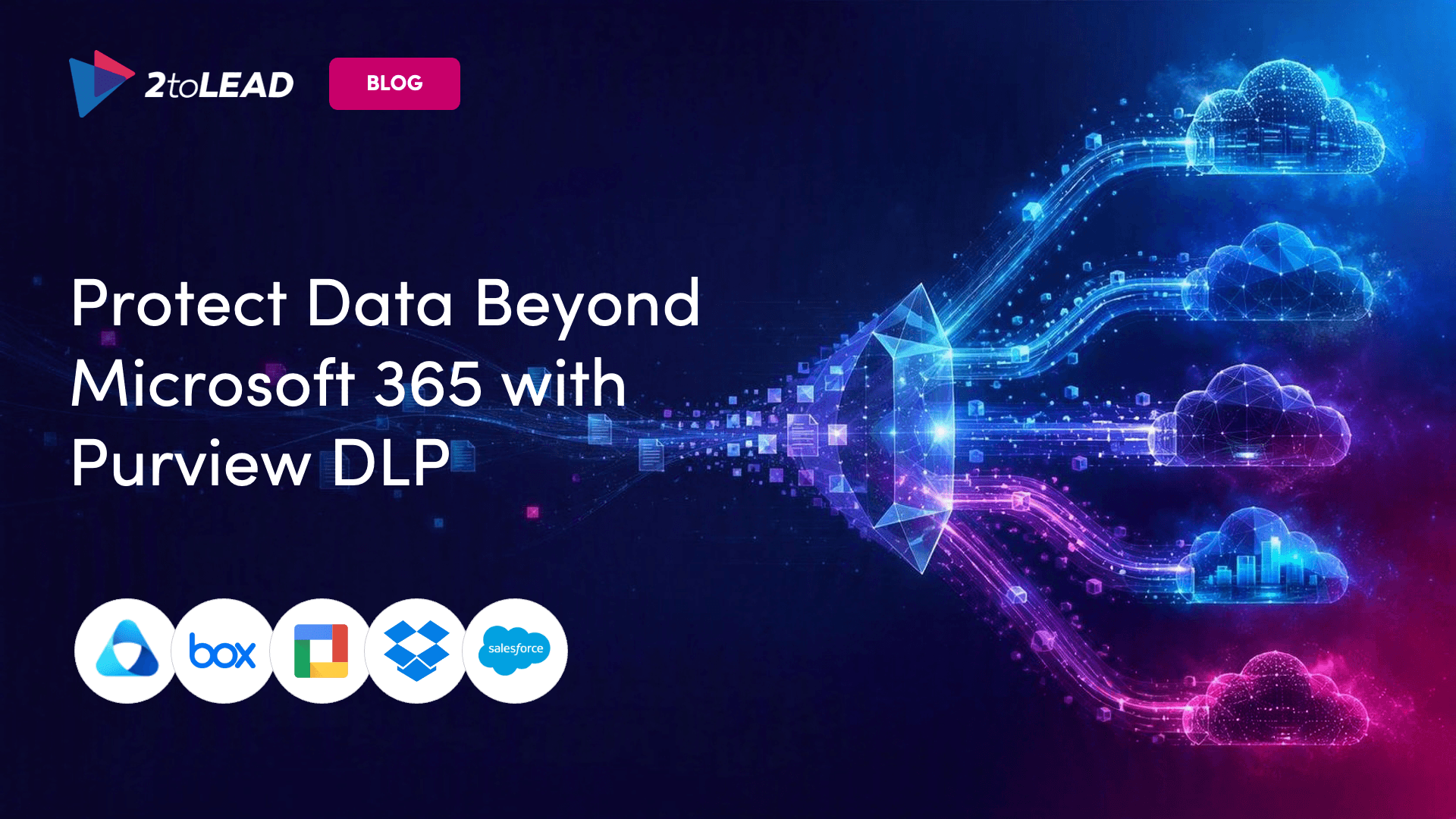
Purview network data security monitors, classifies and applies protection to unmanaged and untrusted cloud app traffic, including generative AI apps.
It delivers this through integrations with secure access service edge (SASE) or secure browser solutions, with Microsoft Entra Global Secure Access as the first-party path and a growing set of non-Microsoft providers available through the Security Store in Purview DLP.
The important design decision is that it does not ask you to build a new classification model. It reuses the classifiers you have already configured elsewhere in Purview.
Your sensitive information types, your sensitivity labels, your existing policy logic. What changes is the enforcement point, not the definition of sensitive.
Discovery runs through collection policies, protection runs through DLP policies, and you can use either or both depending on whether you are still in "show me what's happening" mode or ready to block.
For governance leaders, that is the difference between a six-month program and a configuration exercise. The intellectual work of defining what matters is already done.
Microsoft is specific about the leak paths in scope, and the list is broader than the AI headline implies.
Read that list with an incident in mind rather than a product in mind. Four of those five categories predate the AI conversation entirely, and your risk register almost certainly already names them.
What changes is that one control plane now sees all of them and the alerts land in the same queue your team already triages, which is what finally turns shadow AI from a discovery problem into something a security operations team can work.
Inside Purview DLP policy creation, this shows up as a new Inline Web Traffic scenario. From there, admins configure granular policies and rules to detect and protect sensitive files moving to more than 35,000 unmanaged cloud applications, with matches, alerts and incidents managed centrally across Microsoft Purview and Microsoft Defender.
One detail worth flagging to your delivery team: the feature is available by default, but it does nothing until it is configured. There is no accidental enablement here, and no accidental protection either.
This is where the honest conversation starts, and it is the reason a lot of organizations will read the announcement, get excited, and then stall in week two.
To turn this on with Entra Global Secure Access, your GSA administrator has to put five things in place.
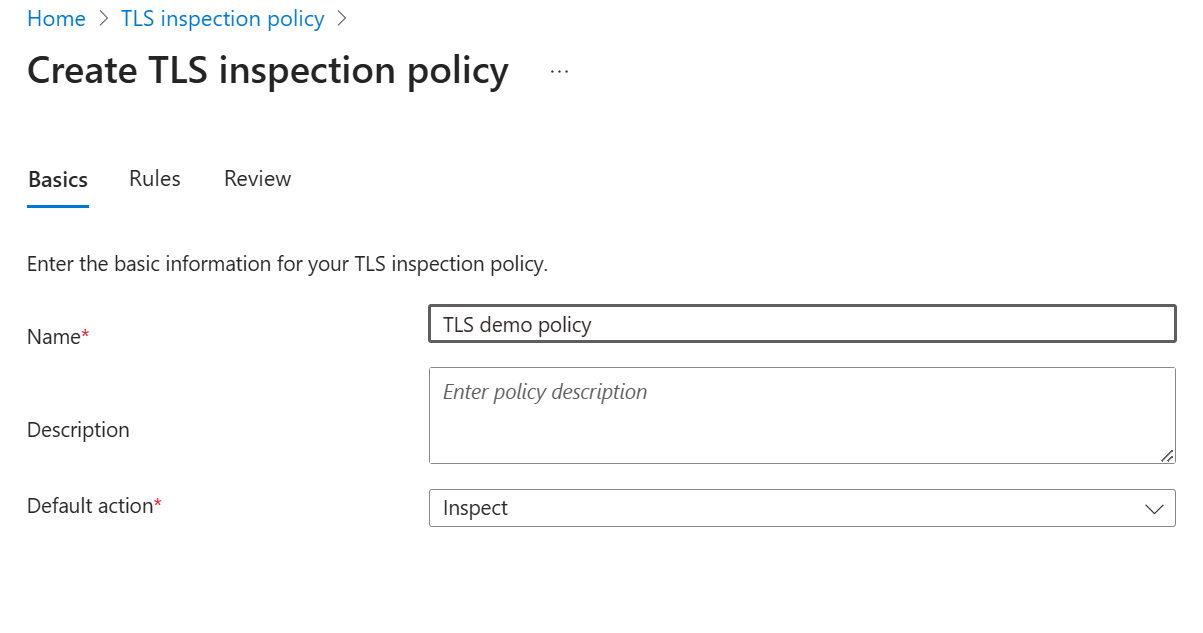
Microsoft's scenario guidance adds a further constraint for the first-party path: devices need to be Entra ID joined.
Treat that list as a program, not a checklist:
None of this is a reason to avoid the capability. It is a reason to scope it as a joint security, network, identity, legal and communications effort from the first meeting rather than the third. The organizations that struggle here are not the ones missing budget. They are the ones that treated it as a Purview project.
Two paths, two different bills.
Network data security with Microsoft Entra Global Secure Access requires either:
Network data security with non-Microsoft SASE and secure browser solutions requires:
Microsoft states plainly that you must configure pay-as-you-go for your tenant to use Purview network data security with those providers.
Practically, this means two questions land on the same desk. Do we already hold the Purview E5 entitlement, and are we willing to add Entra Internet Access on top? If you are sitting on E3 and assuming this is an add-on away, model it properly before it reaches a steering committee. Our breakdown of Purview licensing across E3, E5 and add-ons is a useful starting point for that conversation.
This is the distinction that will cause the most disappointment if it is missed.
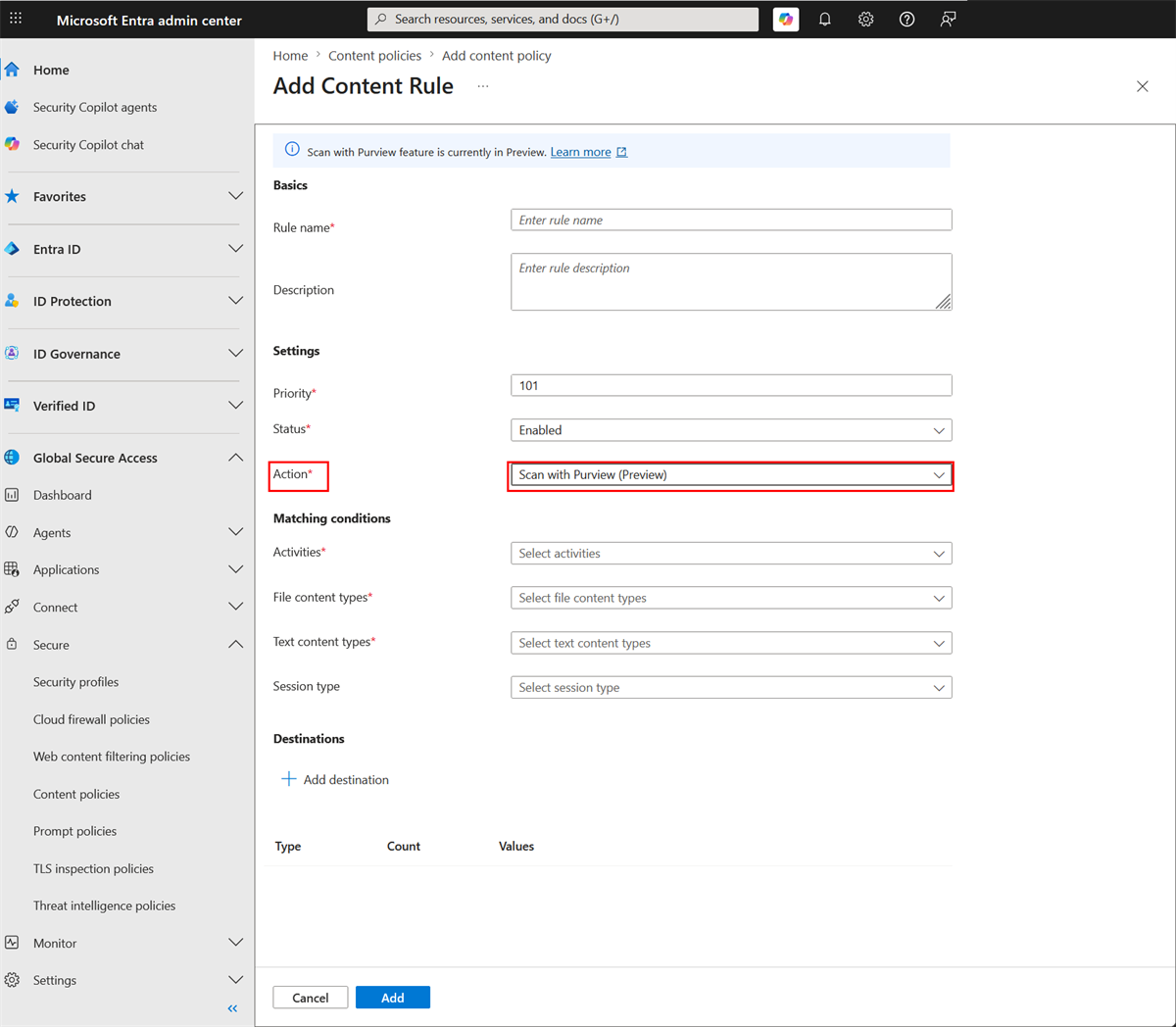
And the sentence to underline for anyone who reads only one line of this article: basic content policy does not inspect text. Text content type inspection requires Scan with Purview and a corresponding Purview DLP policy.
Which means if the scenario keeping your CISO up at night is an employee typing customer data directly into a chat window, the GA feature does not cover it. The preview feature does. Plan your pilot, your communications and your board reporting around that distinction.
On timing, Microsoft's message center guidance for the GSA integration set public preview rollout from mid-November 2025, with general availability beginning end of September and completing by end of October 2026.
You do not need the full architecture to make progress. You need the right first move.
1. Confirm your entitlement position, not your intent. Establish in writing whether you hold M365 E7, or Purview E5 plus Entra Internet Access, or neither. Everything downstream depends on this answer, and it is the one most likely to be assumed rather than verified.
2. Start the TLS inspection conversation with legal and communications now. This has the longest lead time of anything on the list and the least technical difficulty. Treat it as a change and consent workstream running in parallel, not a dependency you discover in month two.
3. Measure your actual exposure before you write a single policy. A usable baseline answers four questions: which generative AI and unmanaged storage destinations your people are reaching, how often, from which business units, and which sensitive information types are showing up in that traffic. Run it for two to four weeks in audit mode and you will typically find the pattern is narrower than feared, with a small number of teams and two or three content types accounting for most of the volume. That is the evidence you take to a steering committee. Enforcement without it produces either a flood of alerts nobody can triage or a policy so narrow it proves nothing.
4. Run discovery before protection. Use collection policies to observe first. Let the data tell you which three sensitive information types account for most of the risk, then write policies against those. Blocking on day one is how DLP programs earn a reputation for breaking work.
5. Map the preview boundary to your top scenario. If text inspection is the control you need, scope your pilot to Scan with Purview and set expectations accordingly with your steering committee. If file movement to unsanctioned storage is the priority, the GA path may get you further, faster.
Endpoint DLP protects the device. Purview DLP protects the workload. Network data security protects the path between them, and it is the path where most shadow AI actually happens.
The organizations that will benefit first are not the ones with the biggest budgets. They are the ones that already know where their sensitive data lives and which classifiers matter. If that foundation is not in place, network DLP will inspect traffic beautifully and find nothing useful.
Does Purview network DLP block ChatGPT?
It can block sensitive content from being shared with ChatGPT rather than blocking the app itself. Purview network data security identifies, blocks and alerts on sensitive content shared through generative AI interactions in browsers, apps and add-ins, including ChatGPT, Gemini and Claude. Blocking based on sensitive text content requires the Scan with Purview action, which is currently in preview.
What licenses do I need for Purview network data security?
With Microsoft Entra Global Secure Access, you need either Microsoft 365 E7 per-seat licenses, or Purview E5 (or equivalent) per-seat licenses plus Entra Internet Access (or equivalent). With non-Microsoft SASE or secure browser solutions, you need Purview E5 (or equivalent) plus the Microsoft Purview pay-as-you-go billing model.
Is network DLP generally available?
Partly. Basic content policy, which blocks or allows by file MIME type, is generally available. The Scan with Purview action in content policies is in preview and supports inspection for selected file and text content types. Microsoft's message center guidance for the Entra GSA integration set general availability rollout beginning end of September 2026 and completing by end of October 2026.
Does this replace endpoint DLP?
No. It covers a different enforcement point. Endpoint DLP governs actions on the managed device, while network data security inspects traffic heading to unmanaged and untrusted cloud apps through a SASE or secure browser integration. The two are complementary layers using the same Purview classifiers.
Do I need TLS inspection?
Yes, for the Entra Global Secure Access path. Microsoft's preparation guidance requires configuring TLS inspection and a TLS inspection policy, alongside the internet access traffic profile, a file policy using the Scan with Purview action, and a security profile linked to Conditional Access. Microsoft also advises establishing and communicating your TLS policy to end users before enabling inspection on user traffic.


Join Our Newsletter