“Good-enough” multi-factor authentication (MFA), like SMS codes, one-time passwords, and push approvals, is now a business liability because attackers can steal or relay those factors in real time. The modern baseline is phishing-resistant MFA, which uses cryptographic, origin-bound credentials (such as passkeys/FIDO2) that won’t authenticate on lookalike sites.
Microsoft explicitly positions phishing-resistant MFA as necessary because traditional MFA methods can be intercepted or socially engineered.
The executive mandate for securing corporate identities has always been straightforward: "Turn on Multi-Factor Authentication (MFA)." The logic was simple. If an employee has to enter a code from a text message or approve a push notification after entering their password, the organization is safe.
That assumption is no longer valid.
Attackers have industrialized methods to bypass traditional MFA. If your defense relies on a human being correctly identifying a malicious URL or spotting a fake login page, your defense will eventually fail. To close this critical gap, the goal is to move toward Phishing-Resistant Authentication.
This shift moves identity security from relying on human judgment to relying on cryptographic certainty. Understanding this distinction is essential for leadership and security professionals.
Microsoft and CISA both warn that not all MFA is equally resistant to today’s attacks, which is why phishing-resistant approaches are treated as the strongest option.
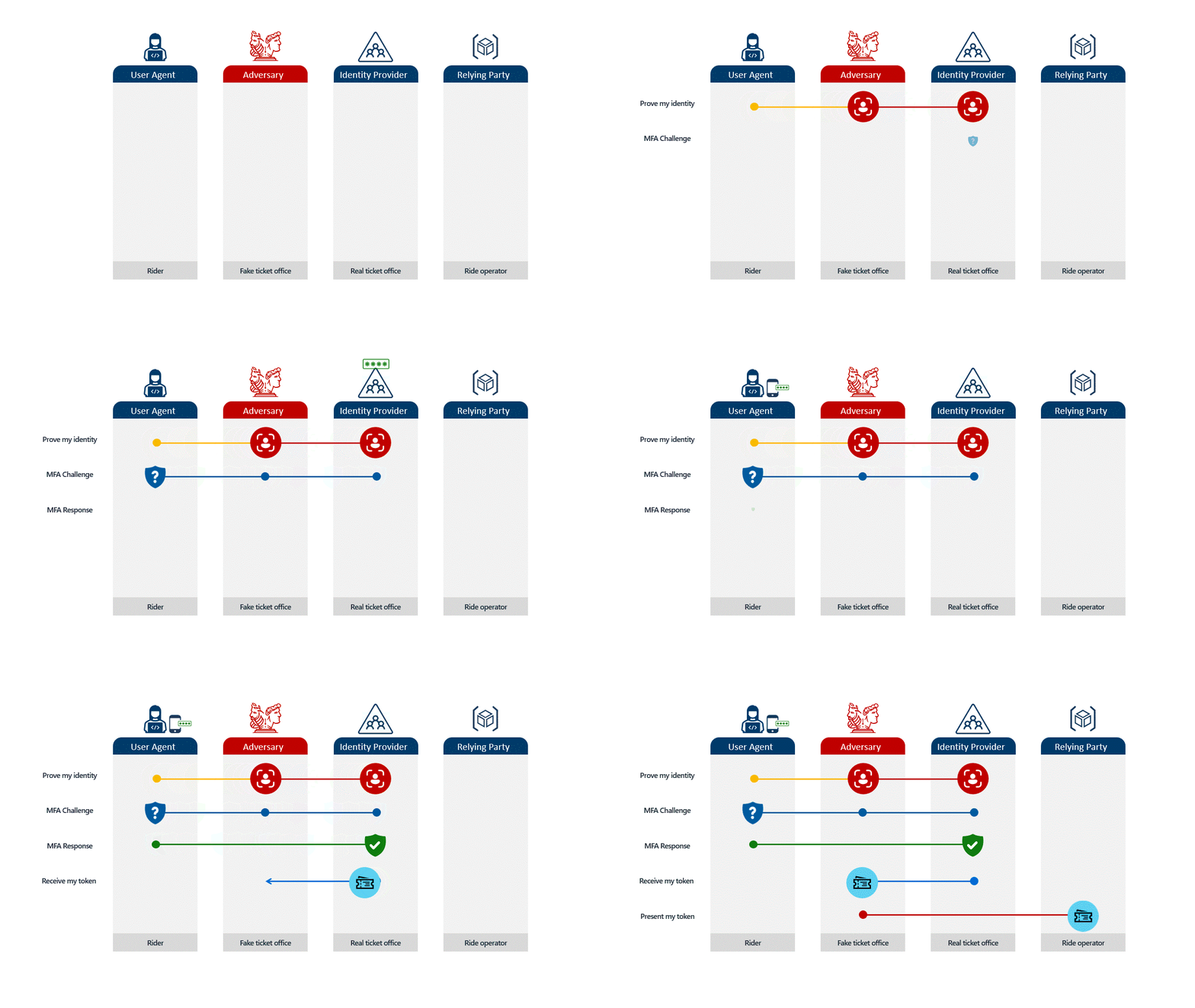
In the past, security awareness training focused on obvious tells: typos in URLs, strange sender addresses, and suspicious formatting. Today, adversary-in-the-middle (AiTM) attacks make those checks far less reliable because the attacker can place themselves between the user and the legitimate service during authentication.
Imagine a user receives an email that looks exactly like a standard Microsoft 365 login request. They click the link, and it takes them to a page that looks identical to your company’s login portal. When they type their password and enter their MFA code, the attacker, sitting invisibly in the middle, captures both instantly.
The attacker then uses that code immediately on the real site to log in as the user. By the time the employee realizes something is wrong, the attacker is already inside. This happens in seconds, and no amount of "user awareness training" can fully stop it because the process looks legitimate to the user.
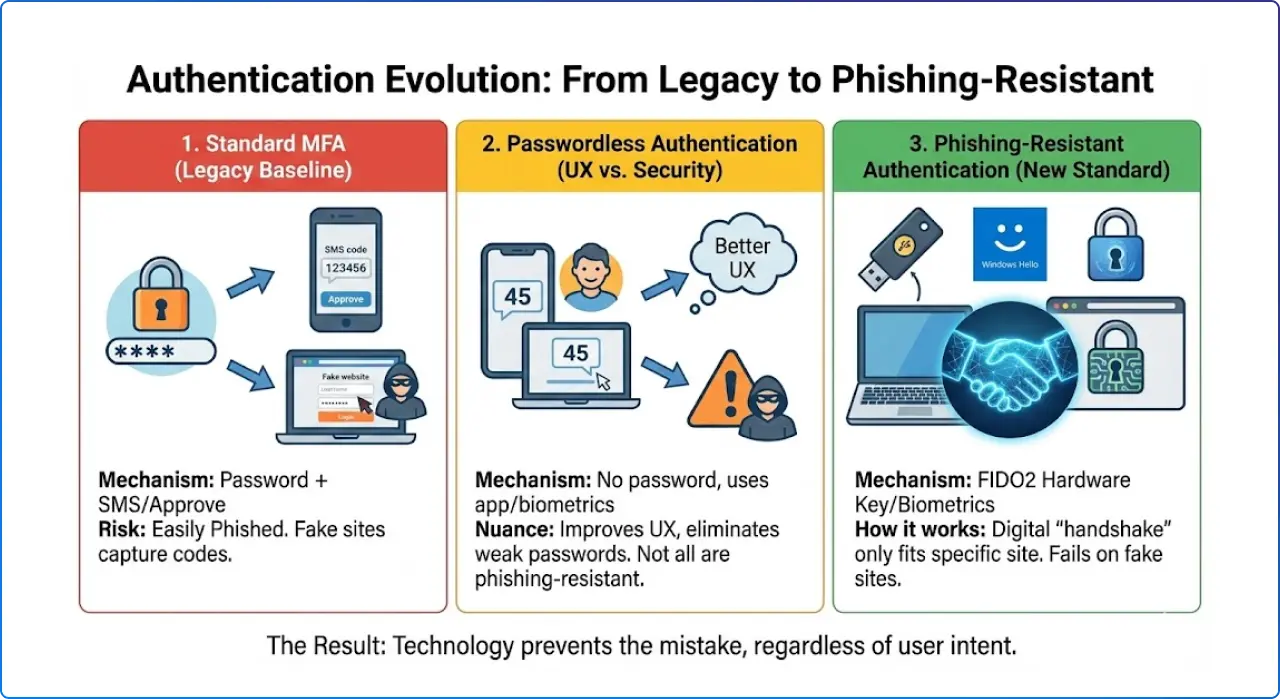
Not all locks are created equal. It is vital to distinguish between standard MFA, passwordless convenience, and true phishing resistance.
This is what most organizations use today. It combines a password with a secondary check, like an SMS text code or a simple "Approve" button on a phone.
"Passwordless" means removing the password from the user's daily sign-in routine.
This is the strategic goal. Phishing-resistant methods use FIDO2 standards to create a digital "handshake" between the device and the specific website.
c0rporate-login.com instead of corporate-login.com), the authentication device (like a Security Key or Windows Hello) recognizes that the "lock" is different. It will simply refuse to sign in.Passwordless is about removing the password step, while phishing resistance is about removing the ability to authenticate to an impostor. Those often overlap, but they are not identical.
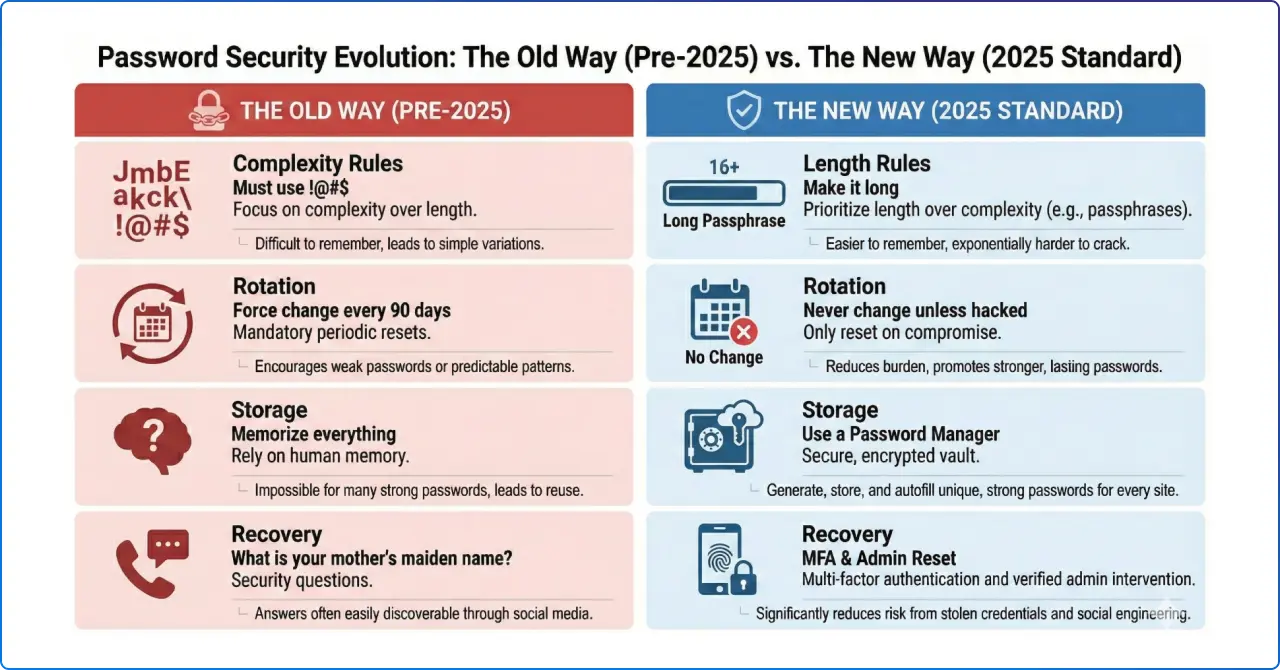
This shift isn't just a Microsoft recommendation; it is the federal standard. The National Institute of Standards and Technology's (NIST) 800‑63 digital identity guidance has evolved significantly in recent revisions.
Crucially, NIST now recommends against arbitrary password expiration policies (e.g., forcing employees to change passwords every 90 days).
Summer2025!, then Autumn2025!).The modern standard is to use strong, long-term authentication methods and only force a reset if there is evidence of a compromise. Moving to phishing-resistant methods allows us to finally abandon these outdated policies, improving employee satisfaction while decreasing risk.
Moving up this hierarchy requires specific licensing and potentially hardware investments.
1. Licensing Prerequisites To enforce these secure policies effectively, ensure you have the right Microsoft Entra (formerly Azure AD) licenses:
Microsoft Entra ID P1: The baseline required to create "Conditional Access" policies that say, "If you are accessing sensitive Finance data, you must use a phishing-resistant key."
Microsoft Entra ID P2 (Recommended): This adds automation. It allows us to trigger these strict requirements only when the system detects risk (like a login coming from a new country), keeping friction low for normal daily work.
2. Hardware & Organizational Investments
Hardware Budget: Provision FIDO2 security keys (like YubiKeys) for high-value targets. This includes the C-suite, IT Administrators, and anyone in Finance/HR with access to sensitive data.
Policy Review: Security leadership must be empowered to revise corporate password policies to align with NIST guidance, removing scheduled rotations in favor of stronger authentication methods.
Migrating to phishing-resistant authentication delivers immediate, measurable value:
The transition from standard MFA to phishing-resistant authentication is no longer an "optional upgrade." It is the necessary baseline for protecting our modern environment.
Turning on MFA was once a major step forward, but “good enough” MFA is now a liability because attackers can phish, relay, or fatigue users into completing traditional second-factor challenges.
Phishing-resistant MFA raises the bar by relying on cryptographic, origin-bound credentials that are designed not to work on impostor sites. Microsoft and CISA both point toward phishing-resistant MFA as the direction organizations should prioritize for meaningful identity hardening.


Join Our Newsletter