Chatbots were yesterday’s milestone. Agents are today’s coworkers.
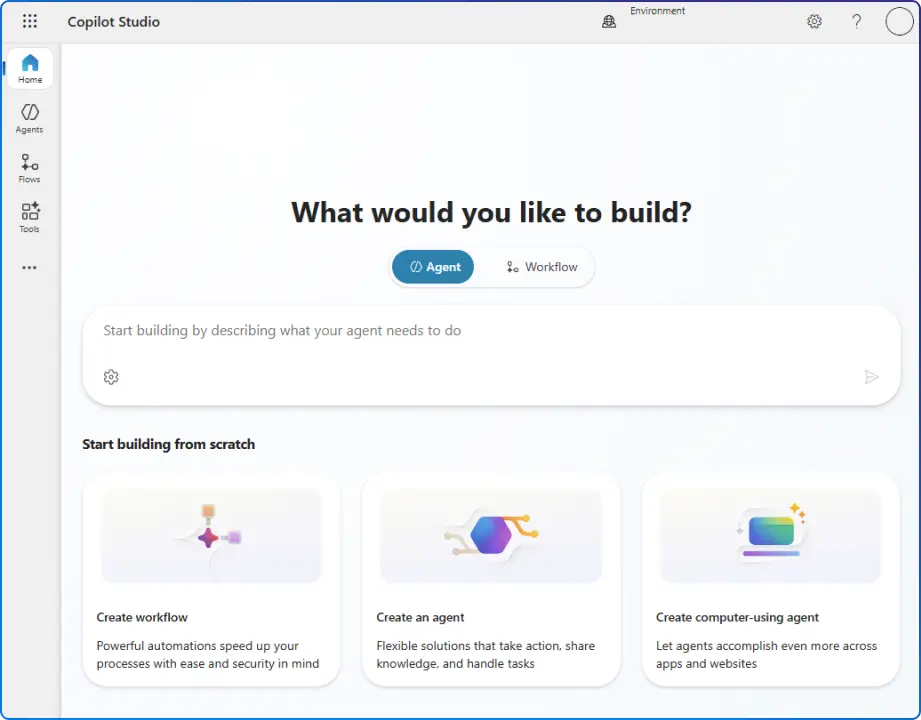
After Microsoft Ignite 2025, Copilot Studio isn’t just a tool to build conversational bots; it’s a platform to create custom agents that reason, act, and collaborate across your Microsoft 365 tenant like autonomous colleagues.
With Agent 365 for governance, Entra Agent ID for identity, and Model Context Protocol (MCP) for deep integrations, enterprises can finally move from proofs‑of‑concept to production‑grade automation.
In this blog, we’ll show you how to build, govern, and publish custom engine agents that your teams can use inside Microsoft 365 Copilot, safely and at scale.
Microsoft now recognizes two complementary approaches:

From an enterprise design standpoint, the choice hinges on compliance posture, orchestration control, and action depth.
If your use case needs bring‑your‑own model, complex REST/API integrations, or proactive automation, custom engine agents give you that latitude, while still benefiting from Copilot Studio’s managed governance and analytics. If speed‑to‑value with Microsoft’s built‑in stack is paramount, declarative agents get you live quickly.
The win: you can start declarative for time‑to‑value and graduate to custom engine agents as needs evolve, without abandoning Microsoft 365 control surfaces, identity, and observability.
Tip: Keep a “release checklist” (instructions, knowledge sources, tools, evaluations, compliance tags, escalation path) and track changes so every iteration remains defensible.

Enterprise adoption lives or dies by governance. Agent 365 centralizes inventory, policies, security, compliance, and monitoring for agents, so IT can scale intelligence without losing control. At Microsoft Ignite 2025, Agent 365 was introduced as the control plane for agents; Entra Agent ID provides first‑class identities and audit across email, Teams, SharePoint, and more.
Copilot Studio’s update recap mirrors the governance emphasis: expanded analytics, Defender‑powered protection, and oversight capabilities through Microsoft Entra Agent ID, giving administrators confidence to standardize agents safely. For regulated industries, this is non‑negotiable.
Governance essentials for your rollout:
Large processes rarely fit one agent. Copilot Studio supports multi‑agent orchestration via child agents (subtasks inside a parent), connected Copilot Studio agents, and external agents via Foundry, Fabric, the Microsoft 365 Agents SDK, or A2A protocol.
Use specialization to improve accuracy and throughput, and design handoffs with clear instructions, so agents know when to request help or escalate.
Once your design works, publish to the Microsoft 365 Copilot channel to meet users where they already work (Office apps, Teams, SharePoint, and Copilot Chat) under admin review and analytics. This is how custom engine agents become daily teammates rather than detached chat apps.
Measure outcomes, not just interactions. Instrument agent evaluations, topic performance, tool success rates, and time‑to‑resolution. Tie KPIs to business outcomes (ticket closure, onboarding cycle time, invoice throughput), then iterate instructions/tools based on evidence, not anecdotes.
If 2024 was the year of playing with bots, 2026 will be the year you scale agents.
Use Copilot Studio to build custom engine agents that genuinely move work forward; use Agent 365 and Entra Agent ID to govern them like coworkers; and publish them into Microsoft 365 Copilot so teams can collaborate with agents in the flow of work.
Start with one well‑scoped process (e.g., HR→IT onboarding, invoice→payment, or frontline SOP updates), prove outcomes, and expand through multi‑agent orchestration.
Expect continued advances in model choice, evaluation tooling, computer use, and Agent 365 controls, plus deeper Work IQ integration and partner agents. Keep a watchlist across the Microsoft 365 Blog and Copilot Studio Blog to align your designs with new capabilities as they land.


Join Our Newsletter