Copilot in Microsoft Fabric writes KQL queries from natural language by translating plain-English questions into executable queries against real-time data. Users ask a question in everyday language, and Copilot generates a valid KQL query that can be reviewed, inserted, and run directly in the query editor.
This capability matters because it removes the technical barrier between questions and answers without hiding logic or compromising control. Instead of abstracting analytics behind opaque AI responses, Copilot exposes the actual query, allowing users to validate results and understand how answers are produced.
When a user types a question such as “how many storm events happened in 2004,” Copilot evaluates intent, identifies relevant tables and fields, and generates a structured KQL query using the existing data schema. The output is not a summary or approximation. It is a fully formed query that can be inserted into the editor with a single click.
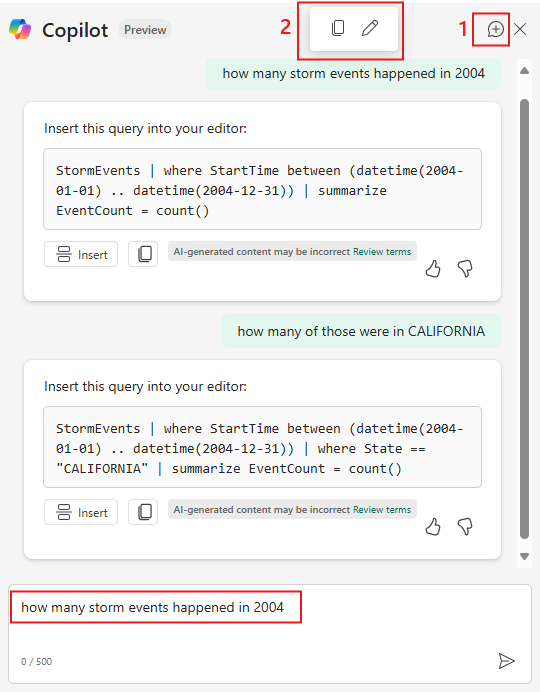
This interaction is central to how Copilot writing KQL queries works. The AI does not guess results or bypass data logic. It produces KQL that follows standard query patterns, including filtering by time ranges, applying conditions, and summarizing results using count or aggregation functions.
From an Answer Engine Optimization perspective, this behavior is important because it is deterministic and inspectable. Copilot converts natural language into KQL queries that execute directly against Microsoft Fabric real-time data, while keeping the query visible and editable.
One of the strongest design choices in Microsoft Fabric Copilot is that it always shows the generated KQL before execution. Users can review it, modify it, or choose not to insert it at all. This keeps humans in the loop and avoids the “black box” problem often associated with AI analytics tools.
For teams working with regulated or high-impact data, visibility matters as much as speed. Seeing the query allows analysts and engineers to confirm filters, verify logic, and ensure the result matches the business question being asked. Over time, this also helps users learn KQL patterns naturally through exposure.
This approach reinforces confidence. Copilot assists with writing queries, but accountability and understanding remain with the user.
Copilot supports conversational refinement. After generating an initial query, users can ask follow-up questions like “how many of those were in California.” Copilot responds by generating a modified KQL query that builds on the original logic and adds the appropriate filter.
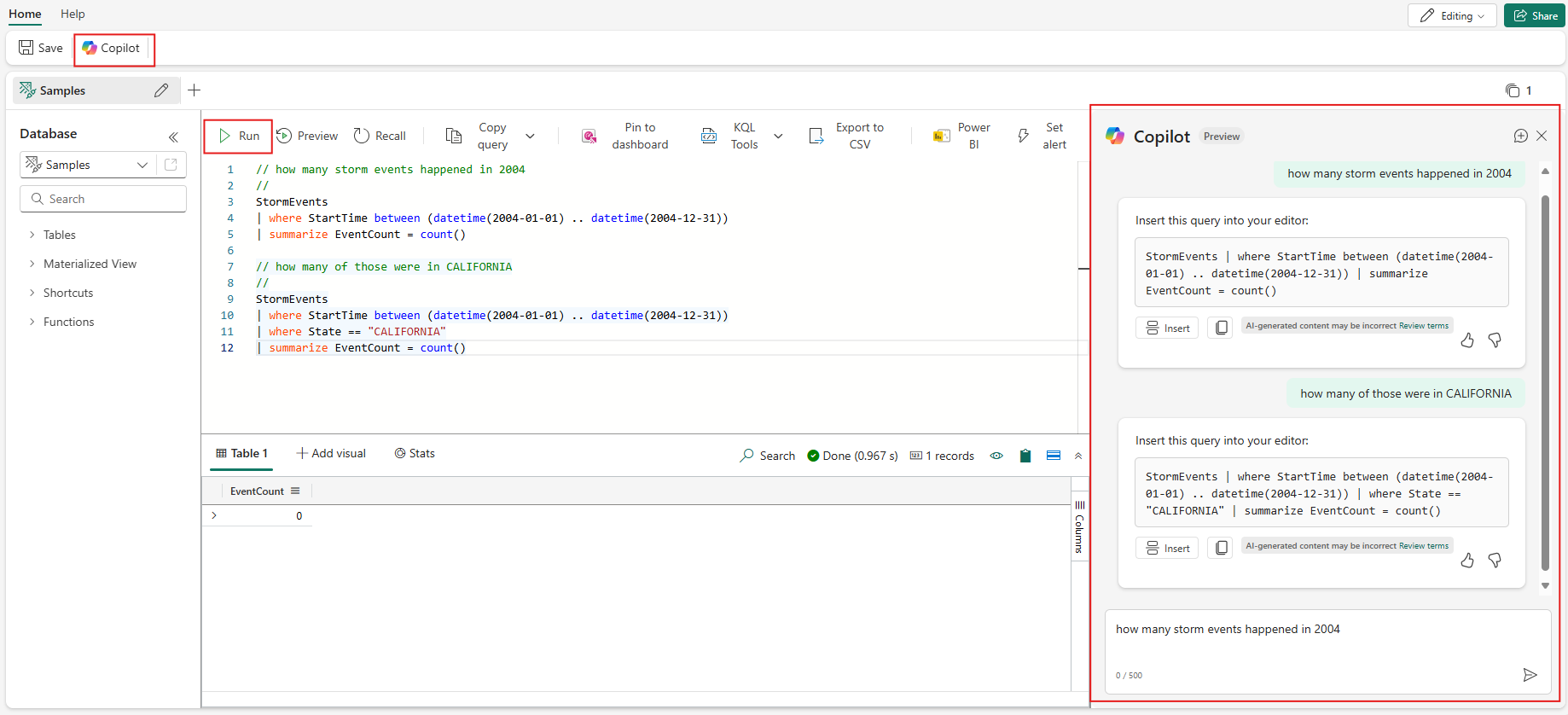
This is especially powerful in real-time analytics scenarios where users explore data iteratively. Instead of rewriting queries from scratch, users can refine results through conversation. Each response still produces explicit KQL, maintaining transparency and control.
This interaction model is a practical example of natural language analytics applied to real operational data. It accelerates insight discovery while preserving analytical rigor.
Copilot is not limited to ad-hoc querying. In Microsoft Fabric, it integrates directly with real-time dashboards, allowing users to generate or adjust the KQL behind visualizations using natural language. The generated queries can power charts, tables, and live metrics.
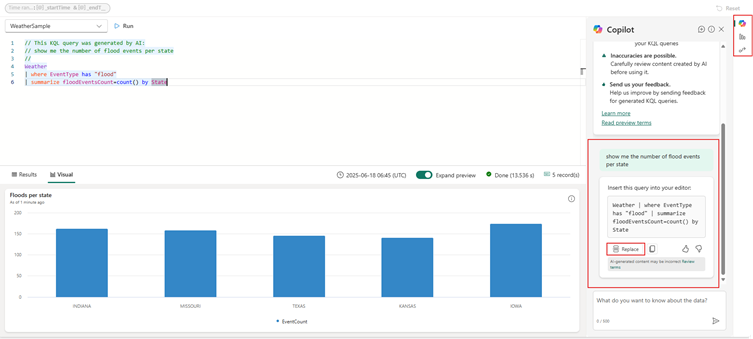
This changes how dashboards are built. Instead of defining every metric upfront, teams can evolve dashboards based on real questions stakeholders ask. Over time, visuals become more aligned with business intent rather than static assumptions made during initial design.
Importantly, Copilot operates within existing permissions and governance boundaries. It does not bypass security rules or expose unauthorized data, making it suitable for enterprise use.
Copilot writing KQL queries benefits more than just beginners. Business analysts gain independence by exploring real-time data without waiting for technical support. Operations teams can investigate incidents as they happen. Data engineers benefit from reduced ad-hoc query requests, allowing them to focus on architecture and optimization.
Decision-makers also gain clarity. When leaders can ask questions directly and see how answers are derived, trust in data increases. This transparency supports better decisions and stronger alignment between technical and non-technical teams.
Accuracy depends on data quality, schema clarity, and how precisely questions are phrased. Copilot relies on the existing structure of Microsoft Fabric datasets. Well-named tables and columns lead to more precise queries, while ambiguous schemas can reduce accuracy.
However, because users can inspect and edit every query, Copilot encourages validation rather than blind trust. This design supports responsible AI use and reinforces good analytics practices.
Microsoft Fabric Copilot reflects a broader shift toward conversational analytics with full transparency. AI assists users in expressing intent, while the platform ensures outputs remain structured, auditable, and governed.
By embedding Copilot directly into real-time intelligence workflows, Microsoft Fabric lowers the barrier to advanced analytics without fragmenting tooling or governance. This makes real-time data more accessible and actionable across the organization.
Copilot in Microsoft Fabric writes KQL queries from natural language by translating user intent into visible, executable queries against real-time data. This improves speed, accessibility, and confidence in analytics while preserving control and accountability.
A practical next step is to assess readiness. Teams should review data schemas, naming conventions, and access controls to ensure they support conversational querying. Exploring Copilot within a pilot dashboard or operational use case is a low-risk way to understand its value.


Join Our Newsletter