Operationalizing agentic AI in Microsoft Fabric means turning an agent from a promising demo into a system you can monitor, govern, and improve over time. The goal is not just to get a good response once. The goal is to make sure the system performs reliably, captures the right telemetry, surfaces risk signals early, and connects technical activity to business value. Microsoft’s recent Fabric guidance points to exactly that model by combining orchestration, telemetry capture, real-time event handling, and analytics in one platform.
This matters because many teams can build an AI proof of concept, but far fewer can run agentic AI in a way that leaders can trust. Once an agent starts making routing decisions, calling tools, or supporting customer and employee workflows, the business needs more than a model output. It needs visibility into what happened, whether it was safe, and whether it delivered measurable value. Microsoft Fabric is designed for end-to-end analytics across ingestion, transformation, real-time processing, analytics, and reporting, with OneLake acting as the shared data layer. That makes it useful for operationalizing agentic applications with Microsoft Fabric instead of managing the work through scattered tools.
The hard part is not generating an answer. The hard part is understanding the chain of activity behind that answer. Agentic applications create more than prompts and responses. Microsoft’s Fabric blog notes that these applications generate operational data such as user prompts, routing decisions, tool calls, outputs, latency, token usage, and safety signals. That wider footprint creates new demands for monitoring, governance, and reporting.
That is why decision-makers need to shift the question. Instead of asking, “Can we build an agent?” they need to ask, “Can we run this agent in production with enough control to trust it?” That means having structured data, live event visibility, and business reporting that can show where the system is working and where it is not. Microsoft’s March 2026 Fabric guidance highlights a production-minded pattern built around telemetry capture, Eventstream-based real-time safety monitoring, and analytics through downstream Fabric workloads.
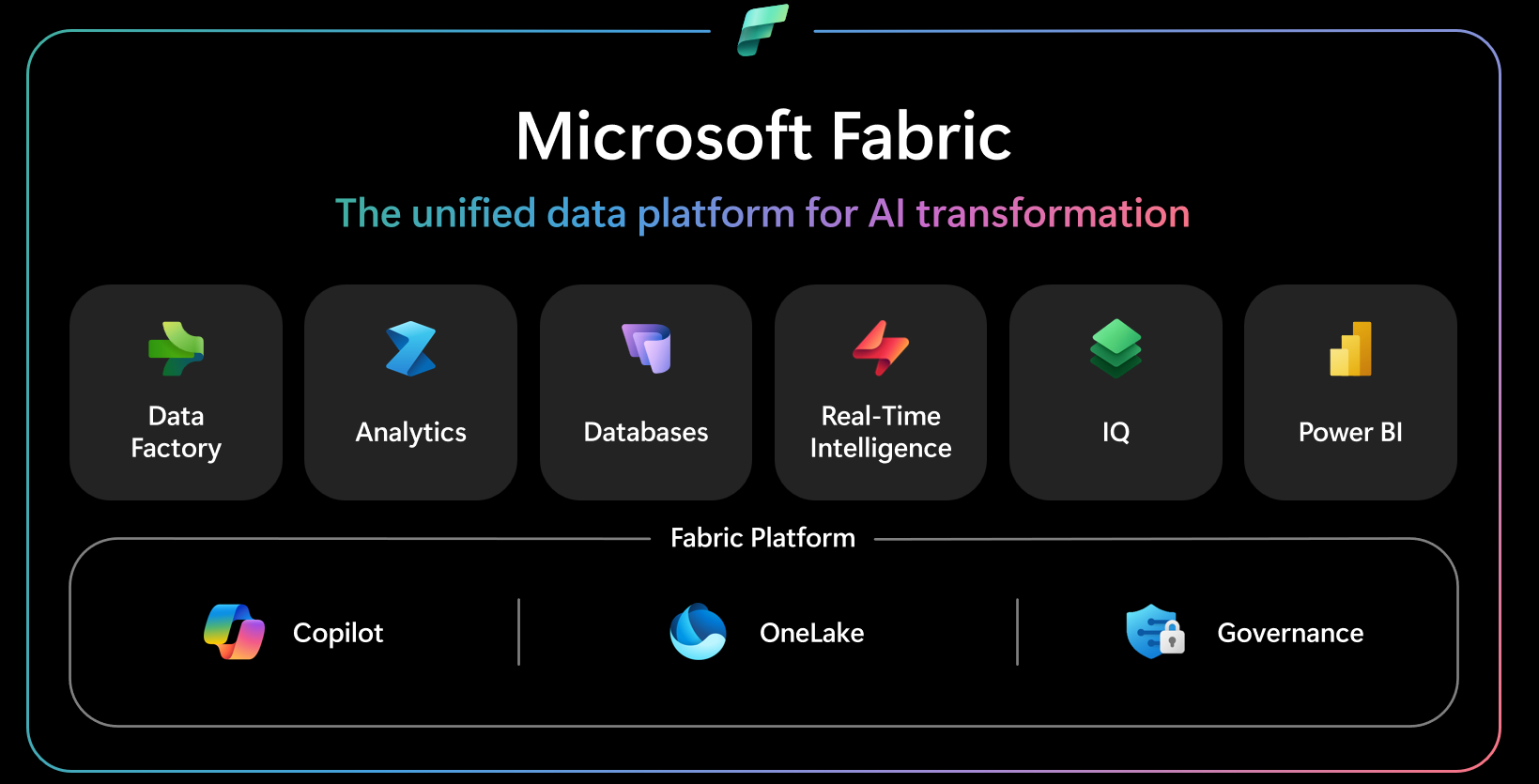
Microsoft Fabric gives teams a way to treat agent operations as data. That is the real advantage. Instead of running an agent as a black box, teams can capture the signals that explain how it behaves over time. Fabric supports that by connecting databases, Real-Time Intelligence, OneLake, and Power BI in one platform. Microsoft describes Fabric as a SaaS analytics environment where workloads share the same underlying platform services, including OneLake, governance, and Copilot-enabled experiences.
In practice, that means different Fabric services can support different parts of the operating model. Structured operational records can live in SQL database in Fabric. Real-time event flows can move through Eventstreams. Shared storage and cross-workload analysis can happen through OneLake. Business-facing reporting can be delivered through Power BI and semantic models. This is what makes operationalizing agentic applications with Microsoft Fabric more than a storage story. It is really an observability and analytics story.
Leaders should focus on four areas.
The first is interaction data. That includes what users asked, what the agent returned, and the context that shaped the exchange. Without that, it is hard to review response quality or investigate bad outcomes.
The second is execution data. That includes routing decisions, tool calls, handoffs, and process outcomes. In multi-agent systems, this is often where friction appears first.
The third is performance data. Latency, throughput, and usage signals help show whether the system is efficient enough to scale.
The fourth is safety and governance data. That includes policy violations, suspicious outputs, repeated failures, and other risk events. Microsoft’s Eventstreams documentation and Fabric guidance both point to the importance of capturing and routing real-time events for further analysis.
Real-time monitoring matters because AI issues do not always wait for a monthly report. If an agent starts failing tool calls, getting stuck in loops, or returning risky outputs, teams need visibility while the system is running. Microsoft says Eventstreams in Fabric can bring real-time events into Fabric, transform them, and route them to different destinations without code. That makes Eventstreams in Microsoft Fabric especially useful for agent telemetry and safety monitoring.
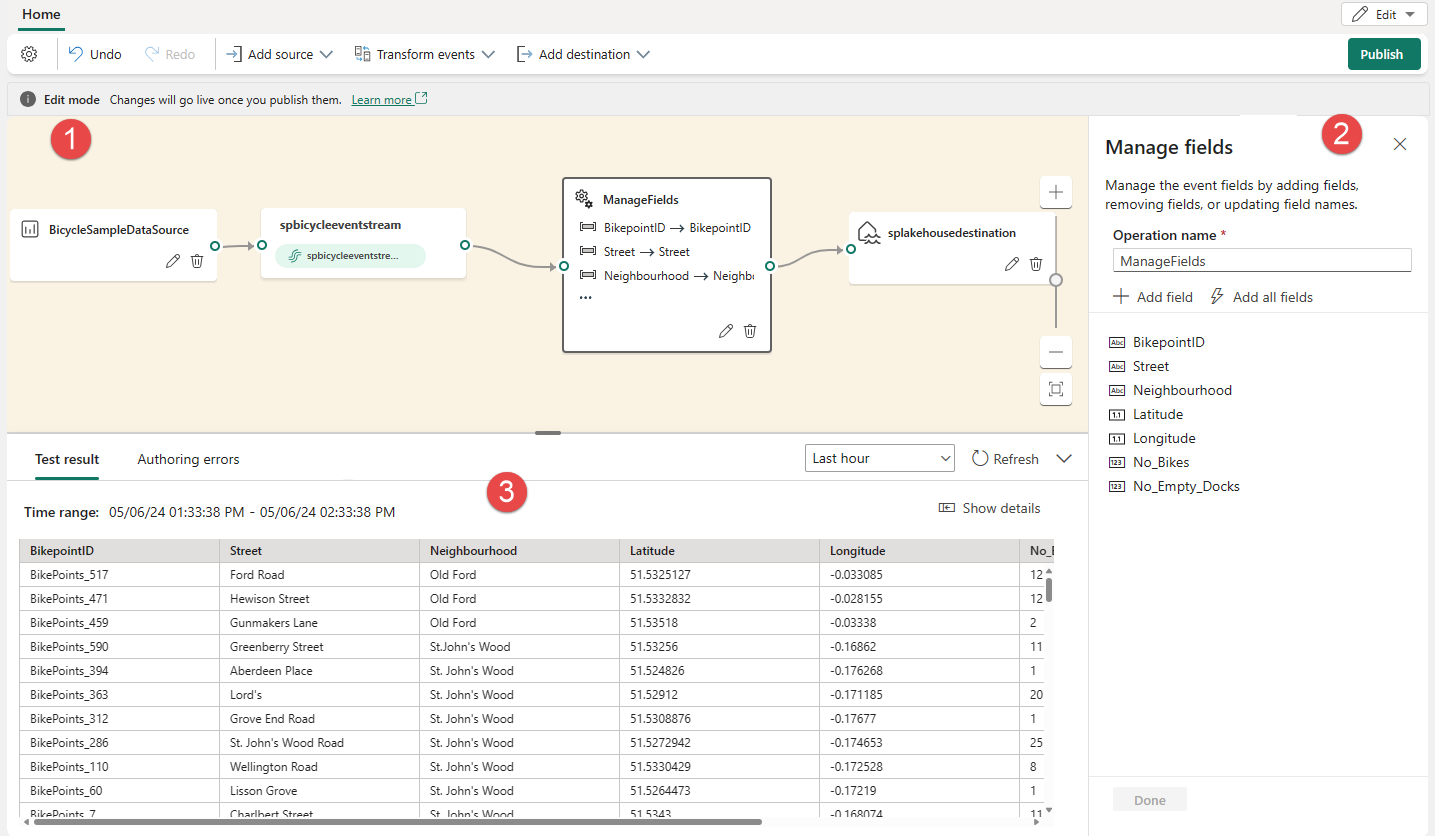
This is where the operating model becomes more mature. Teams are no longer only reviewing logs after the fact. They can design flows that capture events, apply transformations, and route data to downstream destinations for investigation and reporting. Microsoft’s Eventstreams documentation shows that Fabric supports routing event data to destinations such as Eventhouse, Lakehouse, Spark Notebook, derived streams, and Activator. That means the same real-time data can support both monitoring and broader analysis.
Because agentic applications do not produce one simple type of data. Some data is structured and transactional. Some is event-driven. Some is better used for long-term analytics and reporting. Microsoft describes OneLake as the single, unified, logical data lake for the whole organization, designed to be the single place for analytics data in Fabric. That shared foundation helps reduce silos and makes it easier to connect operations with analysis.
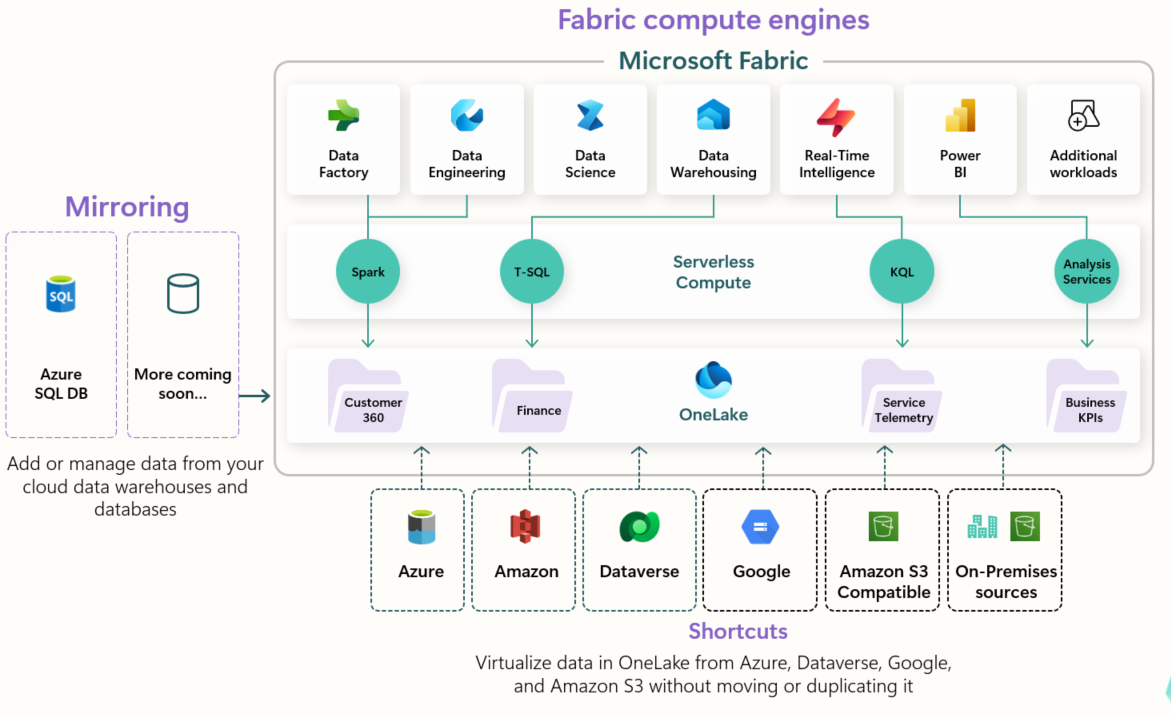
That connection matters for decision-makers. It means agent telemetry, event data, and business metrics do not have to live in separate systems. Microsoft’s Fabric architecture shows workloads such as Data Factory, Analytics, Databases, Real-Time Intelligence, IQ, and Power BI running over the same platform layer with OneLake, governance, and Copilot built in. For organizations exploring agentic AI in Microsoft Fabric, that is important because it supports a more consistent operating model from ingestion through insight.
A strong Fabric setup can help answer questions that matter to both technology leaders and business leaders. Which agent workflows are used most often? Where do handoffs break down? Which events point to safety or quality issues? Which use cases are worth scaling? Where are cost and complexity rising faster than business impact?
Those are the questions that separate AI experimentation from AI operations. Microsoft’s Fabric blog is useful because it frames agentic applications as systems that must be measured and improved, not just launched. When telemetry, event monitoring, and analytics are connected, leaders get a clearer view of what is happening and what should change next.
The best next step is usually not a full rollout. It is a readiness step. Pick one use case. Define what telemetry matters. Decide what should be monitored in real time. Clarify which outcomes matter to the business. Then assess whether your current Fabric environment can support that level of visibility and control.
That is the bigger lesson in Microsoft’s approach. Operationalizing agentic applications with Microsoft Fabric is really about creating a trustworthy operating layer for AI. It helps move organizations from isolated pilots to systems that can be observed, governed, and improved over time.
Microsoft Fabric helps operationalize agentic AI by connecting the layers that matter most in production: platform services, shared data, real-time event handling, and analytics. The value is not only that Fabric can store data. The value is that it can help organizations understand how agents behave, monitor how safely they operate, and measure whether they are creating business value. That is what turns AI from an experiment into an operating capability.
A smart next step is to assess one use case before scaling. Review the signals you would need from day one, map the monitoring and reporting requirements, and explore whether Fabric is the right operating foundation for your agent strategy. That keeps the next step practical, low pressure, and aligned to business readiness.


Join Our Newsletter