The latest Microsoft Teams updates focus on enhancing flexibility, strengthening security, improving meeting experiences, and supporting frontline operations across hybrid work environments. These improvements help users stay connected, communicate with clarity, and reduce cognitive friction, making collaboration across teams more productive within Microsoft 365 collaboration tools.
Here’s a deeper look at what’s changed and how these updates support real work scenarios.
One of the most practical changes in Microsoft Teams is the ability to pop out core functions into separate windows, including chat, calls, calendar, and activity. This gives users more control over how they arrange their workspace, so they can see the information that matters most at any moment. Rather than constantly switching tabs, people can view conversations and schedules side by side, which helps reduce context switching and support more efficient multitasking.
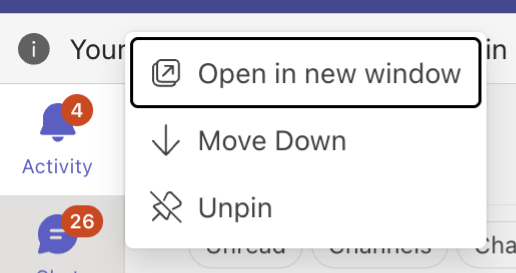
This makes working with Teams feel less like navigating an app and more like organizing a personalized workspace that adapts to the way you work.
Collaboration needs to be both easy and secure. In response, Microsoft Teams now requires team owner approval when someone joins a private team using a join code. Previously, codes could grant immediate access, but this update ensures that team owners maintain clear oversight over membership. It reduces the risk of accidental access to private group spaces while keeping onboarding simple for authorized users.
This change bridges usability and security in a way that benefits both team members and IT administrators.
Teams meetings are becoming more inclusive with automatic language detection for built-in interpretation features. When Interpreter is enabled during a meeting, Teams now detects spoken language in real time and delivers captions and transcripts accordingly. This eliminates the need for participants to manually configure language settings and helps make multilingual meetings feel smoother and more natural.
Improved visual feedback also lets participants know when interpreter features are ready to use, further reducing uncertainty during international or cross-language collaboration.
A highlight of the latest updates is the integration of Microsoft 365 Copilot Chat directly into the Calls app. After a call ends, users can open Copilot Chat to generate post-call insights, including summaries, key points, and suggested actions.
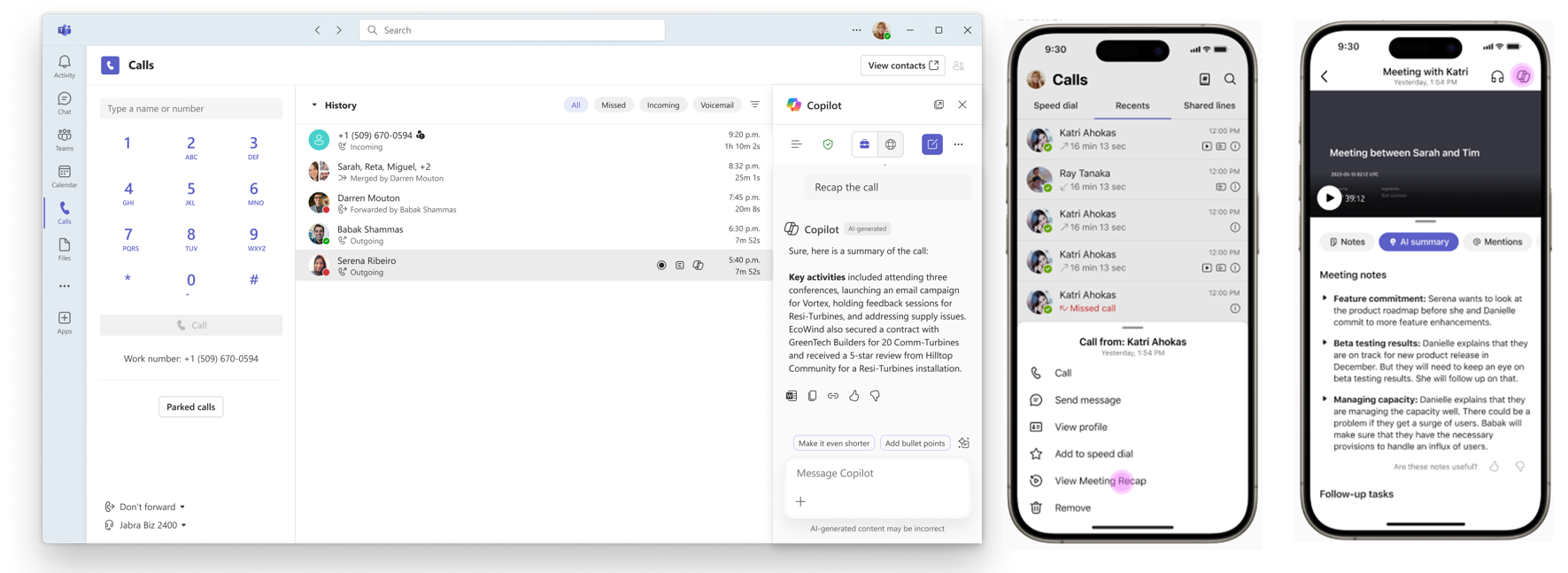
Because Copilot draws on Microsoft Graph and workplace context in addition to the call transcript, the results are more relevant and helpful than simple summaries. This turns post-call follow-up into a fast, actionable step rather than a manual chore, saving time and helping teams stay aligned after conversations.
For organizations that rely on call recording for compliance, quality monitoring, or regulatory requirements, Microsoft Teams now supports queue-level compliance recording with third-party solutions. Instead of configuring recording settings for each individual user, administrators can apply compliance recording policies at the call queue level.
This update reduces administrative overhead, ensures consistent recordings, and helps organizations maintain compliance without extra manual setup.
Communication safety is a top priority, and Teams has introduced Tenant-Owned Domain Impersonation Protection to help guard against spoofing and phishing attacks. This feature examines external sender domains that may look similar to your own organization’s domain and alerts users when something looks suspicious.
By catching potential threats earlier in the messaging process, Teams protects users without disrupting normal communication. This reinforces trust in everyday messaging and is especially valuable when working externally or with large partner networks.
Frontline employees often face unique coordination and communication challenges, whether they work in healthcare, retail, logistics, or field services. Microsoft Teams expands support for these workers through the Frontline Hub in the Teams Admin Center. This centralized experience brings deployment tools, monitoring features, and workflow guidance into one place.
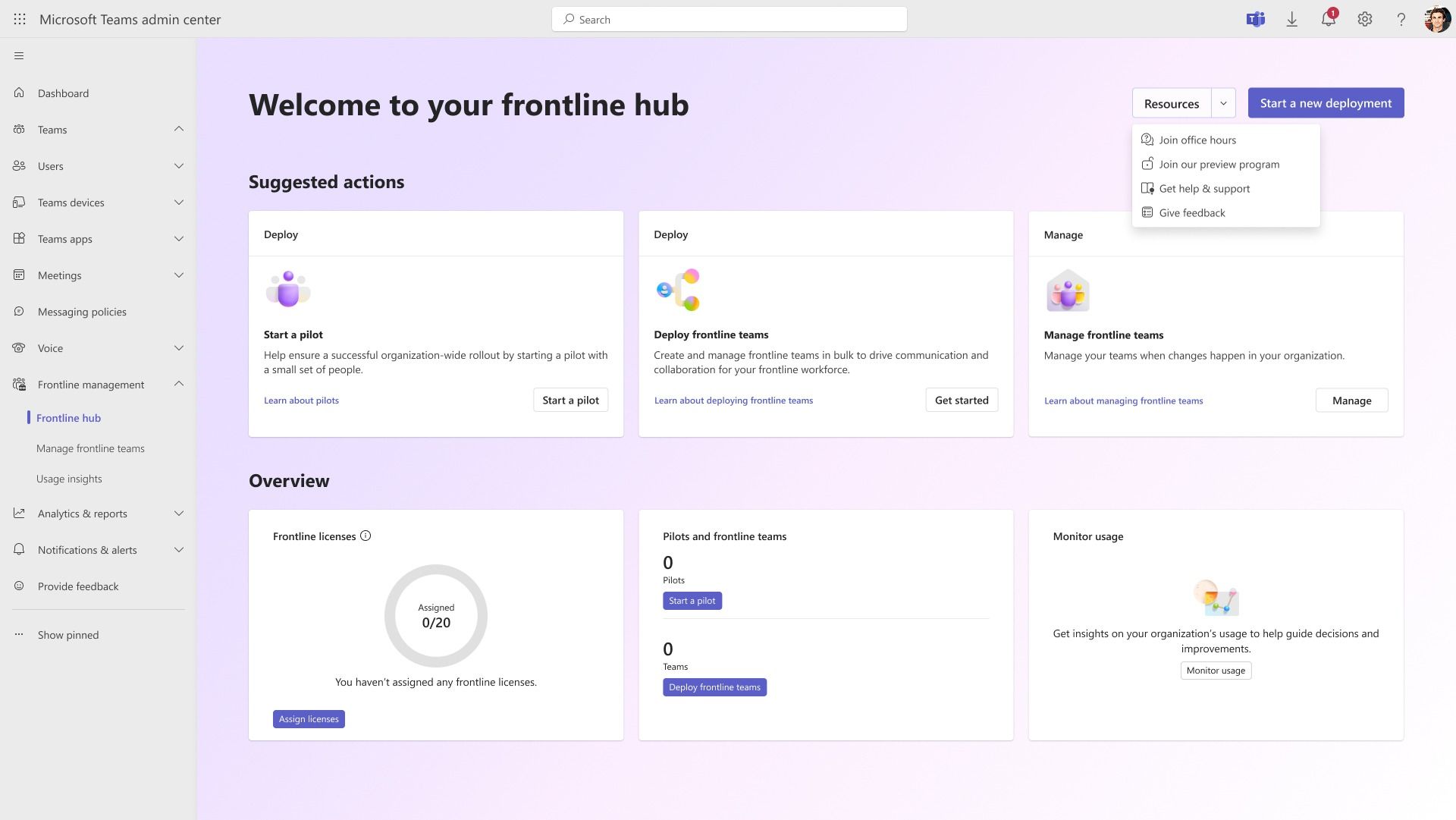
Instead of managing multiple systems or consoles, frontline IT teams can now deploy and monitor frontline workflows more easily. This results in more consistent experiences for workers who rely on Teams as their main communication and task coordination tool.
These capabilities help ensure frontline teams stay connected, informed, and supported with tools tailored to their needs.
Taken together, these Microsoft Teams updates reflect how the platform is evolving to support real work demands. Users gain more control over workspace layouts, stronger protections around team access and messaging, and better meeting and post-call experiences that reduce manual follow-up work. Administrators benefit from simplified compliance tools and consolidated frontline management, all within the broader suite of Microsoft 365 collaboration tools.
Instead of adding more features for the sake of novelty, Microsoft is refining Teams to reduce friction and make collaboration feel more seamless across roles, locations, and workflows.
Whether teams are coordinating complex projects, supporting hybrid work, or communicating in high-pressure environments, the latest Teams improvements emphasize clarity, efficiency, and trust.


Join Our Newsletter