User‑bound user delegation SAS is designed for teams who must use Shared Access Signatures (SAS) but want to reduce one of SAS’ biggest risks: a leaked token being usable by anyone who gets it.
In Azure Storage, a “user delegation SAS” is a SAS token secured with Microsoft Entra credentials (instead of an account key), and it’s created by first requesting a user delegation key and then using that key to sign the SAS.
With user‑bound user delegation SAS, you can go further by binding the token’s use to a specific end user’s Entra identity, so the token can’t be replayed by someone else even if they obtain the URL.
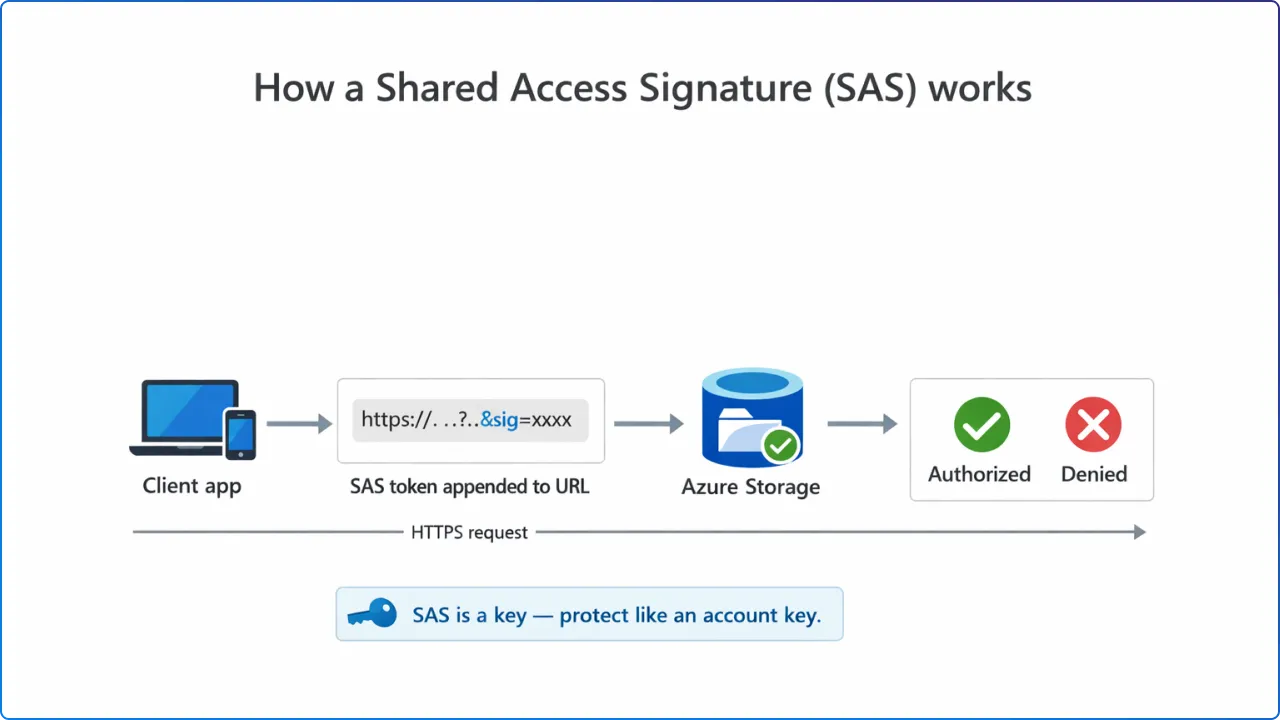
A SAS is effectively a key that grants permissions to storage resources, so it must be protected like an account key to prevent malicious or unintended use.
Microsoft explicitly warns that SAS URIs should be distributed only over secure connections such as HTTPS, because interception enables attackers to use the SAS as the intended user could.
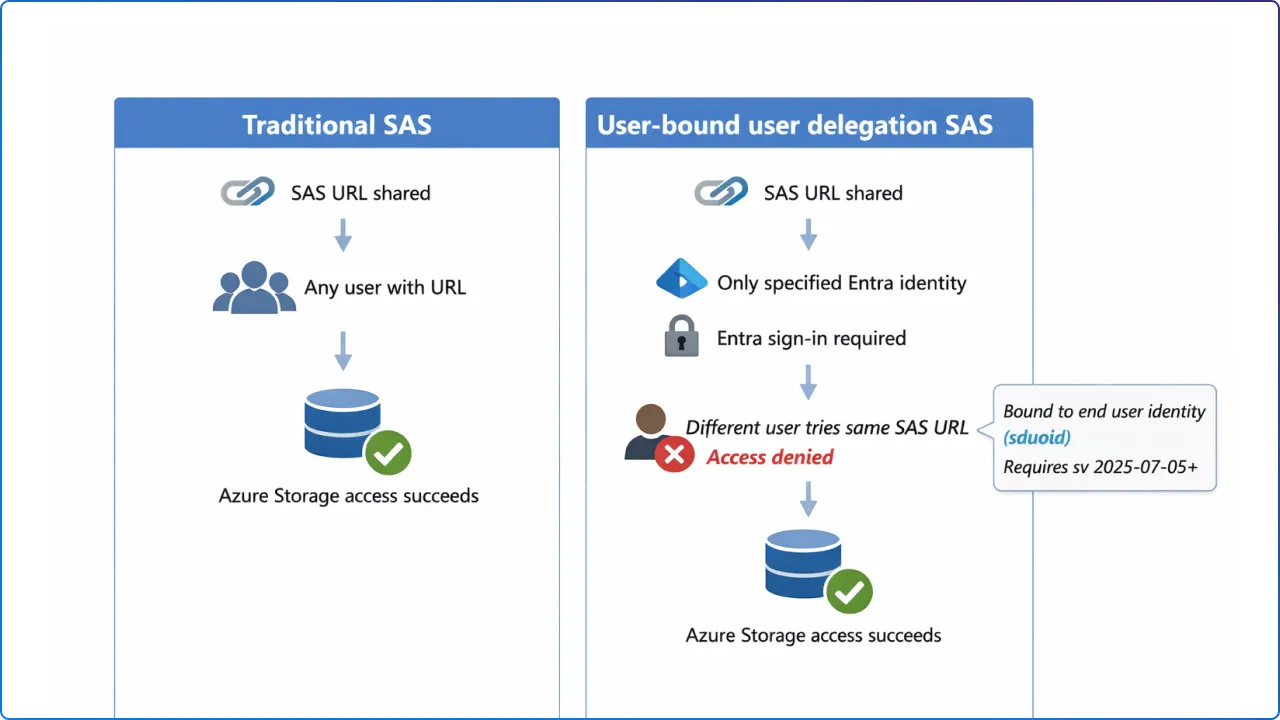
User‑bound user delegation SAS adds a control specifically aimed at misuse: you can specify that the SAS token is bound to the end user when the SAS authorization version (sv) is 2025‑07‑05 or later.
To create a user‑bound token, you include the end user’s Entra object ID in the signedDelegatedUserObjectId (sduoid) field. After that, the end user must verify their identity with an Entra login (bearer token) to use the SAS, and no one other than this user can use the token.
Why this helps: traditional SAS distribution relies heavily on secrecy, because “any client that possesses a valid SAS can access data…as permitted by that SAS.” User‑bound user delegation SAS reduces the blast radius of accidental sharing by requiring the right identity in addition to the right URL.
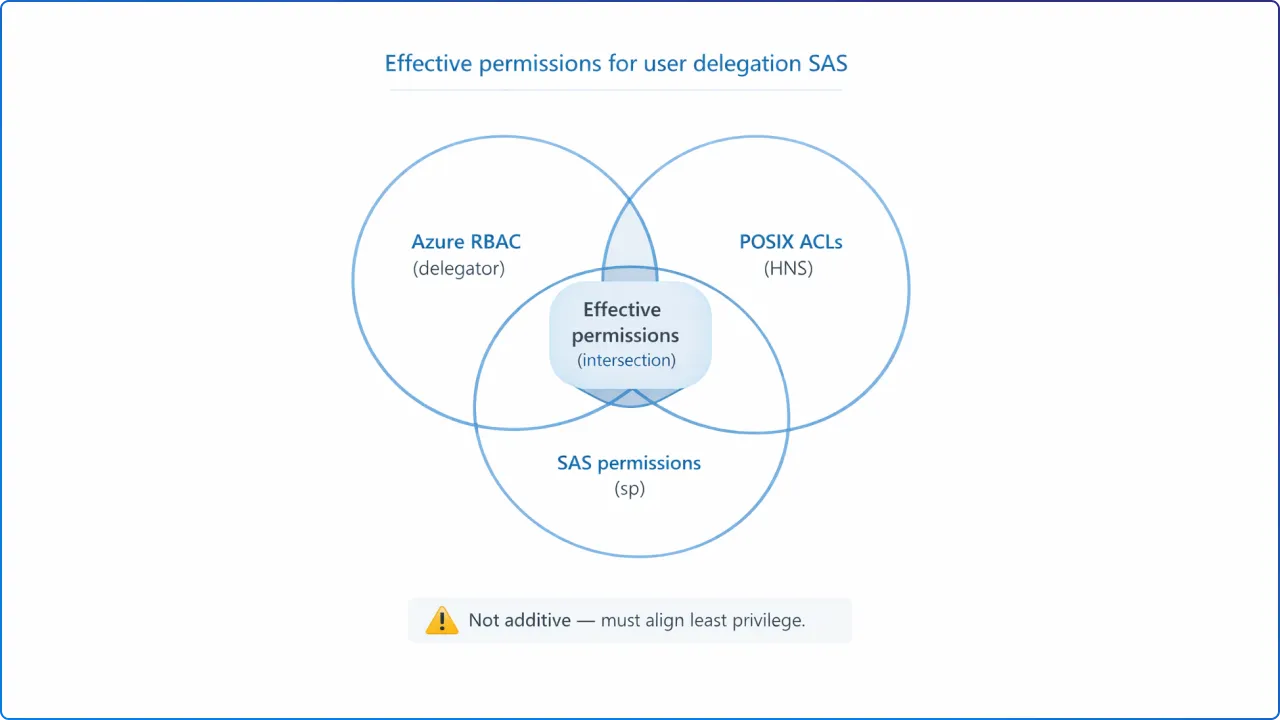
When a client uses a user delegation SAS to access Blob Storage, Azure Storage authorizes the request based on three layers of permissions: RBAC permissions granted to the security principal that requested the user delegation key, POSIX ACL permissions (when HNS is enabled and RBAC can’t grant access), and the permissions explicitly granted on the SAS token.
Microsoft states that the permissions granted to a client who possesses the SAS are the intersection of the permissions granted to the principal (via RBAC/ACL) and the permissions granted by the SAS token’s signedPermissions (sp) field.
If a permission exists in RBAC or POSIX ACLs but is not granted on the SAS token, that permission is not granted to the client using the SAS.
Microsoft recommends aligning RBAC/ACL permissions and SAS token permissions to the minimum required access level for the client.
Practical implication: user delegation SAS helps you avoid embedding or storing account keys in app code, which Microsoft calls a security best practice compared to Shared Key usage.
For least privilege, you still must set both: (1) the delegator’s RBAC/ACL permissions and (2) the SAS token’s sp permissions so they match what the end user should do.
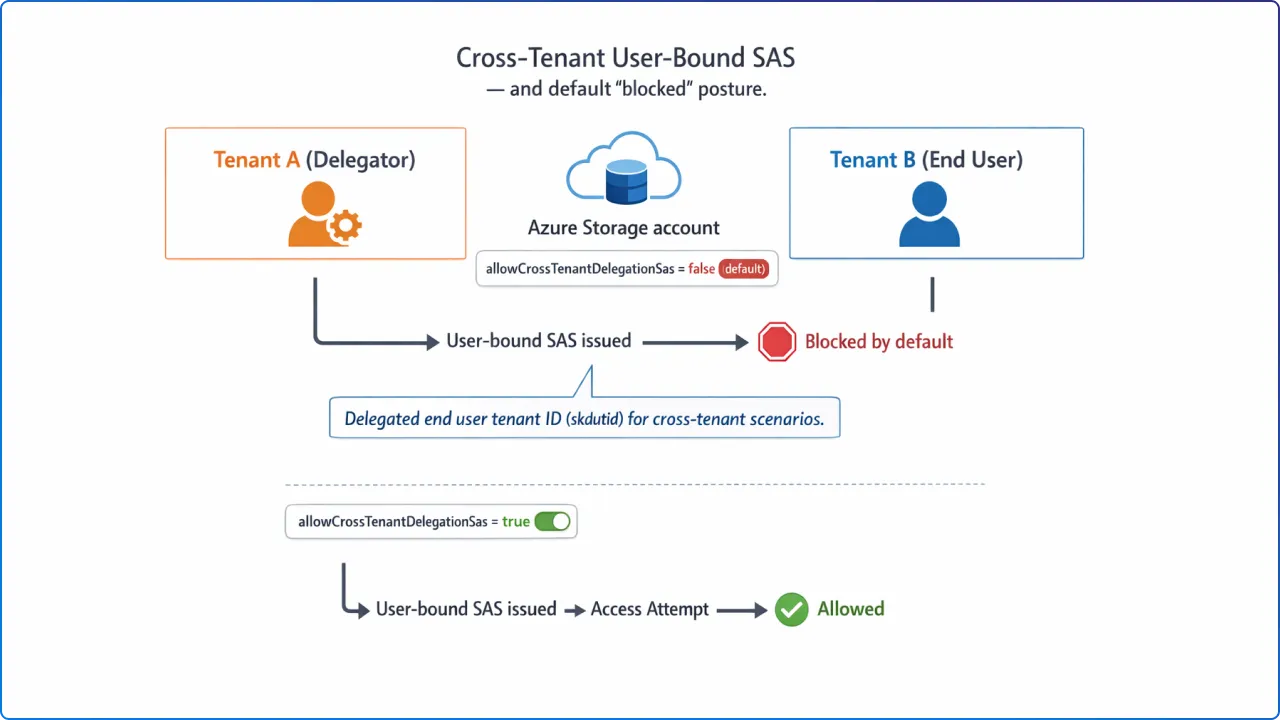
User‑bound user delegation SAS supports an end user in a different tenant by specifying the delegated end user tenant ID in signedKeyDelegatedUserTenantId (skdutid).
However, Microsoft notes that cross‑tenant user‑bound user delegation SAS tokens are not allowed by default.
To allow cross‑tenant user‑bound tokens, you must set the storage account property allowCrossTenantDelegationSas to true.
Microsoft also indicates that this user‑bound feature is currently in preview.
What to do with this: if your scenario involves B2B collaboration or vendor access, the default “off” posture means you can keep cross‑tenant delegation blocked until you have a governance decision and monitoring plan in place.
Because SAS is a delegated access mechanism, Microsoft recommends restricting who can generate SAS tokens and, where possible, preferring Entra‑secured user delegation SAS for superior security versus account‑key SAS.
Microsoft describes two signing options for SAS: (1) sign with a user delegation key created using Microsoft Entra credentials (user delegation SAS) or (2) sign with the storage account key (service SAS/account SAS).
To create a user delegation SAS, you must first request a user delegation key by calling the Get User Delegation Key operation, then use that key to sign the SAS.
The documented high‑level steps are: grant the requesting principal the right permissions (RBAC or POSIX ACLs), acquire an OAuth 2.0 token from Entra ID, use it to request the user delegation key, and then use the key to construct the SAS token fields.
Key versioning requirements (common “gotchas”):
signedVersion (sv) field must be 2018‑11‑09 or later for user delegation SAS, and it indicates the service version used to construct and validate the signature.sv 2025‑07‑05 or later and uses sduoid (and sometimes skdutid) to bind the SAS to the end user identity.sig) is an HMAC computed over the string‑to‑sign using SHA‑256 and then Base64‑encoded.Required permissions to request the user delegation key: a principal must have the Microsoft.Storage/storageAccounts/{serviceType}/generateUserDelegationKey action, and Microsoft lists built‑in roles that include it (for example, Storage Blob Data Contributor, Storage Blob Data Reader, and Storage Blob Delegator).
Because the operation is at the storage account level, the generateUserDelegationKey action must be scoped at the storage account, resource group, or subscription level.
Microsoft cautions that SAS tokens should be protected like keys and that operations using SAS should be performed only over HTTPS, with SAS URIs distributed only over secure connections such as HTTPS.
Microsoft highlights two core risks to plan for: if a SAS is leaked it can be used by anyone who obtains it, and if a SAS expires and the app can’t renew it, functionality can be hindered.
To reduce exposure, Microsoft recommends near‑term expiration times and a revocation plan, plus the broader principle of granting the least possible privileges.
Operational constraints specific to user delegation SAS and user‑bound:
generateUserDelegationKey permission via an appropriate RBAC role at the correct scope.sv=2025-07-05 (or later) and include sduoid to make the SAS user‑bound.allowCrossTenantDelegationSas=true (and document why), since it’s blocked by default.If your security concern is “SAS links are too easy to reuse,” user‑bound user delegation SAS targets that exact problem by requiring the correct Entra identity to use the token, not just possession of the URL.
And because user delegation SAS relies on Entra credentials rather than storage account keys, it aligns with Microsoft’s guidance to prefer Entra‑based authorization for stronger security and reduced key‑handling risk.
What is a user‑bound user delegation SAS?
It’s a user delegation SAS that can be bound to a specific end user identity (via sduoid) so only that Entra identity can use the token, starting with sv=2025-07-05.
How is it different from a regular user delegation SAS?
A regular user delegation SAS is secured with Entra credentials and signed with a user delegation key, while the user‑bound extension additionally requires the end user to authenticate and restricts token use to that end user.
Can user‑bound SAS work across tenants?
Yes, but cross‑tenant user‑bound tokens are not allowed by default and require allowCrossTenantDelegationSas=true, with the tenant specified using skdutid.


Join Our Newsletter