A free eBook for IT leaders on when to use Dataverse, Power Automate, agent flows, workflows, skills or agents in Power Platform, and what each one costs.
"Power Automate or Copilot Studio?" Is the Wrong Question
A few years ago the choice was simple. Flows lived in Power Automate and bots lived in Copilot Studio. Today one business process can touch a Dataverse rule, a cloud flow, an agent flow, a workflow, a skill and an agent. Each one has its own owner model, its own meter and its own way of failing.
The choice that matters is now made per step, not per product. Copilot Studio alone runs on three harnesses, and each one bills differently. From November 1, 2026, new and renewed Power Platform and Dynamics 365 licenses no longer include AI Builder credits, so AI steps in your flows will draw Copilot Credits instead.
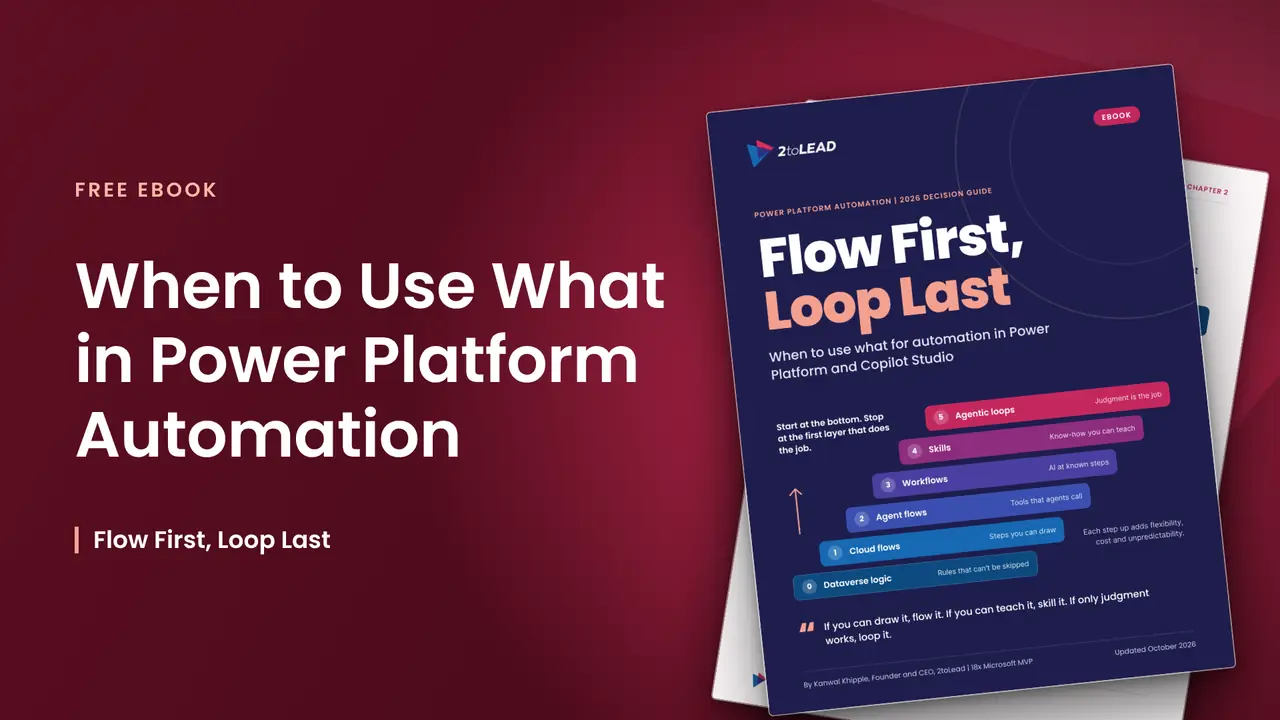
This eBook gives IT leaders and Power Platform architects one rule for every automation request: if you can draw it, flow it. If you can teach it, skill it. If only judgment works, loop it.
What's Inside the Flow First, Loop Last eBook?
A 24-page guide to deciding where each automation request should live, and what it will cost when it gets there:
- A six-layer decision ladder. Start at Dataverse logic and stop at the first layer that does the step reliably: cloud flows, agent flows, workflows, skills or agentic loops.
- Twelve tool cards with "use it when" and "avoid it when" guidance, how each tool bills and how to govern it, including desktop flows, computer use, Cowork and Azure Logic Apps.
- A side-by-side comparison and a map of who can call whom and what converts to what.
- Seven common scenarios mapped to the right layers, from invoice exceptions in accounts payable to high-volume order integration with an ERP.
- A worked cost example in licenses and Copilot Credits.
- Governance by layer and an architecture review scorecard you can reuse in your next design review.
Why the Automation Layer You Choose Matters
The wrong choice rarely fails on day one. It shows up at the first audit, the first invoice or the first time the process changes. Reasoning is the most expensive and least predictable layer, and Microsoft's own harness guidance warns that a more capable harness can overwork a simple problem.
This eBook helps your team:
- Keep rules that must never be skipped in Dataverse, where every app, flow and agent has to respect them
- Use flows for the steps you can draw, so the same input gives the same output
- Package know-how as skills that several agents apply the same way
- Save agentic loops for work where judgment is the job, with a written reason
- Give every Copilot Credit meter a business owner and a cap before the bill arrives
Who Should Read This eBook?
This guide is for the people who decide where the next automation request should live, and who will be asked to explain the bill:
- CIOs, IT directors and heads of digital transformation
- Power Platform and solution architects
- Power Platform and Copilot Studio Centers of Excellence
- Automation leads and process owners in finance, HR and operations
- Licensing and governance teams responsible for Copilot Credit spend
Get the Flow First, Loop Last eBook
Most automation requests in Power Platform should still be flows. The teams that get the most from Copilot Studio will be the ones that reach for reasoning last, and can say exactly why when they do.
Download the eBook to bring a clear, defensible answer to your next architecture review. Deciding where your agents should run? Pair it with the Microsoft Copilot Agent Decision Framework.
Want help applying it? Our one-day Automation Discovery Day maps your top 10 automation requests to the ladder and gives you a cost model, a governance gap list and a 90-day roadmap.
Frequently Asked Questions
What is the Flow First, Loop Last eBook?
It's a free 2026 guide from 2toLead that helps teams decide when to use Dataverse logic, Power Automate cloud flows, Copilot Studio agent flows, workflows, skills or agents. It's built around a six-layer decision ladder and reflects Microsoft licensing as of October 2026.
Should I use Power Automate or Copilot Studio for automation?
Usually both, for different steps. Use Power Automate cloud flows for steps you can draw and a team will own, Copilot Studio agent flows for fixed steps an agent calls as a tool, and agents only where the path changes every time.
How much do Copilot Studio agent flows cost?
Agent flows bill 13 Copilot Credits per 100 actions, with no charge when an agent calls them for a Microsoft 365 Copilot licensed user. The eBook includes a worked example that compares this with Power Automate Premium and Process licenses.
Does the eBook cover the AI Builder credit changes?
Yes. From November 1, 2026, new and renewed Power Platform and Dynamics 365 licenses no longer include AI Builder credits. The eBook explains how AI steps in your flows will draw Copilot Credits instead, and what to check before your next renewal.