By clicking “Accept”, you agree to the storing of cookies on your device to enhance site navigation, analyze site usage, and assist in our marketing efforts. View our Cookie Policy for more information.
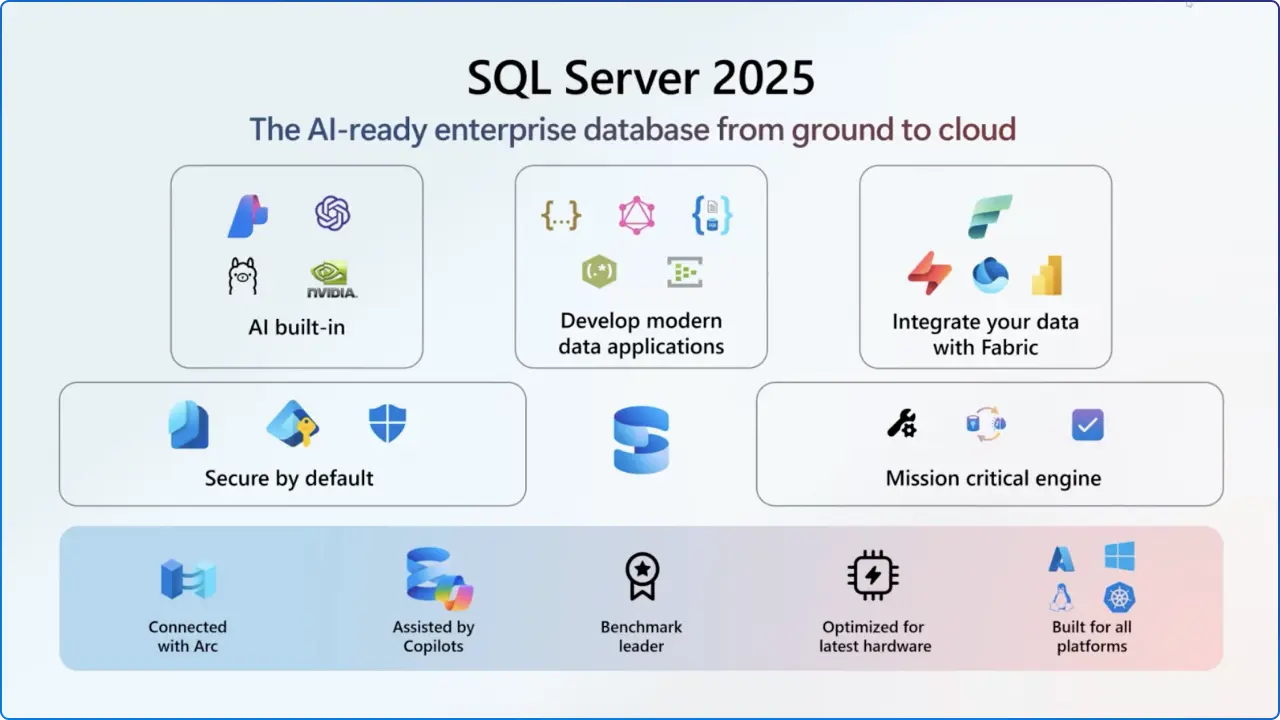
If your data strategy still treats AI, analytics, and Online Transaction Processing (OLTP) as separate islands, SQL Server 2025 is the bridge that finally unifies them, bringing built‑in AI, near–real‑time streaming, Fabric mirroring, developer-first T‑SQL enhancements, and hybrid consistency under one engine.
Announced at Microsoft Ignite 2025, SQL Server’s latest release is now generally available, delivering a ground‑to‑cloud platform that helps teams ship intelligent apps faster, without bolting on extra services or rewriting code.
What’s New: The Highlights from Ignite 2025
1) AI Built Directly Into the SQL Engine
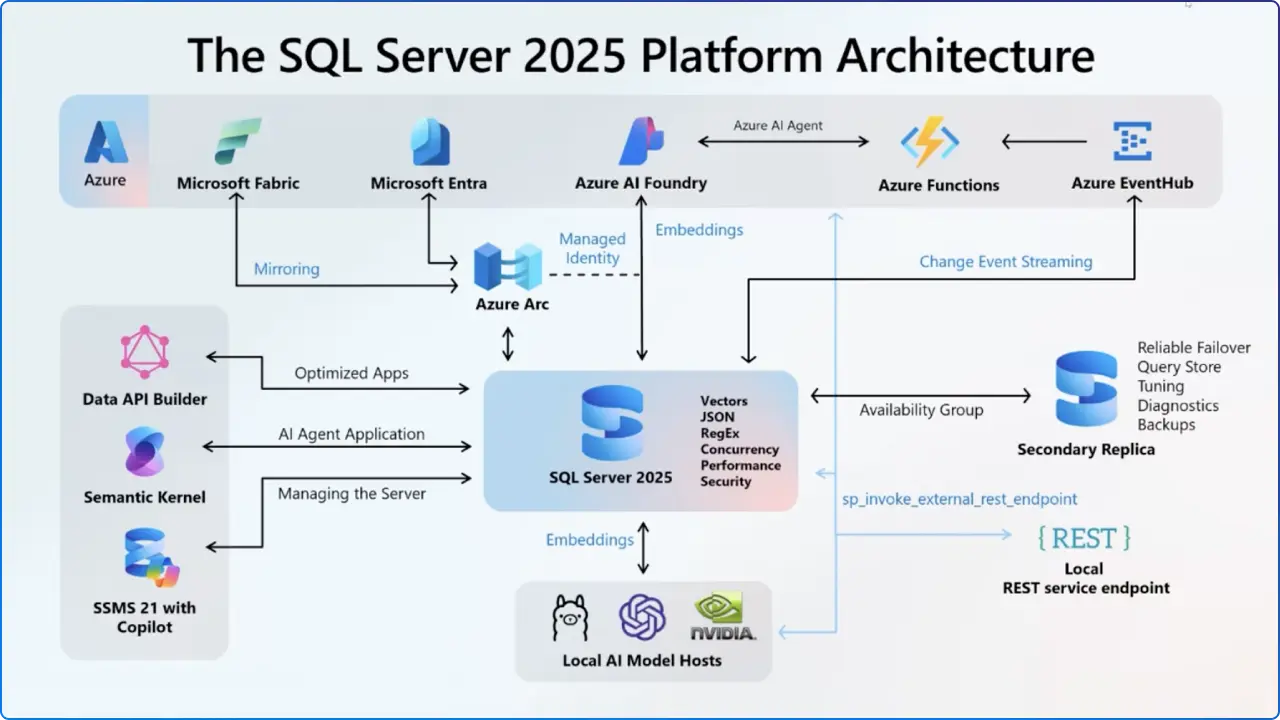
Microsoft’s “one consistent SQL” vision now includes AI primitives at the database layer: store vectors, index them with DiskANN, and orchestrate models, all from T‑SQL. You can integrate models from Microsoft Foundry, Azure OpenAI, OpenAI, and Ollama and switch between them without changing application code. Frameworks like LangChain and Semantic Kernel are supported to speed up app development.
Why this matters:
Instead of maintaining a separate vector store or service, your semantic search and RAG pipelines run side‑by‑side with relational data, reducing latency, simplifying ops, and keeping security/compliance within the SQL governance boundary.
Key AI capabilities (in‑engine):
Native vector data type & functions for storing and comparing embeddings.
DiskANN vector index for fast, accurate, resource‑efficient nearest‑neighbor search at scale.
Model management via T‑SQL/REST, enabling local or cloud‑hosted models under unified control.
2) Developer‑First T‑SQL Enhancements
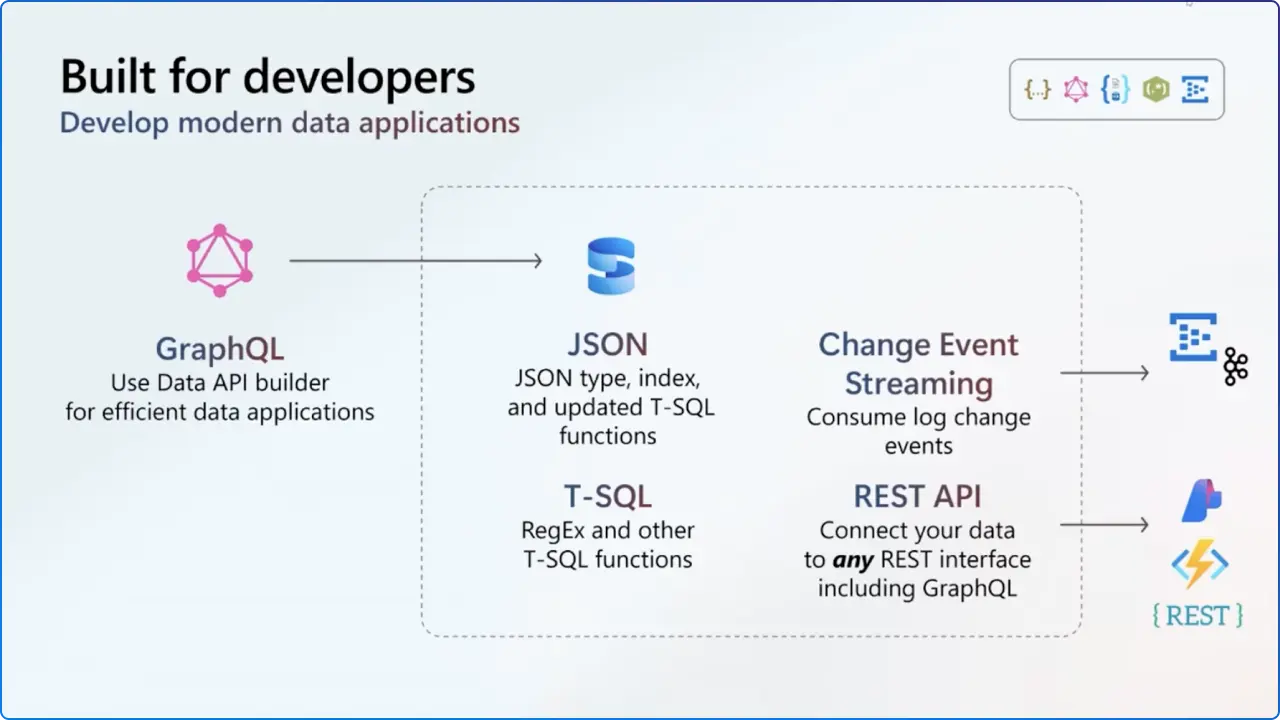
The 2025 release adds native JSON improvements and regular expressions to accelerate data wrangling and text processing workflows within SQL. Combined with GitHub Copilot in SSMS, developers can query, refactor, and document faster.
Regex functions (e.g., pattern matching and substitution) address long‑standing developer asks, handy for cleansing logs, payloads, and strings in‑place.
SSMS Copilot integration offers contextual assistance, ask questions, and get answers from your data directly in your IDE.
3) Real‑Time Data Movement: Change Event Streaming + Fabric Mirroring
Change Event Streaming (CES) lets you stream changes from SQL Server to destinations like Azure Event Hubs, opening up event‑driven architectures without custom pipeline code. Meanwhile, mirroring into Microsoft Fabric’s OneLake enables near‑real‑time analytics on operational data.
CES can be enabled as a preview feature even post‑GA using the new PREVIEW_FEATURES configuration, with upgrades to GA delivered via cumulative updates.
Fabric Mirroring modernizes ingestion, operational data becomes analytics‑ready with minimal overhead.
4) Performance, Concurrency, and Uptime
Under the hood, SQL Server 2025 introduces optimized locking that reduces lock escalation and contention, resulting in higher throughput for heavy DML workloads; improvements to failover reliability further strengthen HA.
Example: TID‑associated locking reduces the need to hold per‑row locks on large updates, mitigating classic bottlenecks while preserving correctness, one of the most impactful changes for busy OLTP systems
5) Hybrid Management & Security with Azure Arc and Microsoft Entra
For organizations spanning on‑premises, edge, and multi cloud, Azure Arc‑enabled SQL Server centralizes inventory, policy, assessments, and identity. With SQL Server 2025 and Arc, you can use Microsoft Entra ID for authentication, bringing managed identities and password-less access patterns to SQL workloads.
Arc gives you a single control plane to query versions, cores, and OS across all instances and to assess backup/encryption posture.
Entra authentication via Arc modernizes inbound/outbound connections (e.g., secure backups to Azure Storage, EKM with Key Vault) without shared secrets.
Edition & Licensing Changes You Shouldn’t Miss
Edition
Compute/Memory & Limits
Key Changes in 2025
Enterprise
Mission‑critical, unlimited scale
AI built‑in, performance & HA advancements, full feature set continues.
Standard
Up to 32 cores; 256 GB buffer pool
Resource Governor now included; higher capacity improves parity with modern hardware.
Express
DB size up to 50 GB
Advanced Services consolidated; Express includes previously “Advanced” features.
Standard Developer / Enterprise Developer
Free for dev/test
New Developer editions mirror paid editions for full‑fidelity dev environments.
Web
—
Discontinued starting with SQL Server 2025.
Lifecycle: Mainstream support to Jan 6, 2031; extended support to Jan 6, 2036 (Fixed Lifecycle Policy).
Upgrade & Compatibility: What Architects Need to Know
Supported upgrades from SQL Server 2014 SP3+, 2016 SP3+, 2017, 2019, and 2022 (Windows‑only paths specified; 64‑bit required).
Preview features opt‑in: Use PREVIEW_FEATURES at the database scope to try specific innovations until they’re promoted in a cumulative update.
Encryption changes & TDS 8.0 introduce breaking changes for linked servers and replication if certificates aren’t configured, plan for OLE DB 19 defaults and TrustServerCertificate=False.
Frequently Compared: SQL Server 2025 vs. 2022
Capability
SQL Server 2022
SQL Server 2025
AI & Vector Search
External services required
Native vectors + DiskANN; T‑SQL model management and semantic search in‑engine.
Event Streaming
Custom ETL or CDC patterns
Built‑in CES to Azure Event Hubs & more.
Analytics Integration
Fabric integration emerging
Mirroring to OneLake for near‑real‑time analytics.
Inventory instances and editions; identify workloads that benefit from AI search, streaming, or Fabric mirroring.
Validate hardware/software compatibility and supported upgrade paths; confirm 64‑bit and OS prerequisites.
Phase 2: Secure the Foundation
Configure certificates for linked servers & replication to avoid encryption‑related breaking changes during upgrade.
Adopt Microsoft Entra authentication (via Azure Arc) for password-less inbound/outbound communications and managed identities.
Phase 3: Modernize the Data Flow
Enable Change Event Streaming for event‑driven integrations; monitor as a preview feature if needed.
Set up Fabric mirroring to funnel OLTP updates into analytics with minimal ETL.
Phase 4: Ship AI Use Cases
Define embeddings & DiskANN indexes for semantic search; orchestrate models from T‑SQL using supported providers.
Measure query concurrency gains with optimized locking; tune workloads with Query Store & IQP insights.
One Engine. One SQL. AI‑Ready.
SQL Server 2025 delivers on Microsoft’s one consistent SQL promise by bringing AI, streaming, analytics, and hybrid control together; inside the database, not around it. Whether you’re modernizing legacy systems or building greenfield intelligent apps, the 2025 release lets you:
keep data governance and compliance stronger by staying inside SQL;
move changes to analytics instantly; and
deliver smarter experiences with vector search and model orchestration without adding fragile dependencies.
If your roadmap includes semantic search, RAG, event‑driven integration, or hybrid observability, SQL Server 2025 is the shortest path to value: from ground to cloud to Fabric.
FAQs
Q1. Does SQL Server 2025 support native vector search and embeddings?
Yes, native vector types and DiskANN vector indexes allow semantic search and RAG inside SQL Server, orchestrated via T‑SQL and REST.
Q2. How do I stream changes in near real time?
Enable Change Event Streaming (CES) to push changes to Azure Event Hubs; use the PREVIEW_FEATURES configuration as needed until features become GA via cumulative updates.
Q3. What are the biggest edition changes?
Standard increases to 32 cores/256 GB, gains Resource Governor; Express grows to 50 GB; Web edition is discontinued.
Q4. How does SQL Server 2025 integrate with Microsoft Fabric?
Use mirroring to OneLake for near‑real‑time analytics on operational data—reduces ETL and speeds insight.
Q5. Is my upgrade path supported?
Upgrades from 2014 SP3+, 2016 SP3+, 2017, 2019, 2022 are supported (64‑bit). Validate OS/hardware prerequisites first.




.webp)