Secure private network streaming to Fabric works by using Eventstream connectors with an Azure virtual network as the secure bridge between Microsoft Fabric and a private data source. In Microsoft’s preview design, the connector is injected into a customer-prepared Azure virtual network so Eventstream can reach sources that are not exposed to the public internet. That makes the feature useful for on-premises systems, private Azure sources, and other private-network environments that still need real-time ingestion into Fabric.
That matters because many organizations want the speed of real-time analytics without weakening their network controls. In a lot of environments, the problem is not whether the business wants streaming data. The problem is whether security teams will allow that data source to become publicly reachable. Microsoft’s new Eventstream pattern addresses that gap by keeping the source private while still letting teams move event data into Fabric for downstream processing and analysis.
Private-network streaming to Fabric matters because many valuable event sources already sit behind firewalls, virtual networks, or on-premises infrastructure. Those systems are often private for good reason. They may contain regulated data, critical operational signals, or workloads that the organization is not willing to expose through public endpoints. Microsoft’s Eventstream private-network support is designed for exactly this type of environment. It creates a secure, managed path so Fabric can ingest private streaming data without requiring the source to be opened to the public internet.
For decision-makers, the business value is not only security. It is also access. If private sources cannot participate in real-time analytics, the most important signals often stay trapped in operational systems. This feature helps teams bring those signals into Fabric sooner, which can improve monitoring, alerting, and near-real-time decision-making. That is what makes secure private network streaming to Fabric more than a networking story. It is a readiness story for enterprise-grade real-time analytics.
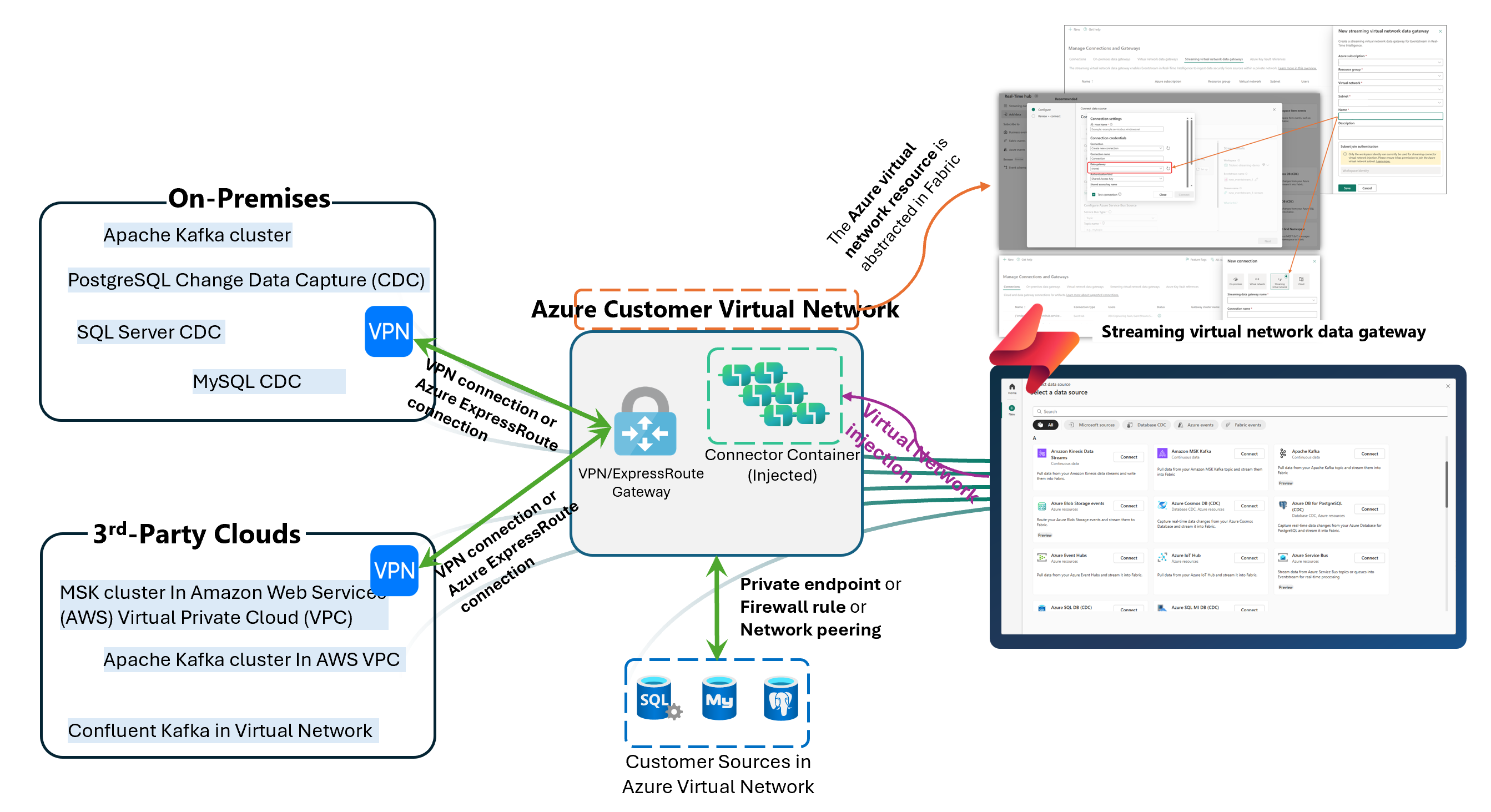
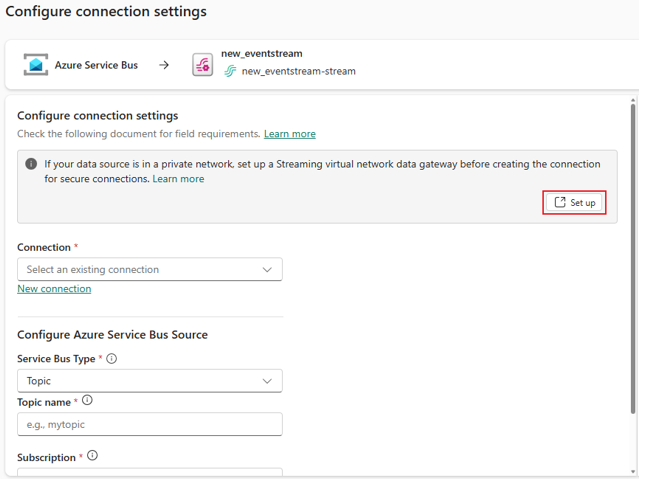
The architecture uses an intermediate Azure virtual network rather than a direct public route. Microsoft says the Azure virtual network must be connected to the private network that hosts the source. For non-Azure and on-premises sources, the guide points to VPN or Azure ExpressRoute. For Azure-based sources, the guide points to private endpoint, selected network access, or virtual network peering. Once that path exists, Eventstream’s connector can use virtual network injection to connect through the Azure virtual network and reach the private source securely.
That design matters because it supports multiple enterprise patterns instead of assuming everything runs the same way. A company might need to pull from an on-premises Kafka deployment, a private Azure SQL CDC source, or another Azure service protected by network controls. The architecture is flexible enough to support those scenarios while keeping Eventstream at the center of ingestion. That gives organizations a cleaner way to standardize real-time streaming into Fabric even when the underlying infrastructure is mixed.
The streaming virtual network data gateway is the Fabric object that represents the Azure virtual network and subnet resources used for this pattern. Microsoft describes it as an abstraction of the Azure virtual network and subnet resources within Fabric. Its purpose is to pass the virtual network information needed for streaming connector virtual network injection, so Eventstream can access streaming sources inside a private network.
This is one of the most important parts of the design because it gives teams a manageable handoff point between Azure networking and Fabric configuration. Microsoft also says the gateway can be created and managed from Manage Connections and Gateways and then selected when setting up streaming connections through the Get Events wizard. That makes the setup easier to reuse instead of treating every private-source connection as a one-off workaround.
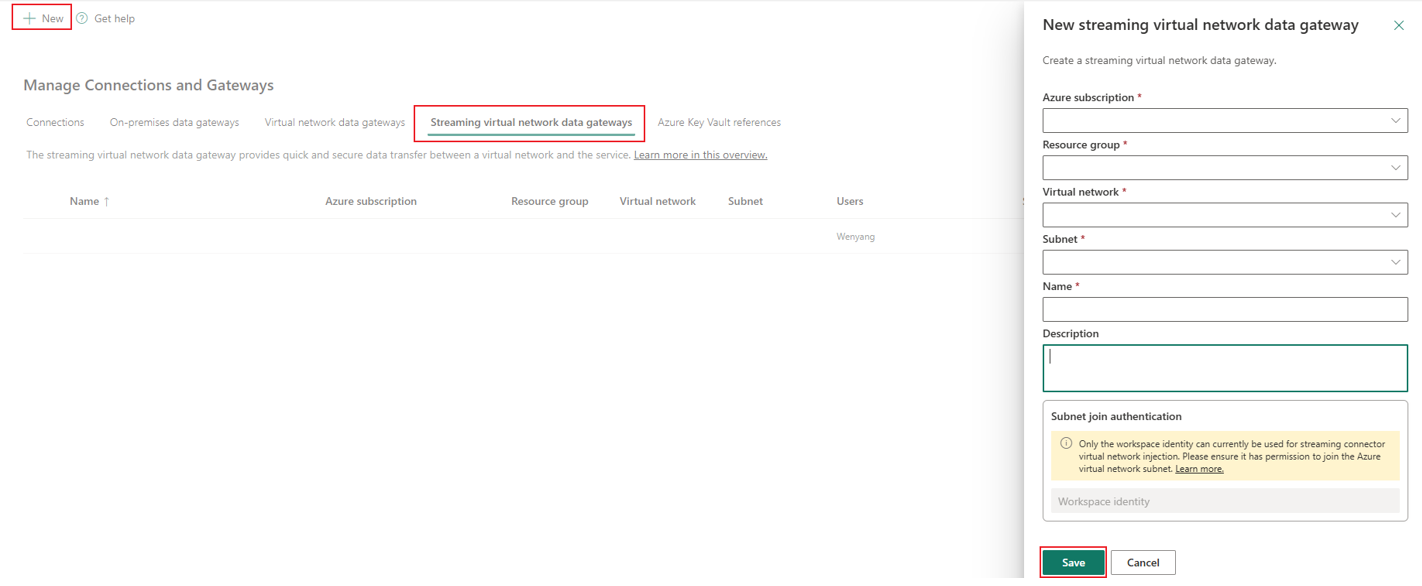
Microsoft’s setup flow is clear. Teams first register the Microsoft.MessagingConnectors resource provider, then create an Azure virtual network and delegate a subnet to that provider. After that, they connect the source’s private network to the Azure virtual network, enable workspace identity in Fabric, and assign that workspace identity the Network Contributor role on the Azure virtual network. From there, they create the streaming virtual network data gateway, create the connection, select the gateway in the Eventstream source setup flow, and publish.
That sequence is worth noting because secure streaming projects usually fail on prerequisites, not on the value of the use case. If the network path is not ready, the connector cannot compensate for it later. Microsoft’s guide even recommends validating connectivity from a virtual machine inside the Azure virtual network before using that network to configure Eventstream. That is a practical checkpoint because it confirms the path works before teams spend time troubleshooting Fabric settings.
Microsoft positions this preview for a meaningful range of streaming and CDC scenarios. The documentation specifically points to sources such as Azure SQL Database CDC, Azure SQL Managed Instance CDC, Azure Service Bus, Azure Cosmos DB CDC, Azure Data Explorer, PostgreSQL, MySQL, and private-network Kafka-related scenarios, depending on the connection method and environment. Microsoft’s broader Eventstream documentation also shows support for real-time ingestion from sources such as Apache Kafka, Amazon MSK, Google Cloud Pub/Sub, MQTT, and other streaming systems.
That matters because the feature is not only useful for Microsoft-to-Microsoft scenarios. It is also relevant to hybrid and cross-cloud estates where real-time data exists in several places, but the organization wants Fabric to be the destination for analysis and action. In that sense, private-network streaming is not just a networking enhancement. It is an expansion of what Eventstream can realistically support in enterprise environments.
This is where many teams get confused. Microsoft’s guidance separates these features by direction and use case. Managed private endpoints are for outbound secure connections from Eventstream to specific Azure resources, such as Azure Event Hubs or Azure IoT Hub, when those services are behind firewalls or public access is disabled. Tenant-level and workspace-level Private Links are inbound controls that restrict access to Fabric and Eventstream from the public internet. Streaming connector virtual network injection is different again: it is the pattern used when Eventstream needs to retrieve data from an external source located in a private network through an Azure virtual network prepared by the customer.
That distinction matters because the wrong feature choice can waste time. If your problem is that users should only reach Fabric from approved corporate networks, Private Link is the right conversation. If your problem is that Eventstream must securely read from Azure Event Hubs or Azure IoT Hub, managed private endpoints are likely the better fit. But if your problem is that the source itself lives in a private network and Fabric needs a safe path into that environment, streaming connector virtual network injection is the more relevant answer.
Once the connection is in place, Eventstream becomes the real-time ingestion layer inside Fabric. Microsoft says Eventstream can capture, transform, and route real-time events to various supported destinations without code. Those destinations include services such as Lakehouse, Eventhouse, Derived stream, Spark Notebook, Fabric Activator, and custom endpoints, depending on the capability mode.
This is where the feature becomes strategically useful. Secure connectivity is only the first part. The larger value comes from what happens next: private operational data can flow into Fabric, be transformed, routed, monitored, and analyzed in a more consistent way. For organizations trying to bring real-time data into decision-making without compromising private-network controls, that is a meaningful shift.
Secure private network streaming to Fabric gives organizations a practical way to bring private event data into Microsoft Fabric without exposing those systems to the public internet. Microsoft’s preview pattern uses Eventstream connectors, an Azure virtual network bridge, and a streaming virtual network data gateway to create that secure path. It is designed for private Azure, on-premises, and other controlled network environments that still need real-time ingestion.
A good next step is to evaluate one real use case. Pick a source that already lives behind private controls, confirm the network path to an Azure virtual network, and then assess whether Eventstream fits your ingestion and analytics design. That keeps the conversation practical and helps teams explore secure streaming readiness before scaling further.


Join Our Newsletter